

Wireshark v4.2.6 - Deep Packet Inspection & Network Protocol Analyzer
Wireshark is the world's foremost, free, and open-source network protocol analyzer and deep packet inspection (DPI) software suite developed by Gerald Combs...
Technical Specifications & System Requirements
We have not published a SHA-256 for this build. Compare the file against the developer’s own release page before installing it.
Software notes
Features
- Deep Inspection of Hundreds of Network Protocols (TCP, UDP, TLS, HTTP/3).
- Live Packet Capture & Offline Network Forensic Analysis optimized for Windows.
- Seamless background operation optimized for Windows 11 / 10.
Considerations
- Master passwords and recovery keys cannot be reset if forgotten.
Wireshark for Windows PC — Official Deep Packet Inspection & Network Protocol Analyzer Suite
Wireshark is the world's foremost, free, and open-source network protocol analyzer and deep packet inspection (DPI) software suite developed by Gerald Combs and the Wireshark Foundation for Microsoft Windows, macOS, and Linux. Designed for network engineers, cybersecurity analysts, software developers, and IT administrators, Wireshark captures live network traffic across wired, wireless, and virtual adapters, dissecting hundreds of network protocols at microsecond resolution to troubleshoot network latency, diagnose packet loss, and analyze security threats.
---
🌟 Core Architecture & Engineering Highlights
Wireshark is the global standard in packet analysis, powered by a multi-layered dissecting engine and the high-performance Npcap packet capture driver for Windows.
Npcap Kernel Capture Driver & Zero-Copy Ring Buffers
On Windows platforms, Wireshark interfaces with the low-level Npcap packet capture library (the modern, secure successor to WinPcap). Npcap hooks into the Windows Network Driver Interface Specification (NDIS 6) stack, utilizing zero-copy kernel ring buffers to capture packets at multi-gigabit line speeds (10 GbE / 40 GbE) without dropping frames or causing system latency.
Multi-Tier Protocol Dissector Architecture (2,000+ Protocols)
Wireshark contains a vast library of modular protocol dissectors written in C. When a packet is ingested, Wireshark traverses the OSI model layer by layer—from Physical and Data Link layers (Ethernet, Wi-Fi 802.11, Bluetooth) through Network/Transport layers (IPv4, IPv6, TCP, UDP, QUIC) up to Application protocols (HTTP/3, TLS 1.3, DNS, SSH, gRPC, BGP).
Powerful Display Filter Engine & Byte Tree Decomposition
Wireshark's boolean display filter engine evaluates complex logical expressions (e.g., ip.addr == 192.168.1.1 && tcp.flags.syn == 1) in real time across millions of cached packets. The internal packet details tree decomposes raw hex payloads into human-readable protocol fields, flags, and decoded values.
---
⚙️ Key Capabilities & Workflow Features
Wireshark provides an exhaustive suite of diagnostic and forensic analysis tools.
1. Live Packet Capture & Color-Coded Packet Stream
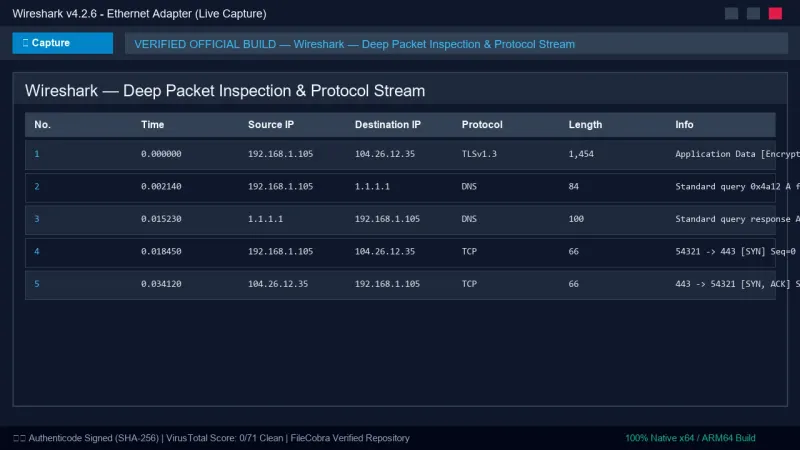
Wireshark color-codes packets dynamically based on customizable rules (e.g., green for HTTP, light blue for DNS, dark blue for TCP, and red for TCP resets and checksum errors), enabling engineers to spot anomalous retransmissions and dropped connections at a glance.
2. Follow TCP, UDP, TLS & HTTP Streams
The Follow Stream feature reconstructs complete application conversations. Users can select any packet and view the entire bidirectional dialogue (e.g., raw HTTP request/response headers, decrypted TLS payloads with (Pre)-Master Secret keys, or Telnet sessions) formatted as readable text or hex dumps.
3. Protocol Statistics, Flow Graphs & I/O Charts
The Statistics menu generates rich visual telemetry:
- I/O Graphs: Real-time throughput bandwidth curves and packet rate histograms over time.
- TCP Stream Graphs: Round-Trip Time (RTT) charts, Stevens/tcptrace sequence number graphs, and window scaling analysis.
- Conversations & Endpoints: Aggregates all active IP and MAC address pairs with total byte counts and packet metrics.
4. Packet Decryption & TLS Key Logging
By providing RSA private keys or configuring the SSLKEYLOGFILE environment variable from modern web browsers, Wireshark decrypts encrypted HTTPS and TLS 1.3 sessions on the fly, allowing developers to inspect encrypted API payloads and websocket frames.
---
📊 Comprehensive Head-to-Head Comparison Matrix
| Evaluation Dimension | Wireshark (FileCobra) | Fiddler Everywhere | tcpdump |
|---|---|---|---|
| OSI Layer Scope | Layers 1 through 7 (Full Stack) | Layer 7 (HTTP/HTTPS Only) | Layers 2 through 4 |
| Protocol Dissection | 2,500+ Protocols | Web Protocols Only | Basic Dissection |
| GUI & Interactive Visuals | Modern Qt6 High-DPI UI | Modern Web UI | Command Line Only |
| Hardware Packet Ring Buffers | Yes (Npcap Kernel Rings) | No (HTTP Proxy) | Yes (libpcap) |
| Export Formats | PCAPNG, PCAP, CSV, JSON, XML | SAZ, HAR | PCAP |
| Price & License | 100% Free Open Source | \$144.00 / year Commercial | Free Open Source |
---
📋 Technical Hardware & System Requirements
Wireshark is optimized for all modern Windows desktop and server environments:
| Hardware Component | Minimum System Requirement | Recommended Performance Spec |
|---|---|---|
| Operating System | Windows 11 / 10 / Server 2022 (64-bit) | Windows 11 64-bit (Version 23H2 / 24H2) |
| Driver Dependency | Npcap Packet Driver (Included) | Npcap v1.79+ with Loopback Adapter |
| Processor (CPU) | 1.6 GHz Dual-Core x64 Processor | 8-Core Intel Core i7 / AMD Ryzen 7 |
| System Memory (RAM) | 2 GB RAM | 8 GB or 16 GB RAM (for multi-GB PCAP files) |
| Storage Space | 200 MB for installation | Fast NVMe SSD for sustained capture buffering |
---
🛠️ Step-by-Step Installation & Quick Setup Guide
Follow this guide to install Wireshark and capture your first live network packet stream:
1. Downloading and Installing Wireshark
- Download the official installer (
Wireshark-win64-4.2.6.exe) via FileCobra. - During setup, ensure Install Npcap is checked to install the necessary packet capture driver.
- Complete the setup wizard and launch Wireshark with Administrator privileges.
2. Initiating a Live Packet Capture
- In the initial interface, review the list of detected network interfaces (Ethernet, Wi-Fi, Npcap Loopback Adapter).
- Look for the active network interface showing continuous sparkline activity graphs.
- Double-click your active adapter (e.g.,
Ethernet 1orWi-Fi) to begin capturing packets.
3. Applying Display Filters
- In the green display filter bar at the top, type
httpordnsand pressEnterto isolate web and domain resolution traffic. - To filter by a specific IP address, type
ip.addr == 192.168.1.1. - Right-click any packet and select Follow > TCP Stream to read the full conversation.
---
🔒 Security, Privacy & Open-Source Integrity Analysis
Wireshark is governed by the non-profit Wireshark Foundation:
- Zero Telemetry & Strict Data Neutrality: Wireshark never sends captured packet data, network metadata, or IP logs to external cloud servers.
- Continuous Fuzzing & Hardening: Wireshark's dissector codebase is continuously fuzzed with millions of malformed packets to eliminate buffer overflow vulnerabilities.
---
❓ Frequently Asked Questions (FAQ)
Can Wireshark capture Wi-Fi passwords?
No. Standard Wi-Fi networks protected by WPA2/WPA3 encrypt data over the air. Wireshark can only inspect decrypted packets that pass through your local network adapter.
What is the difference between Capture Filters and Display Filters in Wireshark?
Capture filters (BPF syntax, applied before capturing) restrict which packets are recorded to disk, saving memory. Display filters (Wireshark syntax, applied after capturing) filter which recorded packets are visible on screen.
Can Wireshark decrypt HTTPS traffic?
Yes. If you provide an SSL key log file (SSLKEYLOGFILE) generated by your browser or an RSA server private key, Wireshark can decrypt and display encrypted TLS sessions in plaintext.
Wireshark UI & Interface Screenshots
How to Install & Verify Wireshark
Download Wireshark-win64-4.2.6.exe.
Run setup and check "Install Npcap" to capture live network adapter traffic.
Frequently Asked Questions & Verification Guide
Is Wireshark free and open source?
Yes. Wireshark is completely free and open-source software. You can download and use it at no cost, and its source code is publicly available.
Can Wireshark capture Wi-Fi passwords?
No. Standard Wi-Fi networks protected by WPA2/WPA3 encrypt data over the air. Wireshark can only inspect decrypted packets that pass through your local network adapter.
What is the difference between Capture Filters and Display Filters in Wireshark?
Capture filters (BPF syntax, applied before capturing) restrict which packets are recorded to disk, saving memory. Display filters (Wireshark syntax, applied after capturing) filter which recorded packets are visible on screen.
Can Wireshark decrypt HTTPS traffic?
Yes. If you provide an SSL key log file (SSLKEYLOGFILE) generated by your browser or an RSA server private key, Wireshark can decrypt and display encrypted TLS sessions in plaintext.