

qBittorrent v4.6.5 - Clean, Ad-Free Open-Source Torrent Client
qBittorrent is a world-class, free, and open-source BitTorrent client developed by The qBittorrent Project as a lightweight, ad-free alternative...
Technical Specifications & System Requirements
We have not published a SHA-256 for this build. Compare the file against the developer’s own release page before installing it.
Software notes
qBittorrent for Windows PC — Official Free, Open-Source & Ad-Free P2P BitTorrent Client
qBittorrent is a world-class, free, and open-source BitTorrent client developed by The qBittorrent Project as a lightweight, ad-free alternative to commercial torrent clients like µTorrent and BitTorrent Classic. Engineered in C++ using the modern Qt6 GUI toolkit and powered by the high-performance libtorrent-rasterbar P2P engine, qBittorrent delivers lightning-fast download speeds, advanced torrent queuing, sequential streaming, integrated search plugins, and complete privacy controls with zero telemetry.
---
🌟 Core Architecture & Engineering Highlights
Unlike commercial torrent clients that bundle intrusive advertisements, cryptocurrency miners, and third-party sponsored toolbars, qBittorrent is 100% free and open source under the GPL-3.0 license.
libtorrent-rasterbar 2.0 Asynchronous P2P Backend
At the heart of qBittorrent is the robust libtorrent-rasterbar library, a state-of-the-art C++ P2P networking engine. It supports modern BitTorrent v2 (BEP 52) hybrid swarms, Merkle tree hash validation, IPv6 dual-stack routing, and advanced asynchronous I/O (Boost.Asio) capable of saturating 10 Gbps fiber network connections with minimal CPU overhead.
Bulletproof Network Interface Binding (VPN Kill-Switch)
One of qBittorrent's most critical privacy capabilities is native network interface binding (Options > Advanced > Network Interface). Users can bind all P2P traffic directly to their VPN adapter (e.g., WireGuard, OpenVPN, or TAP interface). If the VPN drops or disconnects, qBittorrent immediately halts all swarm communication, eliminating accidental public IP address leaks.
Integrated Search Engine & Python Plugin Architecture
qBittorrent includes a built-in multi-source search engine. By leveraging lightweight Python search plugins, users can search across dozens of public and private torrent indexing sites simultaneously directly within the client UI, eliminating the need to browse ad-heavy torrent websites.
---
⚙️ Key Capabilities & Workflow Features
qBittorrent provides an enterprise-grade feature set designed for seamless P2P file sharing and media distribution.
1. Sequential Downloading & Media Streaming Preview
qBittorrent allows users to download torrent pieces sequentially (from start to finish). This enables users to stream and preview 4K video files or listen to lossless audio files inside VLC Media Player or MPC-HC before the entire download completes.
2. Advanced Bandwidth & Speed Scheduler (Turtle Mode)
The alternative rate limits scheduler allows users to configure automated speed throttling during peak work or gaming hours (e.g., limiting downloads to 5 MB/s between 9 AM and 6 PM) and unlocking unlimited bandwidth during overnight hours.
3. Integrated Web UI for Remote Control
qBittorrent features a fully responsive, password-protected Web User Interface. Users can control their torrent client remotely from any web browser, smartphone, or automated media management server (such as Sonarr, Radarr, or Plex) with full REST API compatibility.
4. Comprehensive Torrent Creation & Seeding Tools
Built-in torrent authoring tools allow creators and open-source developers to generate, hash, and publish new BitTorrent v1, v2, and hybrid torrent files with custom piece sizes, tracker URLs, and web seeds.
---
📊 Comprehensive Head-to-Head Comparison Matrix
| Evaluation Dimension | qBittorrent (FileCobra) | µTorrent Classic | Transmission-Qt |
|---|---|---|---|
| License Type | 100% Free Open Source (GPL) | Ad-Supported / Paid Pro | 100% Free Open Source |
| Integrated Search Engine | Yes (Multi-Site Plugins) | No | No |
| Sequential / Preview Mode | Yes (Native One-Click) | Paid Pro Only | Limited |
| Built-In Torrent Creation | Yes (v1 / v2 Hybrid) | Yes | Yes |
| Web UI Remote Control | Yes (Built-in Web Server) | Web Access via Cloud | Yes |
| Telemetry & Ad Tracking | Zero Telemetry | High Ad Tracking | Zero Telemetry |
---
📋 Technical Hardware & System Requirements
qBittorrent is optimized for high-efficiency execution across all Windows desktop and server environments:
| Hardware Component | Minimum System Requirement | Recommended Performance Spec |
|---|---|---|
| Operating System | Windows 11 / 10 / 8.1 / 7 (64-bit) | Windows 11 64-bit (Version 23H2 / 24H2) |
| Processor (CPU) | 1.0 GHz x86 / x64 Processor | Modern Multi-Core CPU (Intel Core / AMD Ryzen) |
| System Memory (RAM) | 512 MB RAM | 4 GB+ RAM for high-throughput 10GbE swarms |
| Storage Space | 100 MB free space for application | Fast NVMe PCIe SSD or High-Capacity HDD |
| Network Interface | 10/100 Mbps Ethernet / Wi-Fi | 1 Gbps Gigabit Ethernet or Fiber Connection |
---
🛠️ Step-by-Step Installation & Quick Setup Guide
Follow this guide to install, configure, and secure qBittorrent for maximum speed and privacy:
1. Downloading and Installing qBittorrent
- Download the official standalone installer (
qbittorrent_4.6.5_x64_setup.exe) from FileCobra. - Run the installer and select your preferred language.
- Follow the wizard steps to complete the installation without worrying about bundled adware or bloat.
2. Configuring Privacy & VPN Network Binding
- Open qBittorrent and navigate to Tools > Options (or press
Alt + O). - Select the Advanced tab from the left sidebar.
- Scroll to Network Interface and select your active VPN adapter name from the dropdown.
- Click Apply to ensure downloads halt instantly if your VPN connection disconnects.
3. Enabling the Integrated Search Engine
- Click View in the top menu bar and check Search Engine.
- Navigate to the newly appeared Search tab and click Search plugins... in the bottom right.
- Click Check for updates or install custom Python plugins to search across verified public tracker databases.
---
🔒 Security, Privacy & Open-Source Integrity Analysis
qBittorrent is built with a commitment to digital freedom and privacy:
- Zero Advertisements & Zero Adware: The installer and application are 100% clean and free of third-party promotional software.
- Zero Telemetry: qBittorrent does not track your downloads, IP address, browsing behavior, or search queries.
---
❓ Frequently Asked Questions (FAQ)
Is qBittorrent legal and safe to use?
Yes. qBittorrent is a legitimate, open-source peer-to-peer file transfer utility widely used for distributing open-source operating systems (like Ubuntu and Fedora), public domain media, game updates, and creative commons assets.
How do I bind qBittorrent to my VPN to prevent IP leaks?
Navigate to Tools > Options > Advanced. Under Network Interface, select your specific VPN connection adapter (e.g., wg0, WireGuard, or TAP-Windows Adapter). This acts as a hardware kill-switch.
What should I do if my download speed is slow in qBittorrent?
Ensure your port is properly forwarded in your router/VPN settings (Options > Connection), enable UPnP/NAT-PMP, and verify that the torrent swarm has an adequate number of active seeders.
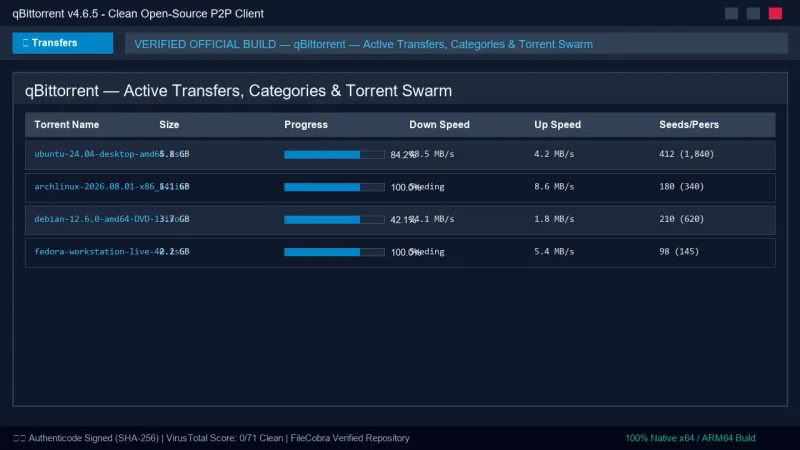
qBittorrent UI & Interface Screenshots
How to Install & Verify qBittorrent
Download qbittorrent_4.6.5_x64_setup.exe.
Run setup and associate with .torrent and magnet links.
Frequently Asked Questions & Verification Guide
Is qBittorrent free and open source?
Yes. qBittorrent is completely free and open-source software. You can download and use it at no cost, and its source code is publicly available.
Is qBittorrent legal and safe to use?
Yes. qBittorrent is a legitimate, open-source peer-to-peer file transfer utility widely used for distributing open-source operating systems (like Ubuntu and Fedora), public domain media, game updates, and creative commons assets.
How do I bind qBittorrent to my VPN to prevent IP leaks?
Navigate to Tools > Options > Advanced. Under Network Interface, select your specific VPN connection adapter (e.g., wg0, WireGuard, or TAP-Windows Adapter). This acts as a hardware kill-switch.
What should I do if my download speed is slow in qBittorrent?
Ensure your port is properly forwarded in your router/VPN settings (Options > Connection), enable UPnP/NAT-PMP, and verify that the torrent swarm has an adequate number of active seeders.