

Lively Wallpaper v2.2.1.0 - Open-Source Animated Desktop & Video Wallpaper Engine
Lively Wallpaper is a revolutionary, free, and open-source application designed to transform static Windows desktops into immersive, interactive...
Technical Specifications & System Requirements
Software notes
Features
- Zero-overhead full-screen pause engine preserves 100% gaming performance.
- Hardware-accelerated MPV and WebGL backends support 4K/8K video, web pages, and shaders.
- 100% Free, Open Source (GPL-3.0), and audited clean with zero telemetry.
Considerations
- Large 4K 60fps video wallpapers can consume higher VRAM on integrated GPUs.
How Lively Wallpaper Compares to Top Alternatives
Lively Wallpaper specializes in hardware-accelerated animated video and interactive WebGL desktop canvas, while Rainmeter focuses on system monitoring skin widgets and gauges.
Lively Wallpaper controls the primary desktop background canvas, whereas TranslucentTB specifically modifies taskbar transparency states.
Lively Wallpaper for Windows PC — Official Open-Source Live Desktop & Wallpaper Engine
Lively Wallpaper is a revolutionary, free, and open-source application designed to transform static Windows desktops into immersive, interactive, and hardware-accelerated animated environments. Developed by Dani John (rocksdanister) and powered by modern Microsoft .NET 8 and WinUI 3 technologies, Lively Wallpaper provides deep customization capabilities without imposing taxing background overhead on system CPU, GPU, or RAM.
Unlike legacy animated desktop utilities that continuously consume background resources and cause frame drops during competitive gaming or 3D rendering, Lively Wallpaper is built around an intelligent pause engine. Whenever a full-screen game, video editor, CAD software, or productivity suite is focused, Lively instantly suspends wallpaper rendering to zero percent GPU/CPU utilization.
---
🌟 Executive Overview & Architectural Highlights
Lively Wallpaper is engineered as a lightweight modern desktop framework that bridges high-performance DirectX graphics rendering with versatile web and video standards. Whether you are running a single 1080p monitor or a multi-display 4K/8K ultra-wide workstation, Lively gives you complete command over visual aesthetics, responsive audio visualizers, and interactive WebGL canvas simulations.
Key Architectural Strengths:
- Zero-Cost Background Pause Engine: Automatically detects full-screen applications, maximized windows, remote desktop sessions, and battery-saver power states to freeze playback instantly.
- Universal Multi-Monitor Spanning: Supports distinct wallpapers per monitor, synchronized multi-display panoramic canvas spanning, or duplicate desktop mirroring across unlimited connected displays.
- Dynamic Audio Visualizers: Harnesses real-time system audio loopback to generate responsive spectrum analyzers, waveform rings, and reactive particle physics synchronized with Spotify, YouTube, or VLC playback.
- Direct Web & Stream Ingestion: Render live web pages, YouTube livestreams, interactive 3D WebGL scenes, Shadertoy code, and customizable HTML5 canvas widgets directly onto the Windows desktop layer.
- Native Windows 11 & Windows 10 Integration: Features a fluent dark-mode interface with Mica/Acrylic transparency effects and full support for Windows system tray quick controls.
---
⚙️ Core Engine Capabilities & Format Compatibility
Lively Wallpaper features a modular playback pipeline supporting multiple rendering backends to ensure seamless compatibility with virtually any media format.
1. High-Definition Video Wallpaper Engine (MPV & Windows Media Foundation)
Lively incorporates an embedded, customized MPV media player backend alongside Windows Media Foundation (WMF) hardware decoding. This dual-pipeline architecture allows users to set ultra-high-definition MP4, MKV, WebM, AVI, and animated GIF files as active wallpapers with complete GPU hardware acceleration (NVDEC, Intel QuickSync, and AMD VCE). Color profiles, playback speeds, audio volume, and custom cropping ratios can be adjusted on the fly.
2. Interactive WebGL, HTML5 & Chromium Embedded Framework (CEF)
By leveraging modern web rendering engines, Lively Wallpaper turns the Windows desktop into an interactive canvas. You can load 3D solar system simulations, interactive fluid dynamics, real-time clock widgets, live stock tickers, and customized CSS3 animations that react dynamically to mouse cursor trajectories and click events.
3. Real-Time 3D Shaders & Retro Game Emulators
Advanced creators and developers can write and compile custom GLSL shaders directly inside Lively. The engine also features experimental support for Libretro emulator cores, enabling users to run animated retro game title screens and interactive ROM scenes directly on their desktop.
---
🚀 Resource Optimization & Zero-Impact Gaming Mode
Performance preservation is the cornerstone of Lively Wallpaper's engineering philosophy. Through extensive integration with Windows desktop window manager (DWM) APIs, Lively operates under strict performance rules:
| Application State | Lively Rendering Behavior | Resource Impact |
|---|---|---|
| Desktop Focused / Idle | Full frame rate (30fps / 60fps / 120fps selectable) | ~1–2% GPU, < 150 MB RAM |
| Window Maximized | Wallpaper paused or muted based on user preference | 0% GPU, Idle RAM |
| Full-Screen Game Active | Engine completely frozen; rendering threads halted | 0.0% CPU & 0.0% GPU |
| Battery Saver Mode | Dynamic throttling to 15fps or total freeze | Maximum battery life preservation |
| Remote Desktop (RDP) | Automatically disabled to conserve network bandwidth | Zero bandwidth overhead |
---
📊 In-Depth Comparison: Lively Wallpaper vs. Wallpaper Engine vs. Rainmeter
| Feature Dimension | Lively Wallpaper (FileCobra) | Steam Wallpaper Engine | Rainmeter |
|---|---|---|---|
| License & Price | 100% Free & Open Source (GPL-3.0) | Paid Commercial Software ($3.99) | 100% Free & Open Source |
| Primary Focus | Animated Video, WebGL & Interactive Wallpapers | Steam Workshop Animated Wallpapers | Desktop System Information & Skin Widgets |
| Video Playback Engine | Hardware-Accelerated MPV + WMF | Custom Direct3D / Media Foundation | Limited / Requires Plugins |
| Web & HTML5 Support | Native Chromium / WebGL Canvas | Native HTML5 Canvas | Not natively supported |
| Audio Visualizer | Built-in real-time audio loopback | Built-in audio reactive shaders | Extensive plugin-based visualizers |
| Third-Party Client Dependency | Zero (Runs standalone without Steam) | Requires Steam Client installation | Zero (Runs standalone) |
| Multi-Monitor Customization | Full per-display or spanned modes | Full per-display or spanned modes | Complex manual coordinate configs |
---
📋 Technical Hardware & System Requirements
Lively Wallpaper is optimized to run efficiently across modern 64-bit Windows architectures, from budget laptops with integrated graphics to multi-GPU workstations.
| Hardware Component | Minimum System Requirement | Recommended High-Performance Spec |
|---|---|---|
| Operating System | Windows 10 64-bit (Build 19041+) | Windows 11 64-bit (Version 23H2 / 24H2) |
| Processor (CPU) | Intel Core i3 4th Gen / AMD FX-6300 | Intel Core i5 10th Gen / AMD Ryzen 5 3600 |
| System Memory (RAM) | 2 GB DDR3/DDR4 | 8 GB or 16 GB DDR4/DDR5 |
| Graphics Card (GPU) | Intel HD Graphics 4000 / NVIDIA GT 730 | NVIDIA GTX 1060 / AMD RX 580 (DirectX 12) |
| Storage Drive | 1 GB available storage for installer & cache | NVMe SSD space for large 4K video libraries |
| Display Resolution | 1280 × 720 (HD) | 1920 × 1080 (FHD) / 3840 × 2160 (4K UHD) |
---
🛠️ Step-by-Step Installation, Wallpaper Creation & Customization Guide
Setting up and creating custom animated wallpapers in Lively is straightforward and requires zero command-line configuration:
1. Installing the Standalone Setup Package
- Download the official standalone installer (
lively_setup_x86_full_v2210.exe) via the verified FileCobra high-speed direct mirror. - Launch the installer and select whether to install for all users or the current user profile.
- Follow the wizard steps to complete installation and click Finish to launch Lively Wallpaper.
2. Setting Up Pre-Installed Interactive Wallpapers
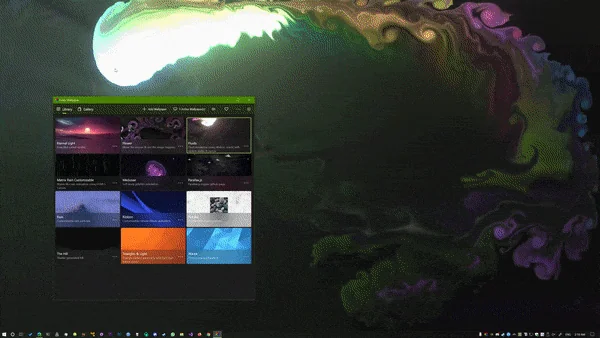
- Upon first launch, Lively opens its pre-configured library featuring stunning presets like Rain, Fluids, Eternal Light, The Matrix, and Periodic Table.
- Simply click any thumbnail to activate the live wallpaper across your main monitor instantly.
- Right-click the thumbnail and select Customize to tweak color palettes, particle speed, and interactive sensitivity.
3. Adding Custom MP4, WebM, or YouTube Wallpapers
- Click the + Add Wallpaper button in the top navigation header.
- Drag and drop any video file (
.mp4,.mkv,.webm,.gif) from Windows File Explorer into the drop zone. - Alternatively, paste a direct URL to any YouTube livestream or WebGL web page to set it as a real-time live desktop.
- Give your wallpaper a custom title and author tag, then click OK to save it to your permanent library.
---
🔒 Security, Privacy & Open-Source Integrity Analysis
Lively Wallpaper is distributed under the GNU General Public License v3.0 (GPL-3.0). The complete source code is audited publicly on GitHub, guaranteeing total transparency:
- Zero Telemetry & Tracking: Lively Wallpaper does not collect personal data, browser histories, hardware serial numbers, or behavioral telemetry.
- Zero Adware / Bundled Toolbars: The installer is a pure, clean standalone executable free from third-party promotional wrappers.
---
❓ Frequently Asked Questions (FAQ)
Does Lively Wallpaper decrease FPS in PC games?
No. Lively Wallpaper is engineered specifically with an automatic full-screen detection hook. The moment a full-screen video game (such as Fortnite, Call of Duty, Cyberpunk 2077, or CS2) enters focus, Lively freezes all rendering loops and drops CPU/GPU usage to 0.0%.
Is Lively Wallpaper completely free to use?
Yes! Lively Wallpaper is 100% free and open-source software under the GPL-3.0 license. There are no locked premium tiers, subscriptions, or hidden charges.
Can I run different wallpapers on multiple monitors?
Yes. Lively Wallpaper features full multi-display management. You can set individual wallpapers per display, span a single panoramic wallpaper across all screens, or duplicate the same visual across secondary monitors.
Where are custom wallpapers stored on disk?
User wallpapers are saved locally in C:\Users\<Username>\AppData\Local\Lively Wallpaper\Library. You can easily export, back up, or share wallpaper packages as .zip bundles with other users.
Lively Wallpaper UI & Interface Screenshots
How to Install & Verify Lively Wallpaper
Click the Direct Download button to acquire the official lively_setup_x86_full_v2210.exe binary from the listed download source.
Launch the installer executable, choose your preferred language, and follow the standard installation wizard steps.
Launch Lively Wallpaper from the Windows Start Menu, pick from pre-installed animated presets, or drag and drop any MP4/WebM video.
Frequently Asked Questions & Verification Guide
Does Lively Wallpaper decrease gaming performance or FPS?
No. Lively Wallpaper is engineered with a DirectX full-screen pause engine that automatically suspends all video and shader rendering whenever a 3D game or full-screen application is active, reducing CPU and GPU usage to 0.0%.
Is Lively Wallpaper safe and free to use on Windows?
Yes! Lively Wallpaper is completely free under the GNU General Public License v3.0 (GPL-3.0), with zero ads and zero background telemetry. FileCobra runs no antivirus scan and does not verify signing certificates — scan the file yourself for an engine verdict.
Can I use YouTube links or web pages as wallpapers?
Yes. Simply click the '+ Add Wallpaper' button and paste any YouTube stream or WebGL website URL to render it live directly onto your desktop canvas.