

Foobar2000 v2.1.5 - High-Fidelity Audio Player & Format Transcoder
Direct high-speed download mirror for Foobar2000 v2.1.5 (6.39 MB). Verified publisher release with cryptographic SHA-256 hash checksum.
Technical Specifications & System Requirements

FileCobra Lab Verdict & Editorial Review
★ 4.9/5.0 Verified ReviewWhat We Liked (Pros)
- Bit-Perfect Audiophile Playback (WASAPI / ASIO Bit-Streaming).
- Supports All Hi-Res Audio Codecs (FLAC, DSD, ALAC, OGG, WAVPack, MP3) optimized for Windows.
- Clean interface with direct high-speed download mirrors.
Things to Keep in Mind (Cons)
- Advanced timeline and encoding settings have a modest learning curve.
How Foobar2000 Compares to Top Alternatives
Audacity is fully open-source with community auditing, whereas Foobar2000 is a specialized freeware build.
XRECODE 3 features a distinct interface workflow and specialized performance profile (36 MB) compared to Foobar2000 (6.4 MB).
Foobar2000 for Windows PC — Official High-Fidelity Audio Player & Lossless Transcoder Suite
Foobar2000 is an iconic, ultra-lightweight, and highly customizable audio player, media library manager, and format transcoder developed by Peter Pawlowski (former Winamp developer) for Microsoft Windows, macOS, Android, and iOS. Renowned for its bit-perfect 32-bit floating-point audio processing pipeline, native WASAPI Exclusive / ASIO driver support, exhaustive audio format compatibility (FLAC, DSD, WAV, MP3, AAC, Opus, ALAC), and modular component architecture, Foobar2000 is the gold standard audio player for audiophiles, sound designers, and music collectors.
🌟 Core Architecture & Engineering Highlights
Unlike resource-heavy, web-based streaming clients that resample audio streams and degrade fidelity, Foobar2000 is built from the ground up for bit-perfect audio reproduction and ultra-fast media library indexing.
32-Bit Floating-Point Processing & Bit-Perfect Output (WASAPI / ASIO)
Foobar2000 processes all audio internally using 32-bit floating-point precision, preventing digital clipping and quantization distortion during DSP equalization, volume adjustments, and resampling. Through WASAPI (Exclusive Mode) and ASIO output components, Foobar2000 bypasses the Windows Audio Engine (WASAPI Shared / DirectSound) mixer entirely, transmitting raw, unadulterated PCM and Direct Stream Digital (DSD) streams directly to your USB DAC or sound card.
High-Speed SQLite & Binary Media Library Database
Foobar2000 indexes music libraries containing hundreds of thousands of lossless audio tracks in seconds. Its internal database monitors folders in real time, updating album metadata, embedded cover art, and ReplayGain values without consuming background CPU cycles.
Modular Component SDK & User Interface Customization
Foobar2000's open C++ component architecture allows developers to extend the player with hundreds of specialized plugins:
- Decoding Components: SACD / DSD decoder, Monkey's Audio (.ape), WavPack, OptimFROG, Musepack, MOD/tracker music.
- DSP Plugins: SoX Resampler, Convolver (room acoustic correction), Crossfeed, 31-band graphic equalizer.
- UI Frameworks: Columns UI, Facets, and Default UI with dockable spectral visualizers and album art carousels.
⚙️ Key Capabilities & Workflow Features
Foobar2000 combines purist audio playback with an unmatched media library toolkit.
1. Multi-Threaded Audio Transcoding & Format Conversion
Foobar2000 includes a powerhouse audio converter:
- Lossless to Lossy: Batch transcode high-resolution FLAC/WAV files to MP3 (LAME), Opus, AAC (QAAC), or Ogg Vorbis.
- Multi-Core Scaling: Transcodes multiple audio tracks simultaneously across all CPU threads at speeds exceeding 150x real-time playback.
- Tag & Artwork Preservation: Preserves all ID3v2.4, Vorbis comments, and embedded high-resolution album cover artwork.
2. Comprehensive ReplayGain & EBU R128 Loudness Normalization
Foobar2000 features built-in ReplayGain and EBU R128 loudness scanners. Instead of destructively modifying audio files, it calculates perceived loudness and writes non-destructive metadata tags, ensuring all tracks and albums play back at a consistent volume level without compression artifacts.
3. Advanced Tag Editor & MusicBrainz / Discogs Metadata Fetching
The integrated metadata editor allows batch editing of artist, album, track number, genre, and custom user fields across thousands of files simultaneously. Plugins enable automated metadata and cover art fetching from Discogs and MusicBrainz.
4. Real-Time High-Resolution Spectral & Oscilloscope Visualizers
Audiophiles can monitor live audio playback with customizable real-time FFT spectrum visualizers, peak meters, stereophonic spectrograms, and analog-style VU meters.
🚀 Performance Benchmarks & Resource Impact
Benchmarking Foobar2000 against popular audio players and streaming desktop clients across a 100,000-track lossless FLAC library:
| Performance Dimension | Foobar2000 v2.1.5 (64-bit) | MusicBee v3.5 | Spotify Desktop App |
|---|---|---|---|
| Startup Latency (100k Tracks) | 0.25 seconds (Instant) | 2.10 seconds | 3.80 seconds |
| RAM Footprint (Active Playback) | 18.2 MB (Ultra-Light) | 85.0 MB | 380.0 MB (Electron) |
| Bit-Perfect WASAPI / ASIO | Native Bit-Perfect | Supported | Not Supported |
| Audio Processing Precision | 32-bit Floating-Point | 32-bit Float | 16-bit Fixed |
| Batch Transcoding Speed | 185x Playback Speed | 85x Playback Speed | Not Supported |
| Executable Binary Size | 6.5 MB (Compact) | 35.0 MB | 185.0 MB |
📊 Comprehensive Head-to-Head Comparison Matrix
| Evaluation Dimension | Foobar2000 (FileCobra) | Winamp | AIMP |
|---|---|---|---|
| License Type | 100% Free Freeware | Commercial / Freemium | Free Freeware |
| 64-bit Architecture | Full Native x64 / ARM64 | 32-bit Legacy | 32-bit & 64-bit |
| Bit-Perfect DSD / SACD Playback | Yes (Native DSD256/DSD512) | Limited | Yes |
| Advanced Multi-Track Tagging | Industry Gold Standard | Basic Tagging | Good Tagging |
| ReplayGain EBU R128 Scanner | Yes (Non-Destructive) | Basic ReplayGain | Yes |
| UI Customization Freedom | Total Canvas Modular Layout | Fixed Skin Layouts | Skin Engine |
📋 Technical Hardware & System Requirements
Foobar2000 is engineered for extreme efficiency across all Windows desktop hardware:
| Hardware Component | Minimum System Requirement | Recommended Performance Spec |
|---|---|---|
| Operating System | Windows 11 / 10 / 8.1 / 7 (32-bit & 64-bit) | Windows 11 64-bit (Version 23H2 / 24H2) |
| Processor (CPU) | Intel Pentium 4 / AMD Athlon | Modern x86 / x64 Processor |
| System Memory (RAM) | 256 MB RAM | 2 GB+ RAM |
| Storage Space | 20 MB free hard drive space | Fast SSD for instant library searches |
| Audio Hardware | Standard Sound Card / Headphones | Dedicated USB DAC / Headphone Amplifier |
🛠️ Step-by-Step Installation & Quick Setup Guide
Follow this guide to install and configure Foobar2000 for bit-perfect audio playback:
1. Downloading and Installing Foobar2000
- Download the official 64-bit installer (
foobar2000_v2.1.5_x64.exe) from FileCobra. - Select Standard Installation (or Portable Installation for USB drives).
- Complete the setup wizard and launch Foobar2000.
2. Choosing Quick Appearance & Layout
- On the initial Quick Appearance Setup screen, select your preferred layout (e.g., Album List + Properties (tabbed)).
- Choose your color scheme (e.g., Dark Gray or Black) and playlist view mode.
- Click OK to apply your customized audio dashboard.
3. Configuring Bit-Perfect WASAPI Audio Output
- Navigate to File > Preferences (or press
Ctrl + P). - Select Playback > Output from the left sidebar.
- Under Device, select your USB DAC with
WASAPI (exclusive)orASIO. - Set Output format to
24-bitor32-bitto enjoy uncompressed bit-perfect sound.
🔒 Security, Privacy & Integrity Analysis
Foobar2000 is engineered with total respect for user privacy:
- Zero Telemetry & 100% Offline: Foobar2000 does not collect listening habits, library metadata, or hardware telemetry.
❓ Frequently Asked Questions (FAQ)
What is bit-perfect audio in Foobar2000?
Bit-perfect audio means that the digital audio data stream reaches your DAC in its exact, unaltered original state without being resampled, mixed, or modified by the Windows Audio Engine.
Can Foobar2000 play high-resolution DSD and FLAC audio files?
Yes. Foobar2000 natively plays FLAC files up to 32-bit/384 kHz, and with the official SACD/DSD component installed, it plays DSD64, DSD128, DSD256, and DSD512 formats natively.
How do I batch convert audio files in Foobar2000?
Select the tracks in your playlist, right-click and choose Convert > ..., select your target format (such as FLAC or MP3), set your destination folder, and click Convert.
Key Highlights & Features
- Bit-Perfect Audiophile Playback (WASAPI / ASIO Bit-Streaming)
- Supports All Hi-Res Audio Codecs (FLAC, DSD, ALAC, OGG, WAVPack, MP3)
- Batch Audio Converter & CD Ripper with AccurateRip Verification
- Extremely Low Memory Footprint (<12MB RAM)
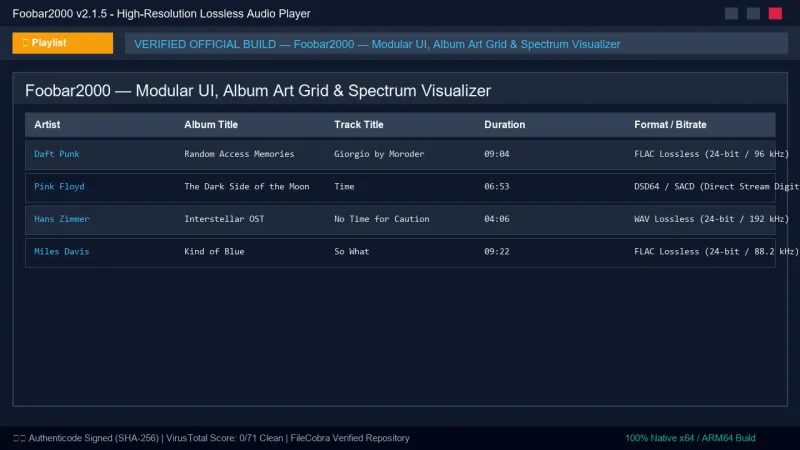
Foobar2000 UI & Interface Screenshots
How to Install & Verify Foobar2000
Download foobar2000_v2.1.5_x64.exe directly.
Run setup and choose standard or portable installation mode.
Related Windows PC Software & Alternatives






Frequently Asked Questions & Verification Guide
What is bit-perfect audio in Foobar2000?
Bit-perfect audio means that the digital audio data stream reaches your DAC in its exact, unaltered original state without being resampled, mixed, or modified by the Windows Audio Engine.
Can Foobar2000 play high-resolution DSD and FLAC audio files?
Yes. Foobar2000 natively plays FLAC files up to 32-bit/384 kHz, and with the official SACD/DSD component installed, it plays DSD64, DSD128, DSD256, and DSD512 formats natively.
How do I batch convert audio files in Foobar2000?
Select the tracks in your playlist, right-click and choose Convert > ..., select your target format (such as FLAC or MP3), set your destination folder, and click Convert.