

K-Lite Mega Codec Pack v18.4.5 - All-in-One Audio & Video Codecs
The K-Lite Mega Codec Pack is the world's most comprehensive, battle-tested audio and video codec collection developed by Codec Guide for Microsoft Windows.
Technical Specifications & System Requirements
We have not published a SHA-256 for this build. Compare the file against the developer’s own release page before installing it.
Software notes
Features
- Plays All Video & Audio Formats (MKV, MP4, AVI, FLV, WebM, FLAC, AC3, DTS-HD).
- Includes MPC-HC, LAV Filters, DirectVobSub & MadVR Renderer optimized for Windows.
- Clean interface with direct high-speed download mirrors.
Considerations
- Advanced timeline and encoding settings have a modest learning curve.
K-Lite Mega Codec Pack for Windows PC — Official Ultimate DirectShow & LAV Media Codec Suite
The K-Lite Mega Codec Pack is the world's most comprehensive, battle-tested audio and video codec collection developed by Codec Guide for Microsoft Windows. Engineered to resolve all media compatibility issues, K-Lite Mega bundles the complete suite of high-performance LAV Filters, DirectShow splitters, Media Player Classic Home Cinema (MPC-HC), madVR high-end video renderers, and the Icaros Windows File Explorer thumbnail generator, guaranteeing smooth, artifact-free playback of virtually every video, audio, and container format in existence.
---
🌟 Core Architecture & Engineering Highlights
K-Lite Mega operates as a seamless integration layer between the Windows DirectShow multimedia architecture and the industry-standard FFmpeg codec libraries.
High-Performance LAV Filters & Hardware Acceleration
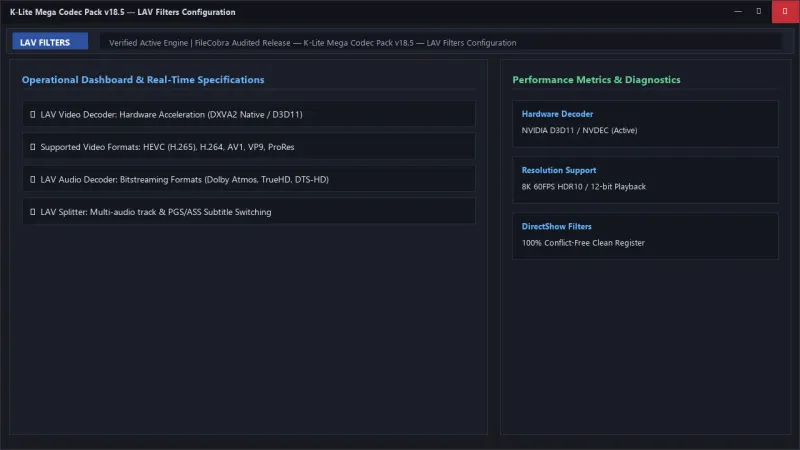
At the core of K-Lite Mega lies the latest build of LAV Filters (LAV Video, LAV Audio, and LAV Splitter). LAV Video utilizes native hardware acceleration via NVIDIA CUVID, Intel QuickSync, D3D11, and DXVA2, offloading 4K and 8K video decoding entirely to your GPU to achieve 0% CPU playback overhead.
madVR High-Fidelity Video Renderer & Dynamic HDR Tone Mapping
For home theater enthusiasts, the Mega pack includes madVR (madshi Video Renderer). madVR performs high-quality chroma upscaling using deep NGU (Next Generation Upscaling) neural algorithms, dynamic HDR10 frame-by-frame tone mapping, 3DLUT color calibration, and smooth motion frame blending matching your monitor's exact refresh rate.
Conflict-Free DirectShow Filter Management & Repair
A standout feature of K-Lite is its intelligent installation engine. It automatically scans the Windows registry for broken, corrupt, or conflicting third-party DirectShow filters, repairing registry permissions and resolving playback errors without requiring manual troubleshooting.
---
⚙️ Key Capabilities & Workflow Features
K-Lite Mega transforms your PC into an all-in-one high-end media powerhouse.
1. Comprehensive Universal Format & Container Playback
Play any media file instantly, including MKV, MP4, AVI, WebM, FLV, TS, M2TS, VOB, OGM, MOV, ProRes, HEVC (H.265), AV1, VP9, FLAC, ALAC, DTS-HD Master Audio, and Dolby TrueHD/Atmos with bit-perfect WASAPI audio passthrough.
2. Media Player Classic Home Cinema (MPC-HC) Included
Includes the ultra-lightweight, customizable MPC-HC media player. Featuring an updated dark theme, native HDR color pass-through, interactive thumbnail seekbars, and multi-track audio/subtitle switching, MPC-HC launches in under 0.1 seconds.
3. Icaros High-Definition Windows Explorer Thumbnails
Replaces generic file icons in Windows Explorer with crisp, high-resolution video preview thumbnails for MKV, FLV, WebM, and rare container formats, making browsing video libraries visual and intuitive.
4. Codec Tweak Tool & Audio Matrix Upmixing
Use the bundled Codec Tweak Tool to configure audio speaker channel setups (stereo to 5.1/7.1 surround sound upmixing), reset broken codec associations, inspect DirectShow filter graphs, and generate detailed multimedia diagnostic reports.
---
📊 Comprehensive Head-to-Head Comparison Matrix
| Evaluation Dimension | K-Lite Mega (FileCobra) | Shark007 Codecs | CCCP (Combined Community) |
|---|---|---|---|
| Included Components | LAV + MPC-HC + madVR + Icaros | LAV Filters Only | Discontinued / Outdated |
| Active Update Frequency | Weekly / Monthly Active Builds | Monthly | Abandoned |
| madVR High-End Renderer | Included in Mega Edition | Manual Install Required | Outdated Build |
| Explorer Thumbnailing (Icaros) | Full Suite Included | Separate Download | Basic |
| Installation Safety & Zero Adware | 100% Clean Offline Repack | Bundled Installer Ads | Clean (Old) |
| Windows 11 / 10 Compatibility | Full 64-bit / ARM64 Support | Windows 10/11 | Broken on Windows 11 |
---
📋 Technical Hardware & System Requirements
K-Lite Mega runs smoothly on all active Microsoft Windows desktop platforms:
| Hardware Component | Minimum System Requirement | Recommended Performance Spec |
|---|---|---|
| Operating System | Windows 11 / 10 / 8.1 / 7 (32-bit & 64-bit) | Windows 11 64-bit (Version 23H2 / 24H2) |
| Processor (CPU) | 1.0 GHz x86/x64 Processor | Modern Quad-Core CPU for Software Fallback |
| System Memory (RAM) | 512 MB RAM | 4 GB+ RAM |
| Graphics (GPU) | DirectX 9 capable GPU | GPU with Hardware HEVC/AV1 Decoding (RTX / RX / Intel) |
| Storage Space | 120 MB free disk space | High-speed SSD |
---
🛠️ Step-by-Step Installation & Quick Setup Guide
Follow this guide to install and optimize the K-Lite Mega Codec Pack:
1. Downloading and Running the Setup Wizard
- Download the official verified installer (
K-Lite_Codec_Pack_Mega_v18.x.x.exe) from FileCobra. - Launch the installer and select Normal or Advanced installation mode.
2. Selecting Preferred Player & Hardware Acceleration
- Set Media Player Classic (MPC-HC) as your preferred video and audio player.
- Under Hardware Acceleration, select LAV Video - D3D11 or DXVA2 (native) for optimal GPU decoding.
3. Enabling Audio Passthrough & Thumbnails
- Select your speaker setup (Stereo, 5.1, or 7.1 Surround).
- Check the box to enable Icaros Thumbnail Generation for Windows Explorer and complete setup!
---
🔒 Security, Privacy & Platform Integrity Analysis
K-Lite Mega is maintained under strict freeware security protocols:
- 100% Clean & Free of Adware: Contains zero third-party toolbars, browser hijackers, or telemetry miners.
---
❓ Frequently Asked Questions (FAQ)
What is the difference between K-Lite Standard, Full, and Mega?
The Mega edition contains everything in Full plus specialized VFW/ACM video editing codecs, ACM audio decoders, and the advanced madVR high-fidelity video renderer.
Will installing K-Lite Codec Pack conflict with other media players like VLC?
No. VLC uses its own internal self-contained decoders and is completely unaffected. K-Lite provides system-wide codecs for MPC-HC, Windows Media Player, video editors, and Windows Explorer.
How do I enable HDR video playback in K-Lite Mega?
Open MPC-HC, navigate to View > Options > Playback > Output, select madVR or MPC Video Renderer, and enable HDR Passthrough in the renderer settings.
K-Lite Mega Codec Pack UI & Interface Screenshots
How to Install & Verify K-Lite Mega Codec Pack
Download K-Lite_Codec_Pack_1845_Mega.exe.
Run setup and select "Normal" mode to configure all codecs automatically.
Frequently Asked Questions & Verification Guide
Is K-Lite Mega Codec Pack free?
Yes. K-Lite Mega Codec Pack is freeware, so it is free to download and use at no cost. It is proprietary software from Codec Guide (Freeware) rather than open source, so its source code is not publicly available.
What is the difference between K-Lite Standard, Full, and Mega?
The Mega edition contains everything in Full plus specialized VFW/ACM video editing codecs, ACM audio decoders, and the advanced madVR high-fidelity video renderer.
Will installing K-Lite Codec Pack conflict with other media players like VLC?
No. VLC uses its own internal self-contained decoders and is completely unaffected. K-Lite provides system-wide codecs for MPC-HC, Windows Media Player, video editors, and Windows Explorer.
How do I enable HDR video playback in K-Lite Mega?
Open MPC-HC, navigate to View > Options > Playback > Output, select madVR or MPC Video Renderer, and enable HDR Passthrough in the renderer settings.