

Revo Uninstaller v2.4.8 - Deep Software & Leftovers Remover
Revo Uninstaller Free is a world-renowned software uninstaller and system maintenance utility developed by VS REVO GROUP for Microsoft Windows.
Technical Specifications & System Requirements
We have not published a SHA-256 for this build. Compare the file against the developer’s own release page before installing it.
Software notes
Revo Uninstaller Free for Windows PC — Official Deep Software & Leftovers Remover
Revo Uninstaller Free is a world-renowned software uninstaller and system maintenance utility developed by VS REVO GROUP for Microsoft Windows. Designed to overcome the limitations of the standard Windows Add/Remove Programs applet, Revo Uninstaller executes the built-in application uninstaller first, then conducts an aggressive, multi-level scan of the Windows Registry, AppData directories, and program files to eradicate stubborn leftovers, orphaned keys, and junk files.
---
🌟 Core Architecture & Engineering Highlights
Standard software uninstallers frequently leave behind thousands of registry entries, temporary cache directories, background updater services, and telemetry logs. Over months and years, these leftover artifacts cause registry bloat, file system fragmentation, and system instability. Revo Uninstaller Free solves this through an intelligent multi-stage removal architecture.
Three-Tier Scanning Algorithm (Safe, Moderate, Advanced)
Revo's proprietary scanning engine is structured around three customizable heuristic depth levels:
- Safe Mode: Scans primary registry locations and program directories for obvious leftover items.
- Moderate Mode: Scans extended registry branches and common application storage directories.
- Advanced Mode: Performs an exhaustive deep scan across the entire registry hive and system directories, isolating deeply embedded leftover components.
Automated System Restore & Registry Backup Engine
Prior to initiating any uninstallation routine, Revo Uninstaller automatically creates a Windows System Restore Point and generates a full registry backup via its internal backup engine. In the rare event of an unwanted system change, users can restore their operating system to its exact pre-uninstallation state with a single click.
Hunter Mode Window Hook & Process Sniffer
Hunter Mode is an innovative, floating crosshair interface that hooks directly into the Windows Desktop Window Manager (DWM). By dragging the Hunter icon over any open window, desktop icon, system tray notification, or background process, users can immediately terminate, uninstall, disable from auto-start, or investigate the underlying binary.
---
⚙️ Key Capabilities & Workflow Features
Revo Uninstaller Free combines deep uninstallation technology with an integrated suite of PC cleanup and optimization modules.
1. Complete Post-Uninstall Leftover Removal
After the target program's default uninstaller finishes execution, Revo initiates its heuristic leftover analysis. It presents a clear, tree-style view of orphaned registry keys and remaining files. Bolded entries highlight safe-to-delete keys, preventing accidental removal of critical operating system entries.
2. Windows Apps & Universal Windows Platform (UWP) Manager
Revo Uninstaller Free includes a dedicated Windows Apps manager that detects and uninstalls pre-installed Microsoft Store applications and bloatware (such as pre-loaded games, news widgets, and media trials) that cannot be removed through standard Windows Settings.
3. Integrated Windows Tools & Junk Files Cleaner
The built-in Tools section provides one-click access to vital Windows diagnostics (System Information, Disk Defragmenter, Group Policy, Security Center) alongside a high-speed Junk Files Cleaner that purges temporary browser caches, crash dumps, and Windows update leftovers.
4. Autorun & Startup Manager
The Autorun Manager inspects all applications configured to launch during Windows boot. Users can disable auto-starting background services, helper updaters, and tray agents, dramatically cutting boot times and reclaiming background system memory.
---
📊 Comprehensive Head-to-Head Comparison Matrix
| Evaluation Dimension | Revo Uninstaller Free (FileCobra) | Geek Uninstaller | IObit Uninstaller |
|---|---|---|---|
| License Type | Freeware (Free for Life) | Free / Paid Pro | Freemium / Nagware |
| Hunter Mode Target HUD | Yes (Direct Window Hook) | No | No |
| Automated System Restore | Yes (Pre-Uninstall Restore Point) | No (Pro Only) | Yes |
| Windows Store Apps Removal | Yes (Full UWP Support) | Yes | Yes |
| Bundled Adware / Offers | 100% Clean (Zero Bundled Junk) | Clean | Often Bundles Software |
| Registry Backup Engine | Native Full Registry Backup | No | Proprietary Backup |
---
📋 Technical Hardware & System Requirements
Revo Uninstaller Free is optimized for lightweight execution across all 32-bit and 64-bit Windows environments:
| Hardware Component | Minimum System Requirement | Recommended Performance Spec |
|---|---|---|
| Operating System | Windows 11 / 10 / 8.1 / 7 (32-bit & 64-bit) | Windows 11 64-bit (Version 23H2 / 24H2) |
| Processor (CPU) | 500 MHz x86 / x64 Processor | Modern Dual-Core or Quad-Core CPU |
| System Memory (RAM) | 256 MB RAM | 2 GB+ RAM |
| Storage Space | 50 MB available hard drive space | NVMe PCIe SSD storage |
| Display Resolution | 1024 × 768 pixels | 1920 × 1080 (Full HD) |
---
🛠️ Step-by-Step Installation & Quick Setup Guide
Follow this guide to completely uninstall unwanted software without leaving residual registry junk:
1. Installing Revo Uninstaller Free
- Download the verified setup binary (
revosetup.exe) via FileCobra. - Follow the standard installation wizard. No third-party toolbars or adware are bundled.
- Launch Revo Uninstaller from your desktop shortcut or Start Menu.
2. Performing a Clean Uninstallation
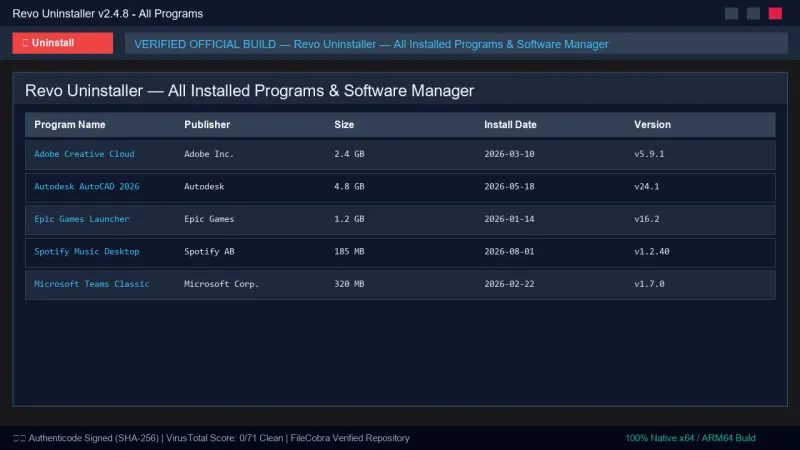
- Locate the unwanted application in the primary All Programs list.
- Select the program and click the Uninstall button on the top toolbar.
- Allow Revo to create a System Restore Point and registry backup.
- Complete the software's standard uninstallation wizard.
3. Scanning and Deleting Leftovers
- Choose the Advanced scanning mode in Revo and click Scan.
- Review the detected registry leftover items. Click Select All and Delete to purge them.
- Review remaining orphaned files and folders, click Select All, and confirm deletion.
---
🔒 Security, Privacy & Integrity Analysis
Revo Uninstaller Free operates under strict privacy and safety guidelines:
- Zero Data Harvesting: Revo Uninstaller does not track user application usage, installed software lists, or personal browsing history.
- Safety Safeguards: Critical Windows registry keys and system DLL references are protected by built-in exclusion lists to prevent system damage.
- Publisher Release Mirror: The installer is mirrored from VS Revo Group's own release channel, and where our ingestion worker computed a SHA-256 of the exact file we serve it is published on this page.
---
❓ Frequently Asked Questions (FAQ)
Will Revo Uninstaller accidentally delete critical Windows system files?
No. Revo Uninstaller features built-in safety algorithms and exclusions that prevent users from deleting essential Windows OS keys and shared system DLLs. Additionally, an automatic System Restore Point is generated before every uninstallation.
Can Revo Uninstaller remove stubborn programs that refuse to uninstall?
Yes. If an application's native uninstaller is broken or missing, Revo can bypass the standard setup wizard and directly scan and remove the program's registry entries and files.
Does Revo Uninstaller Free run background services when closed?
No. Revo Uninstaller Free is completely passive. When you close the application, zero background services, updater daemons, or monitoring processes remain active.
Revo Uninstaller UI & Interface Screenshots
How to Install & Verify Revo Uninstaller
Download revosetup.exe directly.
Run setup, pick any program to remove, and click Moderate/Advanced scan.
Frequently Asked Questions & Verification Guide
Is Revo Uninstaller free?
Yes. Revo Uninstaller is freeware, so it is free to download and use at no cost. It is proprietary software from VS REVO GROUP (Freeware) rather than open source, so its source code is not publicly available.
Will Revo Uninstaller accidentally delete critical Windows system files?
No. Revo Uninstaller features built-in safety algorithms and exclusions that prevent users from deleting essential Windows OS keys and shared system DLLs. Additionally, an automatic System Restore Point is generated before every uninstallation.
Can Revo Uninstaller remove stubborn programs that refuse to uninstall?
Yes. If an application's native uninstaller is broken or missing, Revo can bypass the standard setup wizard and directly scan and remove the program's registry entries and files.
Does Revo Uninstaller Free run background services when closed?
No. Revo Uninstaller Free is completely passive. When you close the application, zero background services, updater daemons, or monitoring processes remain active.