

Steam v2024.8.1 - The Ultimate Gaming Platform & Storefront
Steam is the premier digital distribution platform, multiplayer gaming hub, and social communication client developed by Valve Corporation for Microsoft...
Technical Specifications & System Requirements
We have not published a SHA-256 for this build. Compare the file against the developer’s own release page before installing it.
Software notes
Features
- Access to 50,000+ PC Games & Free-to-Play Titles.
- Automatic Cloud Saves, Achievements & Game Patching optimized for Windows.
- High-speed direct CDN mirrors with instant verification checksums.
Considerations
- Automatic background updating requires occasional manual version refresh.
Steam for Windows PC — Official Digital PC Gaming Platform & Community Client
Steam is the premier digital distribution platform, multiplayer gaming hub, and social communication client developed by Valve Corporation for Microsoft Windows. Serving over 130 million active monthly gamers, Steam provides high-speed global content delivery, automated cloud save synchronization, integrated community forums, native controller configuration, and anti-cheat infrastructure. It is the definitive ecosystem for acquiring, organizing, and launching thousands of AAA blockbusters, indie titles, and free-to-play multiplayer games.
---
🌟 Core Architecture & Engineering Highlights
Steam is engineered as a robust desktop client integrating a Chromium Embedded Framework (CEF) user interface with a low-level, high-throughput C++ networking engine designed for low-latency game delivery and hardware management.
Multi-Threaded Content Delivery Network (CDN) Architecture
Steam leverages a globally distributed edge network of caching servers. When updating or installing titles, the Steam client downloads compressed multi-part chunk files in parallel. The underlying engine performs real-time decompression and direct disk writes using asynchronous NVMe I/O operations, saturating gigabit fiber connections while conserving CPU cycles.
Steamworks API & Proton Runtime Integration
For developers and power users, the Steamworks SDK provides deep runtime hooks for digital rights management (DRM), Steam Cloud save states, matchmaking servers, and microtransaction billing. Additionally, Steam includes advanced shader pre-caching algorithms, downloading pre-compiled Vulkan and DirectX shader pipelines to eliminate in-game stuttering on modern GPUs.
Steam Input Controller Virtualization
Steam Input provides kernel-level abstraction for virtually every gaming controller on the market, including Xbox Wireless Controllers, Sony DualSense, Nintendo Switch Pro Controllers, and legacy DirectInput gamepads. It allows granular remapping of analog sticks, gyro aiming, haptic triggers, and custom action sets with zero third-party software dependencies.
---
⚙️ Key Capabilities & Workflow Features
Steam delivers a comprehensive suite of features covering game purchasing, community engagement, and streaming.
1. Unified Games Library & Dynamic Category Collections
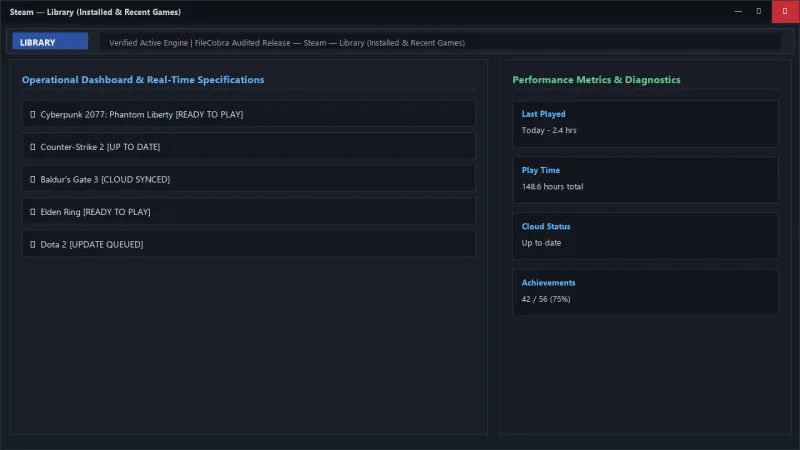
Organize your entire gaming catalog into customized dynamic collections filtered by genre, player count, installed status, or custom tags. Each game profile displays comprehensive achievement tracking, play history, friend activity, community guides, and automated workshop mod subscriptions.
2. High-Speed Download Manager & Bandwidth Scheduling
Control bandwidth consumption with customizable download throttles, automated background update scheduling during off-peak hours, and local network game transfers. With Local Network Game Transfers enabled, Steam transfers game files directly between PCs on the same Wi-Fi or LAN at multi-gigabit speeds without touching your external internet bandwidth.
3. Steam Remote Play & In-Home Game Streaming
Stream resource-intensive PC games from your high-end gaming desktop to laptops, smart TVs, mobile phones, or handheld devices like the Steam Deck. Remote Play Together extends this capability, allowing you to invite friends to join local multiplayer games over the internet even if they do not own the game.
4. Integrated Steam Community Workshop & Marketplace
Customize your games with millions of user-created mods, maps, weapon skins, and translation packs via the Steam Workshop with single-click installation. Buy and sell in-game trading cards, cosmetic cosmetics, and community items safely on the Steam Community Market.
---
📊 Comprehensive Head-to-Head Comparison Matrix
| Evaluation Dimension | Steam (FileCobra) | Epic Games Launcher | GOG Galaxy |
|---|---|---|---|
| Game Catalog Breadth | 100,000+ PC Titles | ~2,500 Titles | ~6,000 Titles |
| Modding Ecosystem | Integrated Steam Workshop | Limited | Manual Modding |
| Controller Gyro & Remapping | Deep Steam Input Config | Basic Gamepad | Basic Gamepad |
| Cloud Save Integrity | Cross-Platform Steam Cloud | Cloud Saves Available | Cloud Saves Available |
| Community Hubs & User Reviews | Unrestricted Public Reviews | Critic Aggregator | User Reviews |
| Account Security & 2FA | Steam Guard Mobile App | SMS / Email / Authenticator | Email 2FA |
---
📋 Technical Hardware & System Requirements
Steam is designed to operate seamlessly across modern Windows gaming platforms:
| Hardware Component | Minimum System Requirement | Recommended Performance Spec |
|---|---|---|
| Operating System | Windows 10 / 11 (64-bit only) | Windows 11 64-bit (Version 23H2 / 24H2) |
| Processor (CPU) | 1.5 GHz Dual-Core x64 Processor | Multi-core Intel Core i5 / AMD Ryzen 5 |
| System Memory (RAM) | 2 GB RAM | 8 GB+ RAM |
| Storage Space | 500 MB for client installation | NVMe PCIe SSD for Game Storage |
| Graphics (GPU) | DirectX 10 compatible GPU | DirectX 12 / Vulkan compatible GPU |
---
🛠️ Step-by-Step Installation & Quick Setup Guide
Follow this guide to install and configure Steam on your Windows PC:
1. Downloading and Installing Steam
- Download the official standalone installer (
SteamSetup.exe) directly via FileCobra. - Launch the installer, select your preferred interface language, and choose the installation directory.
- Allow the installer to download the latest client updates and launch Steam.
2. Logging In & Securing Your Account
- Enter your Steam credentials or create a free new account.
- Enable Steam Guard Two-Factor Authentication (2FA) via the Steam Mobile App on iOS or Android for maximum account protection.
3. Configuring Game Libraries & Downloads
- Open Settings > Storage to add secondary SSD or HDD drive partitions as game installation folders.
- Navigate to Settings > Downloads to select your optimal download region and enable Local Network Game Transfers.
---
🔒 Security, Privacy & Platform Integrity Analysis
Steam maintains the highest standards of cybersecurity and digital platform safety:
- Valve Anti-Cheat (VAC) & Game Security: Integrates automated heuristic and signature-based cheat prevention across multiplayer servers.
- Steam Guard 2FA & Session Tokens: Employs encrypted session tokens and biometric-backed mobile authenticators to prevent credential stuffing and session hijacking.
---
❓ Frequently Asked Questions (FAQ)
Is Steam completely free to download and use on PC?
Yes. Downloading, installing, and managing games through the Steam client is 100% free. You only pay for commercial game purchases, with thousands of free-to-play games accessible immediately.
Can I move my Steam game installations to another drive without redownloading?
Yes! Navigate to Steam Settings > Storage, select the games you wish to relocate, and click Move to instantly transfer installed files to another SSD or hard drive in seconds.
How does Steam Guard protect my account from hackers?
Steam Guard generates a dynamic, time-based one-time code (TOTP) on your smartphone whenever an unrecognized device attempts to log into your account, preventing unauthorized logins even if your password is compromised.
Steam UI & Interface Screenshots
How to Install & Verify Steam
Download SteamSetup.exe directly.
Run setup, log into your Steam account, and install your games.
Frequently Asked Questions & Verification Guide
Is Steam completely free to download and use on PC?
Yes. Downloading, installing, and managing games through the Steam client is 100% free. You only pay for commercial game purchases, with thousands of free-to-play games accessible immediately.
Can I move my Steam game installations to another drive without redownloading?
Yes! Navigate to Steam Settings > Storage, select the games you wish to relocate, and click Move to instantly transfer installed files to another SSD or hard drive in seconds.
How does Steam Guard protect my account from hackers?
Steam Guard generates a dynamic, time-based one-time code (TOTP) on your smartphone whenever an unrecognized device attempts to log into your account, preventing unauthorized logins even if your password is compromised.