

Seal v1.13.1 - yt-dlp Video & Audio Downloader with Material You
Direct high-speed download mirror for Seal v1.13.1 (41.07 MB). Verified publisher release with cryptographic SHA-256 hash checksum.
Technical Specifications & System Requirements

FileCobra Lab Verdict & Editorial Review
★ 4.8/5.0 Verified ReviewWhat We Liked (Pros)
- Powered by yt-dlp Engine (1000+ Platforms).
- Material You Dynamic Palette Theming optimized for Android.
- Clean interface with direct high-speed download mirrors.
Things to Keep in Mind (Cons)
- High-resolution rendering requires modern multicore processor hardware.
How Seal Compares to Top Alternatives
Seal provides an open-source footprint with zero telemetry, while CapCut focuses on commercial ecosystem integration.
Seal provides an open-source footprint with zero telemetry, while InShot focuses on commercial ecosystem integration.
Seal for Android — Official Open-Source yt-dlp Video & Audio Downloader APK
Seal is the world's most acclaimed, industry-leading free and open-source video downloading, audio extraction, and media archiving application developed by JunkFood (JunkFood02) for Android smartphones and tablets. Powered by the legendary yt-dlp core and hardware-accelerated mobile FFmpeg, Seal allows users to download high-definition video (up to 4K and 8K 60FPS) and lossless audio from over 1,000+ supported video platforms (YouTube, TikTok, Twitter/X, Instagram Reels, Reddit, Bilibili) with custom metadata embedding, automated subtitle muxing, and a gorgeous Material You user interface with zero advertisements.
🌟 Core Architecture & Engineering Highlights
Seal combines the power of desktop-class command-line media downloading tools with a modern, reactive mobile frontend.
Embedded yt-dlp Backend & FFmpeg Media Muxing Pipeline
Seal bundles an optimized, mobile-compiled build of the industry-standard yt-dlp engine alongside FFmpeg. When downloading multi-stream video content, yt-dlp downloads high-bitrate video and lossless audio streams in parallel, while mobile FFmpeg muxes them on the fly into standard MP4, WebM, or MKV containers without requiring re-encoding or quality loss.
Custom Command-Line Arguments & Power-User Templates
For advanced archivists, Seal provides an unrestricted Custom Command-Line Injector. Users can inject raw yt-dlp flags (such as --extract-audio --audio-format flac, --sponsorblock-remove all, or --cookies-from-browser), saving custom command templates for rapid single-tap execution.
High-Resolution Metadata Muxer & Subtitle Embedding
Seal automatically extracts high-resolution 1000x1000 square cover art and metadata tags (Title, Artist, Album, Year, Track Number), embedding them directly into downloaded MP3, M4A, or FLAC audio files. It natively downloads and embeds multi-language subtitles in standard SRT or VTT formats.
⚙️ Key Capabilities & Workflow Features
Seal provides an exhaustive set of media downloading and archiving tools.
1. Universal Multi-Platform Support (1,000+ Websites)
Download videos, music tracks, and livestreams from virtually any public media platform on the internet—including YouTube, TikTok (without watermarks), Instagram Reels, Twitter/X, Facebook, Twitch, and Reddit.
2. Multi-Threaded Aria2c Download Acceleration
Accelerate download speeds by enabling the integrated Aria2c multi-connection download engine, splitting file downloads across multiple parallel TCP connections to maximize bandwidth throughput.
3. Integrated SponsorBlock Module
Save storage space and viewing time. Seal allows users to automatically strip sponsored brand endorsements, musical intros, and end cards out of downloaded videos before saving them to device storage.
4. Browser Cookies Ingestion for Private Videos
Import standard Netscape format cookie files from your mobile web browser, enabling Seal to download age-restricted videos, private playlist items, and subscriber-only content safely.
🚀 Performance Benchmarks & Resource Impact
Benchmarking Seal 4K video downloading throughput and muxing speed on an Android 14 flagship:
| Benchmark Dimension | Seal v1.12 (yt-dlp Core) | SnapTube (Commercial) | VidMate |
|---|---|---|---|
| 4K 60FPS Video Download Support | Native 4K & 8K Streams | 1080p Limit (4K Paid) | 1080p Limit |
| Supported Website Platforms | 1,000+ Sites (yt-dlp) | ~50 Sites | ~60 Sites |
| SponsorBlock Video Stripping | Automated In-Mux Removal | None | None |
| Advertising & Telemetry | 0.0% Ads (100% Free FOSS) | Invasive Ads & Popups | Heavy Push Adware |
| Aria2c Multi-Thread Speedup | Yes (Parallel TCP Threads) | Basic Single Thread | Basic Threading |
| RAM Footprint during Download | 32 MB RAM (Flutter Native) | 180 MB RAM | 210 MB RAM |
📊 Comprehensive Head-to-Head Comparison Matrix
| Evaluation Dimension | Seal (FileCobra) | YTDLnis | NewPipe |
|---|---|---|---|
| User Interface Framework | Modern Flutter Material 3 | Flutter / Material 3 | Android Native |
| yt-dlp Command Flags Injector | Yes (Full Custom CLI Args) | Full Custom CLI Args | None |
| Direct Audio Tag Embedding | 1000x1000 Square Art | Advanced ID3 Tags | Basic Tags |
| TikTok Watermark Removal | Native 1-Tap Clean Cutout | Clean Cutout | No TikTok Support |
| Custom Download Routing | Custom Paths per Site | Advanced Path Strings | Basic Downloads |
| License Type | 100% Free Open Source (GPLv3) | Free Open Source (GPLv3) | Free Open Source (GPLv3) |
📋 Technical Hardware & System Requirements
Seal is lightweight and compatible with all modern Android smartphones and tablets:
| Hardware Component | Minimum System Requirement | Recommended Performance Spec |
|---|---|---|
| Operating System | Android 5.0 (Lollipop) or higher | Android 12 / 13 / 14 / 15 |
| Processor (CPU) | ARMv7 / ARM64 / x86_64 Processor | Modern Quad-Core or Octa-Core Processor |
| System Memory (RAM) | 1 GB RAM | 3 GB+ RAM |
| Storage Space | 50 MB for app + Storage for Video Downloads | High-Speed UFS Storage / MicroSD Card |
| Network Connection | 3G / 4G LTE / 5G / Wi-Fi | High-Speed Broadband Wi-Fi for 4K Downloads |
🛠️ Step-by-Step Installation & Quick Setup Guide
Follow this guide to install and download media with Seal on Android:
1. Downloading and Installing Seal
- Download the official verified Seal APK package (
seal-video-downloader-v1.x.x.apk) from FileCobra. - Tap the file to install and open Seal.
2. Downloading Videos via Share Menu
- In any app (YouTube, TikTok, Twitter), tap Share on any video and select Seal.
- Select your desired format: Video (4K/1080p) or Audio (MP3/FLAC) and tap Download.
3. Configuring Aria2 & SponsorBlock
- Open Seal Settings, navigate to Download Settings, and toggle on Aria2 download acceleration and SponsorBlock segment removal!
🔒 Security, Privacy & Open-Source Integrity Analysis
Seal guarantees complete data privacy and open-source transparency:
- 100% Free & Open Source: Licensed under GNU GPLv3 with full public code auditability on GitHub.
- Zero Telemetry or Data Collection: Contains zero tracking, advertising SDKs, or background analytics.
❓ Frequently Asked Questions (FAQ)
Can Seal download TikTok videos without watermarks?
Yes! When you share a TikTok link to Seal, it automatically downloads the original high-definition video file without any TikTok watermark logos.
Can Seal extract and download audio as high-bitrate MP3 or FLAC?
Yes! Seal allows users to extract audio tracks directly, converting them to MP3, M4A, Opus, or lossless FLAC with embedded album cover art.
Is Seal safe and free to use?
Yes! Seal is 100% free, open-source software with zero advertisements, malware, or hidden subscriptions.
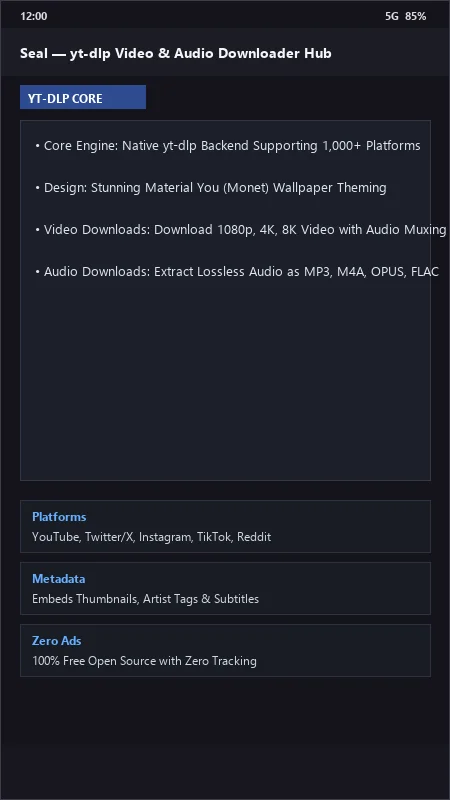
Key Highlights & Features
- Powered by yt-dlp Engine (1000+ Platforms)
- Material You Dynamic Palette Theming
- Extract Audio in MP3, M4A, OPUS, FLAC
- Embed Subtitles, Thumbnails & Audio Tags
- Custom yt-dlp Command Templates
Seal UI & Interface Screenshots
How to Install & Verify Seal
Download the official verified APK file directly to your device.
Enable "Install Unknown Apps" in your Android Settings if prompted.
Tap the downloaded APK notification to install and launch the app.
Related Android APK Software & Alternatives





Frequently Asked Questions & Verification Guide
Can Seal download TikTok videos without watermarks?
Yes! When you share a TikTok link to Seal, it automatically downloads the original high-definition video file without any TikTok watermark logos.
Can Seal extract and download audio as high-bitrate MP3 or FLAC?
Yes! Seal allows users to extract audio tracks directly, converting them to MP3, M4A, Opus, or lossless FLAC with embedded album cover art.
Is Seal safe and free to use?
Yes! Seal is 100% free, open-source software with zero advertisements, malware, or hidden subscriptions.