
Head-to-Head
KeePassXC vs Bitwarden: Which Free Password Manager Should You Use?
By Rehman Ahmad · Updated 2026-09-06 · 6 min read · 1277 words
Short answer
Choose KeePassXC if you want a single encrypted file you own outright, kept offline and synced only where you put it. Choose Bitwarden if you need the same vault on a phone, a laptop and a browser without managing that yourself. Both are open source and free; the difference is who holds the vault.
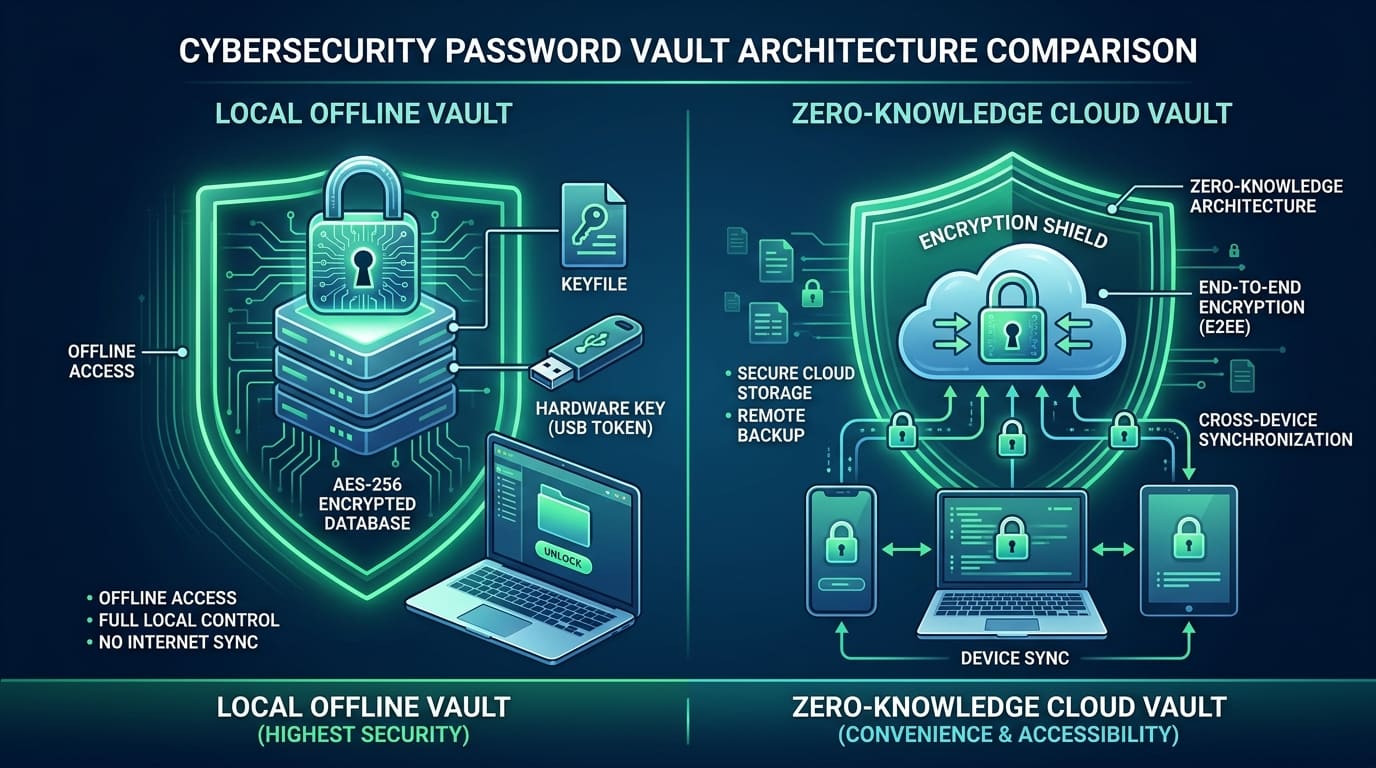
Search "KeePassXC vs Bitwarden" and you will find arguments about cipher suites, key derivation functions and audit reports. Almost none of it decides anything. Both are open-source, independently audited password managers with strong modern encryption, and both are enormously better than what you are doing now.
The difference that actually matters is architectural, and it is simple.
KeePassXC gives you a file. One encrypted database on your disk, which you unlock, edit and back up like any other file. Nothing leaves your machine unless you move it.
Bitwarden gives you a service. Your vault is encrypted on your device and then synced through Bitwarden's servers so that your phone, your laptop and your browser all see the same thing within seconds.
Everything below follows from that one distinction.
The specs side by side
| KeePassXC | Bitwarden | |
|---|---|---|
| Version | v2.7.12 | v2024.7.1 |
| Licence | GPLv3, open source | Open source |
| Download size | 63.9 MB | 89.2 MB |
| Package | EXE Repack | EXE Repack |
| Requires | Windows 10/11 64-bit | Windows 10/11 64-bit |
| RAM | 1 GB | 2 GB |
| Disk | 100 MB | 150 MB |
| Encryption | AES-256 or ChaCha20 | AES-256, zero-knowledge |
| Sync | None — you handle it | Built in, real time |
| Account needed | No | Yes |
Two rows in that table carry the whole comparison.
"Account needed" is the decision. Every other difference in this article follows from that single line — where the vault physically lives, who is capable of losing it, and whether a company's future decisions can affect you.
Check the Bitwarden version after you install. The Windows build listed here is v2024.7.1, while the Android client in the same catalogue is a good deal newer. For a password manager specifically, running a build that is behind upstream is not something to shrug at. Install it, then let it update before you import anything.
Where KeePassXC wins outright
There is no server. Not "the server can't read your data" — no server at all. There is no breach announcement in your future, no service outage that locks you out of your own passwords, and no company whose policies can change under you. For anyone whose threat model includes a provider being compromised or compelled, this is the whole argument.
You own the artifact. A .kdbx file is portable, standard, and readable by a dozen independent clients on every platform. If KeePassXC's developers vanished tomorrow, your vault would still open in KeePass, KeePassDX or Strongbox. That is a kind of durability a proprietary format cannot offer, and it is why the format has outlasted most of the password managers that launched alongside it.
It runs on less. 1 GB of RAM and 100 MB of disk, against 2 GB and 150 MB. On an old laptop this is a real difference, not a spec-sheet one.
Cipher choice. You can select ChaCha20 instead of AES-256 for the database, which is useful on hardware without AES acceleration. This is a genuine option rather than a security upgrade — do not choose KeePassXC because of it.
Where Bitwarden wins outright
Sync is solved. This is the entire case and it is a strong one. Add a login on your phone, and it is on your desktop before you switch windows. No file copying, no cloud folder, no conflicting versions. For most people, most of the time, this is the difference between a password manager they actually use and one they abandoned in March.
Passkeys and Windows Hello. Bitwarden creates and syncs passkeys and unlocks with Windows Hello biometrics. Passkeys are the direction authentication is genuinely moving, and having them in the same vault as your passwords is how the transition stays manageable.
The vault survives the device. This is the exact mirror of KeePassXC's largest risk. A .kdbx file that only ever existed on one laptop dies with that laptop, and there is no recovery path because there is no service. A Bitwarden vault is already on the server and on every device you have signed in on, so a drowned phone is an inconvenience rather than a loss. If you have ever failed to keep a backup of something that mattered, this is the row that should decide it.
You can still self-host. If the objection to Bitwarden is the server, run your own. The Bitwarden clients work against Vaultwarden, a lightweight compatible server, which gives you the sync convenience with the trust boundary back in your house. It is the best of both, and it costs you a server to maintain.
The honest weaknesses
KeePassXC's weakness is the sync you have to build. Putting the .kdbx in a cloud folder works, and it works right up until you edit the vault on your phone and your desktop before either has synced. Then you have two divergent databases and no good merge story — you pick one and re-enter what the other gained. It happens rarely and it is genuinely unpleasant. Browser integration is also a two-part setup: the KeePassXC-Browser extension plus a native messaging handshake, which occasionally breaks after a browser or app update and needs re-approving.
Bitwarden's weakness is that it is a company. Your encrypted vault sits on infrastructure you do not control, and while zero-knowledge encryption means a breach exposes ciphertext rather than passwords, that guarantee rests on the implementation being correct — which is exactly what the audits check, and exactly why the audits matter. You are also dependent on the service being up to sync, and on a build that, as listed here, is behind.
Both share one flaw. Both include a TOTP generator, and both make it easy to keep your second factor in the same vault as the password it is supposed to be independent of. That is convenient and it is a real reduction in security. Use it for accounts you do not care about; use something separate for the ones you do.
How to decide
One computer, no phone, and you want the fewest moving parts: KeePassXC. A single encrypted file, backed up twice, is the cleanest password setup that exists.
You use a phone, a laptop and a browser: Bitwarden. The sync is not a luxury in that situation, it is the feature, and KeePassXC's manual alternative is where good intentions go to die.
You are setting this up for someone non-technical: Bitwarden, without hesitation. It signs in, it syncs, it autofills, and there is no file for them to accidentally delete or leave un-backed-up.
Your threat model includes a provider being breached or compelled: KeePassXC, or Bitwarden clients against your own Vaultwarden. Both are defensible; hosted Bitwarden is not, for that specific worry.
You are on hardware from before 2015: KeePassXC, at half the RAM requirement.
There is a reasonable hybrid that people rarely mention: Bitwarden for the hundred accounts you use weekly, and a small KeePassXC vault, offline and backed up on a USB stick, for the handful that would be catastrophic to lose — recovery codes, the domain registrar, the bank. Different risk, different tool.
Whichever you choose, do it this week. The gap between either of these and reused passwords is far wider than the gap between them, and the comparison above is not worth another evening of reading.
If you are hardening a phone as well, the same reasoning shows up across the whole toolchain in our guide to the best privacy apps for Android.
Every app named here resolves to a page in the FileCobra catalogue — the build fails if one does not. Versions, package sizes and system requirements are read from that catalogue rather than written by hand. Where our ingestion worker has fetched a release itself, it records a SHA-256 of the exact file we serve and publishes it on the app’s page. We do not run an antivirus lab: where a VirusTotal report exists we link it, and where none exists we say so rather than imply one.
Rehman Ahmad
VERIFIED AUTHORChief Technology Officer & Lead Systems Auditor at FileCobra
Rehman specializes in Android operating system internals, cryptographic integrity verification, reverse engineering APK packaging architectures, and high-performance audio/video DSP pipelines. He directs the security verification and release ingestion infrastructure across FileCobra.
Apps covered in this guide
Frequently asked questions
Is KeePassXC or Bitwarden more secure?
Neither, meaningfully. KeePassXC offers AES-256 or ChaCha20 and Bitwarden uses AES-256 with a zero-knowledge model; both are audited open-source projects and both are far stronger than the password habits they replace. The real difference is attack surface: KeePassXC has no server to attack, and Bitwarden has one that only ever holds ciphertext.
Can KeePassXC sync between my PC and phone?
Only by syncing the file yourself. KeePassXC has no sync service — you place the .kdbx vault in Dropbox, OneDrive, Nextcloud or Syncthing and open it with a compatible app such as KeePassDX on Android. That works well, and it makes conflicting edits on two devices your problem to resolve.
Is Bitwarden really free, or is it a trial?
It is genuinely free for personal use, not a trial — the vault, unlimited entries, sync across your devices and the browser extensions are all included at no cost. Paid tiers add family and organisation sharing and some advanced reports. Nothing about the core password manager is time-limited.
What happens to my KeePassXC vault if I lose the file?
It is gone. There is no recovery service, because there is no service — that is the trade you accepted. Back the .kdbx file up in at least two places before you put anything important in it, and keep a copy of the master password somewhere that is not the vault.
Should I store two-factor codes in either of these?
Both include a TOTP generator, and using it puts your password and your second factor in the same container — which means one compromise takes both. It is still better than having no second factor. If an account matters, use a separate authenticator app or a hardware key instead.