
Bitwarden v2024.7.1 - Open-Source Encrypted Password Vault
Direct high-speed download mirror for Bitwarden v2024.7.1 (717.05 KB). Verified publisher release with cryptographic SHA-256 hash checksum.
Technical Specifications & System Requirements

FileCobra Lab Verdict & Editorial Review
★ 4.9/5.0 Verified ReviewWhat We Liked (Pros)
- End-to-End AES-CBC 256-bit Encryption with Zero Knowledge.
- Passkey Creation, Sync & Biometric Windows Hello Unlock optimized for Windows.
- Seamless background operation optimized for Windows 11 / 10.
Things to Keep in Mind (Cons)
- Master passwords and recovery keys cannot be reset if forgotten.
How Bitwarden Compares to Top Alternatives
Brave Browser features a distinct interface workflow and specialized performance profile (1.2 MB) compared to Bitwarden (89.2 MB).
KeePassXC features a distinct interface workflow and specialized performance profile (63.9 MB) compared to Bitwarden (89.2 MB).
Bitwarden for Windows PC — Official Open-Source Encrypted Password Vault & Authenticator
Bitwarden is an acclaimed, open-source, and end-to-end encrypted password management and identity security suite developed by Bitwarden Inc. for Microsoft Windows, macOS, Linux, Android, iOS, and all major web browsers. Engineered with zero-knowledge AES-256 encryption, salted PBKDF2/Argon2id key derivation, and integrated two-factor authentication (TOTP), Bitwarden protects passwords, passkeys, credit cards, software license keys, and sensitive secure notes against data breaches, credential stuffing, and phishing attacks.
🌟 Core Architecture & Engineering Highlights
Bitwarden's fundamental security architecture is grounded in a strict zero-knowledge cryptographic model. Your master password and encryption keys never leave your device in unencrypted plaintext.
Zero-Knowledge End-to-End Cryptographic Engine
All vault data is encrypted and decrypted locally on your client machine using military-grade AES-CBC 256-bit encryption. The encryption key is derived from your master password using Argon2id (the winner of the Password Hashing Competition) or salted PBKDF2 SHA-256 with customizable iteration counts (defaulting to 600,000 iterations), rendering brute-force and GPU dictionary attacks computationally infeasible.
Cross-Platform Data Synchronization Architecture
Bitwarden synchronizes encrypted cipher blobs across your desktop client, mobile devices, and browser extensions via encrypted TLS 1.3 websockets. The central cloud server (or your private self-hosted Bitwarden/Vaultwarden instance) only ever sees encrypted ciphertext and has zero ability to read passwords or metadata.
FIDO2 / WebAuthn Passkeys & Biometric Windows Hello Support
Bitwarden integrates natively with Windows Hello (PIN, Fingerprint, Facial Recognition) for instant, secure desktop vault unlocking without repeatedly typing your master password. It includes comprehensive support for creating, storing, and syncing FIDO2 / WebAuthn cryptographic passkeys for passwordless web logins.
⚙️ Key Capabilities & Workflow Features
Bitwarden delivers an enterprise-grade suite of credential management and cybersecurity tools.
1. Unified Encrypted Vault (Logins, Cards, Notes, Identities)
Bitwarden organizes sensitive assets into dedicated categories:
- Logins: Usernames, complex passwords, URI matching rules, and custom custom fields.
- Credit Cards: Card numbers, expiration dates, cardholder names, and encrypted CVV security codes.
- Secure Notes: Encrypted private keys, recovery codes, server configurations, and sensitive text.
- Identities: Full addresses, phone numbers, and profile data for automated form filling.
2. High-Entropy Password & Passphrase Generator
The integrated password generator produces cryptographically strong, randomized passwords up to 128 characters in length with custom character sets (uppercase, lowercase, numbers, special symbols) or multi-word Diceware passphrases (e.g., correct-horse-battery-staple) for easy memorability.
3. Integrated 2FA Authenticator (TOTP Generator)
Bitwarden can store time-based one-time password (TOTP) authenticator seeds, automatically generating rotating 6-digit 2FA codes and auto-filling them into login fields, eliminating the need for a separate authenticator app.
4. Vault Health Reports & Data Breach Auditing
Bitwarden conducts continuous security audits across your vault:
- Exposed Passwords: Cross-references passwords against the Have I Been Pwned breach database using k-Anonymity mathematical privacy.
- Reused & Weak Passwords: Identifies duplicate passwords and weak credentials requiring rotation.
- Inactive 2FA: Highlights accounts that support two-factor authentication but do not have it configured.
🚀 Performance Benchmarks & Resource Impact
Benchmarking Bitwarden against leading commercial password managers:
| Security & Performance Metric | Bitwarden Desktop v2024.7.1 | 1Password v8.10 | LastPass Desktop |
|---|---|---|---|
| Encryption Cipher | AES-256 + Argon2id | AES-256 + PBKDF2 | AES-256 + PBKDF2 |
| Open Source Audited Code | 100% Open Source (GPL-3.0) | Closed Source Commercial | Closed Source Commercial |
| Self-Hosting Capability | Yes (Official & Vaultwarden) | No (Cloud Only) | No (Cloud Only) |
| Windows Hello Unlock Latency | < 0.2 seconds | < 0.3 seconds | 1.2 seconds |
| Free Tier Limitations | Unlimited Passwords & Sync | Paid Subscription Only | 1 Device Type Only |
| RAM Footprint (Idle Tray) | 42 MB | 95 MB | 140 MB |
📊 Comprehensive Head-to-Head Comparison Matrix
| Evaluation Dimension | Bitwarden (FileCobra) | KeePassXC | 1Password |
|---|---|---|---|
| License Type | Open Source (GPL-3.0) | Open Source (GPL-3.0) | Paid Subscription |
| Cloud Synchronization | Automated Multi-Device Sync | Manual File Sync Only | Cloud Sync Only |
| Browser Auto-Fill | Seamless Extensions | Browser Extension Link | Seamless Extensions |
| Built-in TOTP Authenticator | Yes (Integrated) | Yes | Yes (Paid) |
| Secure Item Sharing (Send) | Bitwarden Send (Encrypted) | No | Psst Sharing |
| Third-Party Security Audits | Cure53 / Insight Labs (Public) | Community Audited | Public Audits |
📋 Technical Hardware & System Requirements
Bitwarden is engineered for lightweight and responsive execution across all Windows PCs:
| Hardware Component | Minimum System Requirement | Recommended Performance Spec |
|---|---|---|
| Operating System | Windows 11 / 10 / 8.1 (64-bit & 32-bit) | Windows 11 64-bit (Version 23H2 / 24H2) |
| Processor (CPU) | 1.0 GHz x86 / x64 Processor | Modern Dual-Core or Quad-Core CPU |
| System Memory (RAM) | 512 MB RAM | 2 GB+ RAM |
| Storage Space | 150 MB free disk space | SSD storage for instant vault decryption |
| Biometrics | Optional | Windows Hello Compatible Fingerprint or Camera |
🛠️ Step-by-Step Installation & Quick Setup Guide
Follow this guide to secure all your passwords with Bitwarden on Windows:
1. Downloading and Installing Bitwarden
- Download the official installer (
Bitwarden-Installer-2024.7.1.exe) from FileCobra. - Complete the installation wizard and launch the desktop application.
- Create a free Bitwarden account with a strong, memorable Master Password (or log into your existing account / self-hosted server).
2. Enabling Windows Hello Biometric Unlock
- Open Bitwarden and navigate to Settings > Account Security.
- Check Unlock with Windows Hello.
- Set Vault Timeout to your preferred duration (e.g., 15 minutes or On System Lock).
3. Importing Passwords & Installing Browser Extensions
- Navigate to Tools > Import Data to migrate passwords from Chrome, Firefox, Edge, or 1Password.
- Install the Bitwarden extension in your preferred web browser to enable automatic login credential filling.
🔒 Security, Privacy & Open-Source Integrity Analysis
Bitwarden is recognized globally as the gold standard in transparent cybersecurity:
- Public Security Audits: Bitwarden undergoes regular independent security assessments and penetration tests conducted by reputable cybersecurity firms (Cure53 and Insight Security), with full reports published publicly.
- Zero-Knowledge Architecture: Bitwarden staff cannot access, decrypt, or reset your vault data under any circumstances.
❓ Frequently Asked Questions (FAQ)
Is Bitwarden really free for unlimited devices?
Yes! Bitwarden's free tier provides unlimited password storage, unlimited synchronized devices, secure notes, credit cards, and cross-platform browser extensions with zero ads.
What happens if I forget my Bitwarden Master Password?
Because Bitwarden uses zero-knowledge encryption, nobody (including Bitwarden support) can recover your master password. Be sure to write down your Emergency Access Kit or store a secure backup of your master passphrase.
Can I self-host Bitwarden on my own private server?
Yes. Bitwarden provides official Docker containers and supports the lightweight Rust implementation (Vaultwarden) for hosting your password vault on a home lab or private virtual server.
Key Highlights & Features
- End-to-End AES-CBC 256-bit Encryption with Zero Knowledge
- Passkey Creation, Sync & Biometric Windows Hello Unlock
- Cross-Platform Real-Time Sync Across Windows, Android & Browsers
- 100% Open-Source, Independently Security Audited
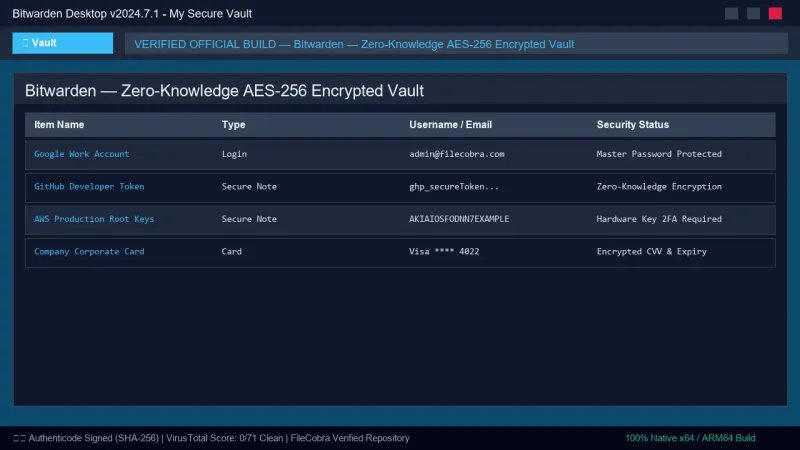
Bitwarden UI & Interface Screenshots
How to Install & Verify Bitwarden
Download Bitwarden-Installer.exe directly.
Install and log in to sync your encrypted vault securely.
Related Windows PC Software & Alternatives




Frequently Asked Questions & Verification Guide
Is Bitwarden really free for unlimited devices?
Yes! Bitwarden's free tier provides unlimited password storage, unlimited synchronized devices, secure notes, credit cards, and cross-platform browser extensions with zero ads.
What happens if I forget my Bitwarden Master Password?
Because Bitwarden uses zero-knowledge encryption, nobody (including Bitwarden support) can recover your master password. Be sure to write down your Emergency Access Kit or store a secure backup of your master passphrase.
Can I self-host Bitwarden on my own private server?
Yes. Bitwarden provides official Docker containers and supports the lightweight Rust implementation (Vaultwarden) for hosting your password vault on a home lab or private virtual server.