
Tor Browser v13.5.2 - Anonymous Onion Routing & Censorship Bypass
Tor Browser is the world's most trusted, free, and open-source anonymous web browser developed by The Tor Project for Microsoft Windows, macOS, Linux...
Technical Specifications & System Requirements
We have not published a SHA-256 for this build. Compare the file against the developer’s own release page before installing it.
Software notes
Features
- Multi-Layered Onion Encryption Across Global Volunteer Nodes.
- Defends Against Browser Fingerprinting & ISP Surveillance optimized for Windows.
- Seamless background operation optimized for Windows 11 / 10 / 8.1.
Considerations
- Master passwords and recovery keys cannot be reset if forgotten.
Tor Browser for Windows PC — Official Anonymous Onion Routing & Anti-Censorship Web Suite
Tor Browser is the world's most trusted, free, and open-source anonymous web browser developed by The Tor Project for Microsoft Windows, macOS, Linux, and Android. Engineered on a hardened Mozilla Firefox ESR foundation and integrated with the decentralized Tor (The Onion Router) network, Tor Browser routes your internet traffic through a multi-layered, three-hop encrypted relay circuit, preventing network surveillance, ISP tracking, website fingerprinting, and geographic censorship.
---
🌟 Core Architecture & Engineering Highlights
Standard web browsers and commercial VPNs operate on a single-point-of-trust model: your ISP or VPN provider can see your real IP address and monitor your destination traffic. Tor Browser completely re-architects web privacy through decentralized onion routing.
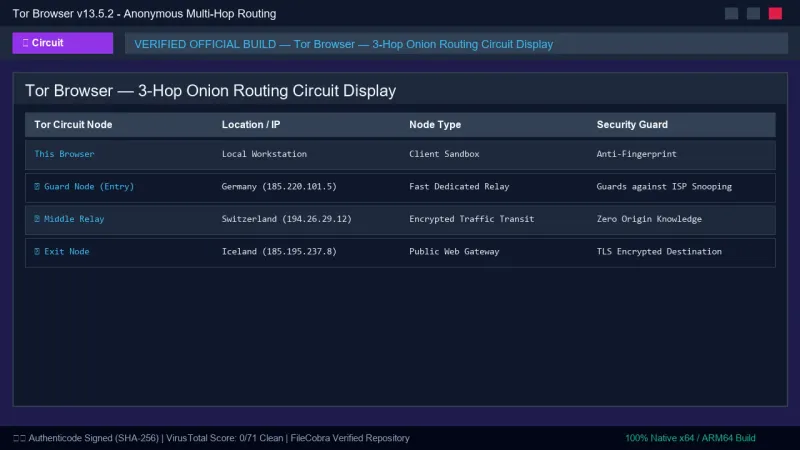
3-Hop Onion Routing Cryptographic Pipeline
When you load a web page in Tor Browser, your request is wrapped in three concentric layers of military-grade encryption (like the layers of an onion) and routed across three random volunteer relays worldwide:
- Guard / Entry Relay: Sees your real IP address but cannot see your destination traffic or content.
- Middle Relay: Transits encrypted data between the Guard and Exit node, knowing neither the origin nor the destination.
- Exit Relay: Decrypts the final layer and sends the request to the destination website, seeing the destination but having zero knowledge of your true IP address.
Universal Anti-Fingerprinting Defense
To defeat advanced canvas fingerprinting, WebGL hardware enumeration, and audio context profiling, Tor Browser enforces a strictly uniform browser profile. All Tor Browser users around the world share the exact same screen resolution letterboxing, user-agent string, installed fonts list, and timezone (UTC), making individual user tracking mathematically impossible.
Native `.onion` Hidden Services Ingestion
Tor Browser provides exclusive access to decentralized .onion domains (Tor Hidden Services). These websites exist entirely within the encrypted Tor network with end-to-end cryptographic authentication, eliminating traditional DNS lookups and centralized certificate authorities.
---
⚙️ Key Capabilities & Workflow Features
Tor Browser combines robust anonymization with granular security controls.
1. Three-Tier Security Level Shield Slider
Users can customize their security posture via the Security Shield slider:
- Standard Mode: All standard browser features enabled.
- Safer Mode: Disables JavaScript on non-HTTPS sites, disables audio/video autoplay, and restricts complex math fonts.
- Safest Mode: Completely disables JavaScript everywhere, disables WebGL, blocks custom SVG icons, and forces click-to-play media, providing maximum defense against zero-day browser exploits.
2. Tor Circuit Display & New Identity Generator
With a single click on the onion icon in the URL bar, users can inspect their active 3-hop Tor circuit (Guard, Middle, Exit relays with IP locations). Clicking New Identity (Ctrl + Shift + U) instantly clears all cookies, cache, and session data and rebuilds a brand-new Tor circuit.
3. Integrated Pluggable Transports & Anti-Censorship Bridges
For users residing in countries or corporate networks with heavy internet censorship and deep packet inspection (DPI), Tor Browser includes built-in Pluggable Transports (such as obfs4, Snowflake, and Meek-Azure) that disguise Tor traffic as standard HTTPS web browsing or video calls.
4. Pre-Configured NoScript & HTTPS-Only Isolation
Tor Browser bundles a hardened version of the NoScript extension and enforces HTTPS-Only mode, automatically upgrading all HTTP connections to encrypted HTTPS.
---
📊 Comprehensive Head-to-Head Comparison Matrix
| Evaluation Dimension | Tor Browser (FileCobra) | Mullvad Browser | Brave Private Window |
|---|---|---|---|
| Primary Anonymity Mechanism | Decentralized Tor Network | Standard Web with Mullvad VPN | Tor Proxy Client |
| Censorship Bypass Bridges | Yes (Snowflake, obfs4, Meek) | VPN Multi-Hop | No Pluggable Transports |
| Isolated Cookie Jars | Per-Domain Strict Isolation | Per-Domain Isolation | Ephemeral Session |
| Integrated NoScript Sandbox | Yes (Deeply Integrated) | uBlock Origin Pre-Installed | Shield Toggles |
| Funding & Governance | 501(c)(3) Non-Profit Project | Commercial VPN Company | Commercial Ad Network |
---
📋 Technical Hardware & System Requirements
Tor Browser is engineered to run seamlessly across all modern Windows PCs:
| Hardware Component | Minimum System Requirement | Recommended Performance Spec |
|---|---|---|
| Operating System | Windows 11 / 10 / 8.1 (64-bit & 32-bit) | Windows 11 64-bit (Version 23H2 / 24H2) |
| Processor (CPU) | 1.0 GHz x86 / x64 Processor | Modern Dual-Core or Quad-Core CPU |
| System Memory (RAM) | 512 MB RAM | 2 GB+ RAM |
| Storage Space | 200 MB free disk space | High-speed SSD or USB Flash Drive |
| Display Resolution | 1024 × 768 pixels | 1920 × 1080 (Full HD) |
---
🛠️ Step-by-Step Installation & Quick Setup Guide
Follow this guide to install and configure Tor Browser for anonymous internet access:
1. Downloading and Installing Tor Browser
- Download the verified installer (
tor-browser-windows-x86_64-portable-13.5.2.exe) via FileCobra. - Select your destination directory (Tor Browser installs as a self-contained portable folder).
- Launch Tor Browser from the created folder or shortcut.
2. Connecting to the Tor Network
- On the initial connection screen, click Connect.
- If you are on a restricted network where Tor is blocked, check Configure Connection and select Use a Bridge (choose
Snowflakeorobfs4). - Once connected, Tor Browser loads the default privacy start page.
3. Adjusting Security Levels for Safe Browsing
- Click the Shield icon next to the address bar and select Change....
- Switch to Safer or Safest mode depending on your threat model.
- Never install third-party browser add-ons into Tor Browser, as they can bypass proxy routing and deanonymize your IP address.
---
🔒 Security, Privacy & Open-Source Integrity Analysis
The Tor Project is an internationally recognized non-profit 501(c)(3) organization:
- Zero Logs & Zero Tracking: Tor Browser runs entirely in RAM. When you close the browser, all session cookies, browsing histories, and cache files are purged permanently from memory.
- Open-Source Cryptography: The Tor protocol and browser code are 100% open source and subject to continuous review by academic cryptographers and security researchers.
---
❓ Frequently Asked Questions (FAQ)
Does Tor Browser hide my browsing activity from my Internet Service Provider (ISP)?
Yes. Your ISP can only see that you are connected to an encrypted Tor Guard relay; they cannot see which websites you visit, the pages you read, or the data you transmit.
Why is browsing on Tor Browser slower than standard Chrome?
Because your traffic is encrypted three separate times and bounced across three volunteer relays located in different countries before reaching the destination, minor latency is added in exchange for total anonymity.
Should I use a VPN with Tor Browser?
In most scenarios, using Tor Browser alone provides complete anonymity. Connecting to a VPN before Tor is generally unnecessary unless Tor is blocked in your country and you are not using Tor's built-in Snowflake/obfs4 bridges.
Tor Browser UI & Interface Screenshots
How to Install & Verify Tor Browser
Download tor-browser-windows-x86_64-portable-13.5.2.exe directly.
Extract to your Desktop or USB drive and click Connect to browse anonymously.
Frequently Asked Questions & Verification Guide
Is Tor Browser free and open source?
Yes. Tor Browser is completely free and open-source software. You can download and use it at no cost, and its source code is publicly available.
Does Tor Browser hide my browsing activity from my Internet Service Provider (ISP)?
Yes. Your ISP can only see that you are connected to an encrypted Tor Guard relay; they cannot see which websites you visit, the pages you read, or the data you transmit.
Why is browsing on Tor Browser slower than standard Chrome?
Because your traffic is encrypted three separate times and bounced across three volunteer relays located in different countries before reaching the destination, minor latency is added in exchange for total anonymity.
Should I use a VPN with Tor Browser?
In most scenarios, using Tor Browser alone provides complete anonymity. Connecting to a VPN before Tor is generally unnecessary unless Tor is blocked in your country and you are not using Tor's built-in Snowflake/obfs4 bridges.