

Download Signal Desktop — End-to-End Encrypted Messaging Linked to Your Phone for Windows PC v8.32.0 for Windows PC
End-to-end encrypted messaging and calling on your PC, linked by QR code to Signal on your phone — not a standalone app — with disappearing messages, no ads...
Technical Specifications & System Requirements
Software notes
Features
- All messages, calls and attachments stay end-to-end encrypted on the desktop, using the same Signal Protocol and safety numbers as the phone app.
- Conversations sync with your phone in real time, so you can start a chat on mobile and continue it on the PC keyboard without missing messages.
- Disappearing messages, group chats, stickers, voice notes and file sharing all work on desktop, making it a full companion rather than a cut-down viewer.
- There are no ads, no trackers and no data business behind it, because Signal is run by a non-profit foundation funded by user donations.
- The interface is clean and fast, with screen lock and keyboard-friendly navigation that suit long working days spent messaging from a desk.
Considerations
- Signal Desktop is not standalone: it requires Signal already registered on an Android phone or iPhone and links by QR code, with no desktop registration possible.
- Your existing phone chat history is not transferred, so a newly linked desktop starts with an empty history and only receives messages from then on.
- If you lose access to the phone account or change numbers carelessly, the linked desktop loses its connection and must be set up again.
How Signal Desktop — End-to-End Encrypted Messaging Linked to Your Phone for Windows PC Compares to Top Alternatives
Telegram Desktop is a cloud messenger whose chats live on Telegram's servers, with huge groups and channels, while Signal is end-to-end encrypted by default with disappearing messages and a non-profit foundation behind it.
WhatsApp Desktop mirrors the phone app most people already use, while Signal collects far less metadata, is open source and is run by a donations-funded non-profit rather than an advertising company.
About & Overview: Signal Desktop — End-to-End Encrypted Messaging Linked to Your Phone for Windows PC
Signal Desktop brings Signal's end-to-end encrypted messaging and voice and video calling to a Windows keyboard and big screen, but it is not a standalone app. It must be linked by scanning a QR code with Signal already registered on an Android phone or iPhone; you cannot register a new Signal account on desktop, and your phone's existing chat history is not transferred to the computer. Once linked, messages sync between devices, so conversations started on the phone continue on the PC, including groups, attachments, stickers and disappearing messages. Signal is run by the non-profit Signal Technology Foundation, funded by donations, with no ads and no advertising trackers, and the apps are open source. It suits anyone whose private conversations already live on Signal and who types a lot at a desk. Just plan around the phone requirement: the desktop app is a companion to your phone account, not a replacement for it.
In-Depth: Signal Desktop — End-to-End Encrypted Messaging Linked to Your Phone for Windows PC
Signal Desktop in depth: an encrypted companion that must be linked to a phone
Signal Desktop 8.32.0 brings end-to-end encrypted messaging and voice and video calling to a Windows keyboard and a larger screen, with encryption on by default using the same Signal approach as the phone app, including safety numbers you can verify. The limit must be stated plainly: Signal Desktop is not standalone. It must be linked to a phone that already has the Signal mobile app registered. You cannot register a new Signal account on the desktop, and there is no desktop-only sign-up.
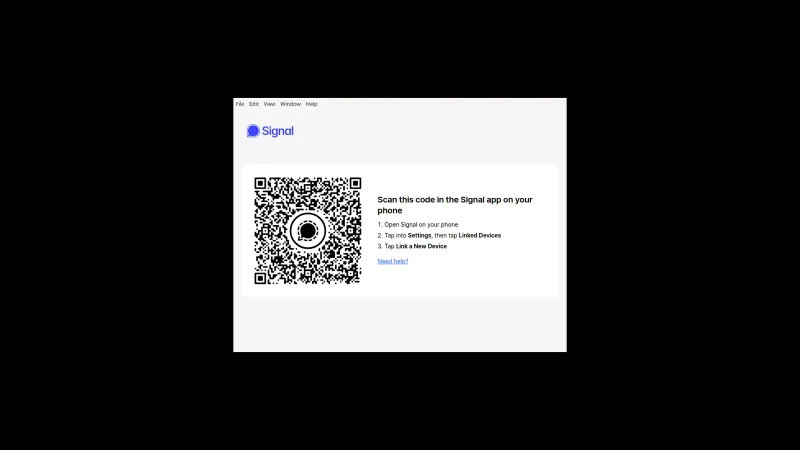
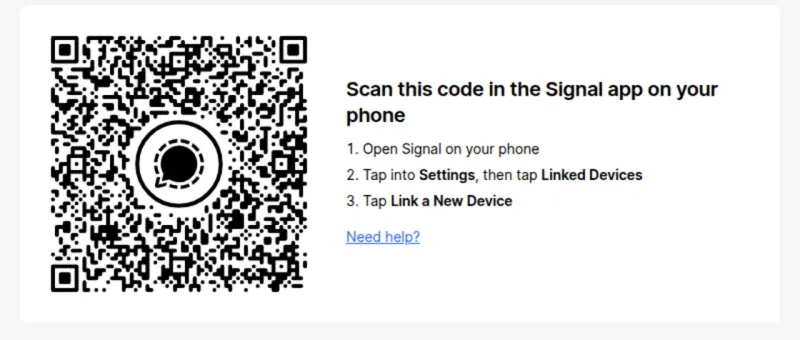
Linking is done by QR code. You open Signal on the phone, go to Linked Devices, and scan the code the desktop app shows. From that moment, messages sync between devices, so a conversation started on the phone can continue on the PC, including groups, attachments, stickers, voice notes and file sharing. Disappearing messages work on desktop as they do on mobile.
One consequence surprises many new users: your existing phone chat history is not transferred. A newly linked desktop starts empty and only stores messages sent and received after linking, while the full history stays on the phone. Linked devices can then send and receive independently, so the phone does not need to stay online, but the phone account must remain registered and active. Signal Desktop runs on Windows 10 and 11, 64-bit only, and is run by the non-profit Signal Foundation.
Who Signal Desktop is for, and who it will frustrate
Signal Desktop is for people whose private conversations already live on Signal and who spend long stretches at a desk. If you type a lot, share files from your computer, or take calls while working, a proper keyboard and a big screen make a real difference, and the clean interface with screen lock suits long working days. It also fits anyone who specifically values Signal's model: end-to-end encryption by default, no ads, no advertising trackers, open-source apps, and a non-profit foundation funded by donations rather than a data business.
It is not for anyone without a phone in the picture. If you want to register an account on a PC alone, Signal Desktop cannot do it at all. If you expect a Telegram-style independent desktop account that signs in by itself and pulls down your full history, you will be frustrated: the desktop starts empty, by design, and stays tied to the phone account.
It is also a poor fit if your phone situation is unstable. Losing access to the phone account or changing numbers carelessly can break the linked desktop's connection and force a fresh setup. And if most of your contacts are not on Signal, the desktop app solves nothing, because it is a companion to that specific network, not a bridge to other messengers. Judge it as a desk extension for existing Signal users, and it makes complete sense.
A real Signal Desktop session: a working day at a desk, phone in a drawer
An office worker who already uses Signal on her phone installs Signal Desktop 8.32.0 on her Windows 11 PC at the start of the day. She opens Linked Devices in the phone app, scans the QR code on the desktop screen, and the desktop opens empty, exactly as expected, because her old phone history is not copied across. Within minutes the first new messages arrive on both devices at once.
Through the day she answers a family group chat on the full keyboard, drags a document from the PC into a conversation as an attachment, and takes a voice call at her desk without picking up the phone, which stays in a drawer. For a sensitive exchange with a colleague she sets disappearing messages, so that thread clears itself on the agreed timer on both devices. When she leaves her desk she uses screen lock rather than closing the app.
By evening, every conversation she touched that day is current on both phone and PC, and she picks the thread up on the phone on the way home without missing anything. The concrete outcome is a full working day of encrypted messaging handled on the desktop, with the phone needed only for the one-time link at the start.
Signal Desktop — End-to-End Encrypted Messaging Linked to Your Phone for Windows PC UI & Interface Screenshots
How to Install & Verify Signal Desktop — End-to-End Encrypted Messaging Linked to Your Phone for Windows PC
Download signal-desktop-win-8.32.0.exe, the installer for Signal Desktop version 8.32.0, and first make sure Signal is installed and registered on your Android phone or iPhone.
Double-click signal-desktop-win-8.32.0.exe to install Signal Desktop 8.32.0 on 64-bit Windows 10 or 11, then launch the app to display its linking QR code.
On your phone, open Signal, go to Settings and Linked Devices, tap the link option, and scan the QR code shown by the desktop app. Your desktop starts empty because phone history is not transferred.
Related Windows PC Software & Alternatives


Frequently Asked Questions & Verification Guide
Is Signal Desktop — End-to-End Encrypted Messaging Linked to Your Phone for Windows PC free and open source?
Yes. Signal Desktop — End-to-End Encrypted Messaging Linked to Your Phone for Windows PC is completely free and open-source software. You can download and use it at no cost, and its source code is publicly available.
Can I create a Signal account on Signal Desktop without a phone?
No. Signal accounts are registered through the Android or iPhone app with a phone number. Signal Desktop can only be linked to that existing account by scanning a QR code from the phone, and registration on desktop is not supported.
Why is my phone chat history missing on Signal Desktop?
Signal does not copy your existing message history to newly linked devices, by design, for security and privacy. The desktop starts empty and only stores messages sent and received after linking, while your full history stays on your phone.
How many computers can I link to one Signal account?
You can link up to five devices, such as desktops and tablets, to one phone account. Manage them in the Signal phone app under Settings and Linked Devices, where you can also unlink a computer you no longer use.
Does my phone need to stay online for Signal Desktop to work?
Not constantly. Unlike some messengers, linked Signal devices can send and receive independently once linked, so the desktop works even if your phone is temporarily off, though the phone account must remain registered and active.