
VN Video Editor v2.3.8 - Multi-Track Vlog & Timeline Maker
VN Video Editor (VlogNow) is an acclaimed, professional-grade free non-linear video editing (NLE) application developed by VN, LLC for Android smartphones...
Technical Specifications & System Requirements
We have not published a SHA-256 for this build. Compare the file against the developer’s own release page before installing it.
Software notes
Features
- Curve Speed Ramp & Variable Speed Keyframes.
- Multi-Track Audio & Video PIP Compositing optimized for Android.
- Clean interface with direct high-speed download mirrors.
Considerations
- High-resolution rendering requires modern multicore processor hardware.
VN Video Editor for Android — Official Professional Multi-Track NLE Video Studio APK
VN Video Editor (VlogNow) is an acclaimed, professional-grade free non-linear video editing (NLE) application developed by VN, LLC for Android smartphones, tablets, and desktop workstations. Celebrated globally by vloggers, travel videographers, mobile filmmakers, and commercial editors as the definitive free alternative to Premiere Pro on mobile, VN provides a desktop-class multi-track timeline, zero forced watermarks, 6-point curve speed ramping, custom 3D LUT (.cube) color grading, keyframe spline animations, and lossless 4K 60FPS video rendering at up to 100 Mbps bitrates with zero subscription requirements.
---
🌟 Core Architecture & Engineering Highlights
VN Video Editor is built on a high-efficiency mobile NLE architecture optimized for precision timeline editing and zero-latency hardware playback.
Desktop-Class Multi-Track NLE Timeline Workspace
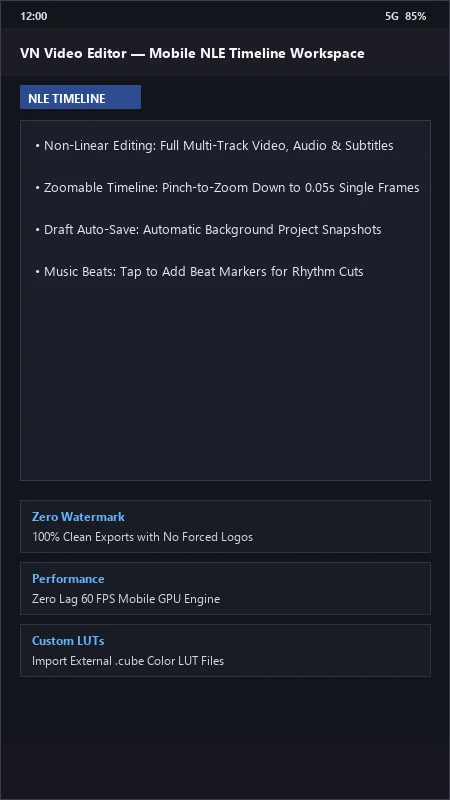
VN features an intuitive, multi-track timeline layout supporting stacked video, audio, picture-in-picture (PIP), sound effects, and subtitle tracks. The interactive timeline supports pinch-to-zoom gestures down to individual 0.05-second frames, allowing editors to execute microsecond-precise jump cuts and seamless rhythmic transitions with zero timeline lag.
6-Point Curve Speed Ramping & Bezier Acceleration
VN's signature Curve Speed Ramping tool offers unprecedented velocity control. Creators can choose from cinematic speed presets (Montage, Hero Time, Bullet Time, Jump Cut) or manually manipulate six independent Bezier curve control points from 0.125x to 8.0x speed, featuring automatic audio pitch stabilization during speed transitions.
Professional 3D LUT Color Ingestion & HSL Color Wheels
Unlike standard editors with locked filter presets, VN Video Editor natively supports importing custom 3D LUT (.cube) files directly from your phone's storage. It features full manual color grading controls, including 8-channel HSL (Hue, Saturation, Lightness) color wheels, shadow/highlight curves, exposure, temperature, vibrance, and film vignette tuning.
---
⚙️ Key Capabilities & Workflow Features
VN Video Editor delivers an exhaustive set of production tools for mobile content creators.
1. 100% Watermark-Free Export Architecture
VN Video Editor is committed to creative freedom: there are zero mandatory watermarks or forced logo bugs inserted into exported videos on the free version. Creators simply delete the optional ending title card with a single tap.
2. Keyframe Spline Animation & Picture-in-Picture
Animate overlay videos, stickers, logos, and custom text with sub-pixel Keyframe Animation. Apply position coordinates, scale factors, rotation angles, and opacity transitions with customizable spline easing curves.
3. Integrated Music Beat Detection & Rhythm Sync
Import audio from your local library, extract audio from videos, or record live voiceovers. VN automatically analyzes audio waveforms to place visible Beat Markers on the timeline, making it effortless to cut footage perfectly on the beat.
4. Advanced Subtitle Styling & SRT File Import
Create professional open captions with full font formatting, text animations, and color styling. VN natively imports external subtitle files (.srt), automatically aligning translated subtitles to your project timeline in seconds.
---
📊 Comprehensive Head-to-Head Comparison Matrix
| Evaluation Dimension | VN Video Editor (FileCobra) | CapCut | KineMaster |
|---|---|---|---|
| Watermark on Free Version | Zero Watermark (100% Clean) | Removable Ending | Forced Watermark (Free) |
| Custom LUT Import (.cube) | Yes (Direct File Import) | No | No |
| Speed Curve Flexibility | 6-Point Smooth Bezier Curves | Preset Curves | Standard Speed Slider |
| Cross-Platform Project Sync | Mobile & Desktop (.vlog) | Cloud Sync (Paid) | .kine Project Export |
| External SRT Subtitle Import | Native .srt File Import | Auto Captions Only | Manual Text Entry |
| Commercial License Feasibility | 100% Free for Commercial Work | Free Tier with ToS Limits | Subscription Required |
---
📋 Technical Hardware & System Requirements
VN Video Editor runs with exceptional efficiency across all modern Android smartphones and tablets:
| Hardware Component | Minimum System Requirement | Recommended Performance Spec |
|---|---|---|
| Operating System | Android 7.0 (Nougat) or higher | Android 12 / 13 / 14 / 15 |
| Processor (CPU) | 64-bit Octa-Core Processor | Modern Snapdragon 7/8 Series / Dimensity 8000+ |
| System Memory (RAM) | 3 GB RAM | 6 GB - 12 GB RAM (for High-Bitrate 4K Projects) |
| Storage Space | 200 MB for app + Video Storage | High-Speed UFS 3.1 / 4.0 Internal Storage |
| Display Resolution | 1080 × 1920 pixels or higher | 1080p FHD+ or 2K Widescreen Tablet Display |
---
🛠️ Step-by-Step Installation & Quick Setup Guide
Follow this guide to install and edit professional videos using VN Video Editor on Android:
1. Downloading and Installing VN Video Editor
- Download the official verified VN APK package (
vn-video-editor-v2.x.x.apk) from FileCobra. - Tap the file to install and open VN Video Editor.
2. Creating a New Project & Importing Media
- Tap the '+' (Plus) icon at the bottom and select New Project.
- Select your video clips and photos from your gallery, then tap the blue arrow to load them into the multi-track timeline.
3. Applying Speed Curves, Color LUTs & Exporting
- Select any clip, tap Speed, select Curve, and adjust the Bezier control knobs for dynamic speed ramping.
- Tap Filter > Add LUT to import your favorite
.cubecolor presets. - Tap Export in the top right, customize your resolution (up to 4K), frame rate (60 FPS), and average bitrate (up to 100 Mbps), then tap the checkmark to render!
---
🔒 Security, Privacy & Platform Integrity Analysis
VN Video Editor guarantees total creator privacy and software safety:
- 100% Local On-Device Processing: All video cutting, LUT color grading, and 4K exporting occur strictly locally on your phone; no footage is uploaded to third-party cloud servers.
---
❓ Frequently Asked Questions (FAQ)
Does VN Video Editor put a watermark on exported videos?
No! VN Video Editor does not place any mandatory watermarks on your exported videos. To remove the short default ending clip, simply scroll to the end of the timeline, tap the ending card, and tap "Delete".
Can I import my own 3D LUT (.cube) color grading files into VN?
Yes! In the Filter menu, tap the "+" icon (or "Add LUT") and select any standard .cube color lookup table file from your phone's storage or Google Drive to apply professional cinematic color grading.
Can I share VN projects between Android and PC?
Yes! VN supports exporting projects as .vlog project archive packages, which can be transferred and opened directly in VN Video Editor for Windows or macOS for seamless cross-platform editing.
VN Video Editor UI & Interface Screenshots
How to Install & Verify VN Video Editor
Download the official verified XAPK file directly to your device.
Enable "Install Unknown Apps" in your Android Settings if prompted.
Tap the downloaded XAPK notification to complete installation.
VN Video Editor Version History & Build Numbers
Every VN Video Editor build FileCobra has mirrored, newest first. Match the build number against the copy you already have to confirm whether you are up to date.
- Added custom LUT filter color grading file import
- Fixed freeze frame duration
- Enhanced music beat marker automatic waveform detector
- Faster 4K export speed
- Added subtitle SRT and auto-caption import
- Dark theme UI improvements
- Milestone stable release with full watermark-free video editor engine
Frequently Asked Questions & Verification Guide
Is VN Video Editor free?
Yes. VN Video Editor is freeware, so it is free to download and use at no cost. It is proprietary software from VN Video Editor (Official) rather than open source, so its source code is not publicly available.
Does VN Video Editor put a watermark on exported videos?
No! VN Video Editor does not place any mandatory watermarks on your exported videos. To remove the short default ending clip, simply scroll to the end of the timeline, tap the ending card, and tap 'Delete'.
Can I import my own 3D LUT (.cube) color grading files into VN?
Yes! In the Filter menu, tap the '+' icon (or 'Add LUT') and select any standard .cube color lookup table file from your phone's storage or Google Drive to apply professional cinematic color grading.
Can I share VN projects between Android and PC?
Yes! VN supports exporting projects as .vlog project archive packages, which can be transferred and opened directly in VN Video Editor for Windows or macOS for seamless cross-platform editing.