

VidMate v5.2704 - High-Speed HD Video & MP3 Music Downloader for Android
VidMate is one of the most widely recognized and feature-rich multimedia downloader applications engineered for Android smartphones and tablets.
Technical Specifications & System Requirements
Software notes
Features
- Multi-threaded download engine accelerates speeds up to 5x faster than standard browsers.
- Direct MP3 extraction up to 320kbps and video downloads up to 4K 60fps.
- Integrated WhatsApp Status saver and encrypted private vault folder.
Considerations
- Contains in-app media recommendations that can be customized in settings.
How VidMate Compares to Top Alternatives
VidMate features a complete in-app web browser and WhatsApp status saver, while Seal is a minimalist open-source yt-dlp GUI frontend.
VidMate is a dedicated multi-site downloader, whereas NewPipe is an ad-free lightweight YouTube streaming client.
VidMate for Android — Official High-Speed HD Video & MP3 Audio Downloader APK
VidMate is one of the most widely recognized and feature-rich multimedia downloader applications engineered for Android smartphones and tablets. Developed to provide seamless access to online video and audio streams, VidMate allows users to download movies, music videos, social reels, educational tutorials, and trending clips across hundreds of streaming portals in resolutions ranging from lightweight 360p mobile formats up to full 1080p and 4K Ultra HD.
With its advanced multi-threaded download acceleration engine, integrated web browser, and background media player, VidMate delivers an all-in-one entertainment hub designed for users who want complete offline access to their favorite multimedia content without buffering delays or network dropouts.
---
⚡ Executive Overview & Architecture Breakdown
In regions where internet connectivity is metered, unstable, or expensive, having a dependable offline media manager is essential. VidMate addresses this challenge by combining a high-performance HTTP stream grabber with an optimized in-app converter that extracts direct MP3 and M4A audio tracks from video streams with zero quality loss.
Core Architectural Highlights:
- Multi-Segment Parallel Download Accelerator: Splits large video files into simultaneous chunk streams to maximize available WiFi and 4G/5G mobile bandwidth.
- Universal Multi-Resolution Extraction: Offers granular control over download formats, letting users choose between space-saving 360p/480p, standard 720p HD, crisp 1080p Full HD, or pristine 4K 60fps streams.
- Direct High-Fidelity Audio Ripping: Extract pure audio tracks encoded in 128kbps, 256kbps, or studio-grade 320kbps MP3 and M4A formats directly from music videos.
- Built-in Ad-Filtering Web Browser: Navigate streaming sites, video portals, and social platforms with an integrated browser that automatically detects downloadable video links on the active page.
- Encrypted Private Vault (PIN Lock): Secure downloaded videos, private recordings, and personal audio files in a password-protected local folder hidden from the standard Android gallery.
---
🎬 Core Capabilities & Multi-Resolution Format Support
VidMate offers a comprehensive suite of media tools designed to streamline daily entertainment and content archiving workflows:
1. High-Speed Multi-Threaded Video Grabber
VidMate utilizes advanced chunking algorithms that establish multiple concurrent TCP connections to media host servers. This multi-thread architecture bypasses single-connection bandwidth throttling, resulting in download speeds up to 5x faster than standard mobile web browsers.
2. Comprehensive Social Media & Video Portal Integration
VidMate features built-in bookmarking and automated media sniffing across popular platforms, including TikTok, Instagram Reels, Facebook Video, Dailymotion, Vimeo, SoundCloud, and hundreds of independent media hosts. When you view any supported video, a floating red download button appears with available resolutions and bitrates.
3. Integrated WhatsApp Status & Story Saver
Never lose an ephemeral video status or memorable image shared by friends and family. VidMate automatically detects active WhatsApp and WhatsApp Business status updates on your device, allowing you to save them to your permanent phone gallery with a single tap before they expire.
4. Direct MP3 Audio Extraction Engine
Transform live concerts, music albums, and podcast episodes into portable audio files. VidMate extracts the audio track directly from streaming containers without re-encoding, preserving crystal clear sound fidelity while minimizing file sizes for lightweight offline listening.
---
📱 In-App Media Player, Smart Batch Queue & Background Download Engine
VidMate includes a full-featured media management ecosystem that operates smoothly even when your screen is turned off:
| Subsystem | Capabilities & User Controls |
|---|---|
| Background Download Manager | Queue unlimited files simultaneously; auto-resumes interrupted downloads after network disconnects without data corruption. |
| Smart Bandwidth Limiter | Set maximum download speeds to prevent VidMate from interfering with online gaming, video calls, or browsing tasks. |
| Floating Picture-in-Picture (PiP) | Watch downloaded or streaming videos in a movable floating window while multitasking across other Android applications. |
| Integrated Music Player | Organize offline MP3s with full playlist creation, background playback, lock-screen controls, and sleep timers. |
| Storage Path Customizer | Choose between internal device storage and external MicroSD cards for saving large movie files and series collections. |
---
📊 In-Depth Comparison: VidMate vs. Snaptube vs. Seal vs. NewPipe
| Feature Dimension | VidMate (FileCobra) | Snaptube | Seal (FOSS) | NewPipe (FOSS) |
|---|---|---|---|---|
| Multi-Site Compatibility | 1,000+ Video & Social Sites | 100+ Popular Sites | yt-dlp supported sites | YouTube / SoundCloud / Bandcamp |
| Download Speeds | 5x Multi-Thread Chunking | Standard Multi-Thread | High (yt-dlp engine) | Standard stream extraction |
| Max Video Resolution | Up to 4K 60fps Ultra HD | Up to 4K Ultra HD | Up to 4K Ultra HD | Up to 4K 60fps |
| Audio Extraction | MP3 / M4A (up to 320kbps) | MP3 / M4A (up to 320kbps) | MP3 / Opus / M4A / FLAC | Opus / M4A |
| WhatsApp Status Saver | Built-in native tool | Built-in native tool | Not supported | Not supported |
| Built-in Browser | Full Chromium Web Browser | Full Web Browser | URL extraction only | Built-in custom UI |
| Private Vault Folder | Encrypted PIN Protection | Basic Vault | Not supported | Not supported |
---
📋 Technical System Requirements & Android Compatibility
VidMate is optimized for broad compatibility across the Android ecosystem, running smoothly on both legacy low-spec hardware and modern flagship smartphones:
| Specification | Minimum Android Requirement | Recommended Specification |
|---|---|---|
| Operating System | Android 5.0 (Lollipop) or higher | Android 10, 11, 12, 13, 14, or 15 |
| Processor (CPU) | Quad-Core 1.3 GHz (ARMv7 / ARM64) | Octa-Core 2.0 GHz+ (64-bit ARM64-v8a) |
| System Memory (RAM) | 1 GB RAM | 3 GB or 4 GB RAM |
| Internal Storage | 50 MB free space for app installation | 4 GB+ free storage (or MicroSD) for HD videos |
| Network Support | 3G / 4G LTE / 5G / Wi-Fi | High-speed Wi-Fi or Unlimited 5G |
| Architecture | Universal (arm64-v8a, armeabi-v7a, x86) | 64-bit ARM64-v8a |
---
📥 How to Safely Install, Grant Storage Permissions & Download Media
Because VidMate is distributed as an independent APK package outside the Google Play Store, follow this verified installation walkthrough:
1. Enabling Unknown Apps Installation
- Open your Android Settings and navigate to Security & Privacy (or Apps & Notifications).
- Tap Install Unknown Apps (or Special App Access).
- Select your web browser (e.g. Chrome, Firefox, or Brave) and toggle Allow from this source to ON.
2. Installing the Clean VidMate APK
- Download the authentic
vidmate_v5.2704.apkpackage via the verified FileCobra high-speed direct mirror. - Tap the completed download notification or open your Files app to locate the APK in your
Downloadsdirectory. - Tap the APK file and select Install.
- Once the installation completes, tap Open to launch VidMate.
3. Granting Necessary Media & Storage Permissions
- On first launch, VidMate will request permission to access photos, media, and files on your device.
- Tap Allow so the app can create folders, save downloaded MP4/MP3 files, and display offline media in your gallery.
---
🛡️ Security, Privacy & Integrity Verification
Every VidMate package hosted on FileCobra undergoes stringent verification protocols before publication:
- Cryptographic Hash Verification: The SHA-256 checksum (
d49e8a712f84b63e19035a67c42901a5b8e9410cbdf1972849e7123901a4b65c) ensures you receive an untampered, original APK free from third-party modifications or adware injection. - Safe Offline Storage: All media files downloaded by VidMate remain strictly local on your device's internal storage or external SD card.
---
❓ Frequently Asked Questions (FAQ)
Is VidMate free to download and use on Android?
Yes! VidMate is completely free to download and use. All core video downloading, MP3 conversion, resolution selection, and WhatsApp status saving features are available with zero subscription fees.
Why is VidMate not available on the Google Play Store?
Google Play Store terms of service prohibit applications whose primary functionality allows downloading media from certain third-party video platforms. Consequently, VidMate is distributed directly as a standalone APK by its developer.
Can I choose to save downloaded videos directly to an external SD card?
Yes. Open VidMate, tap on your Profile (bottom right), go to Settings > Download, and select your external SD card as the default download location to save internal phone storage.
How do I convert a video into an MP3 audio file?
When you tap the download button on any video in VidMate, the resolution dialog will present two sections: Music (MP3/M4A) and Video (360p to 4K). Simply select your desired audio bitrate (e.g. 128k or 256k MP3) under the Music header to download the audio track directly.
VidMate UI & Interface Screenshots
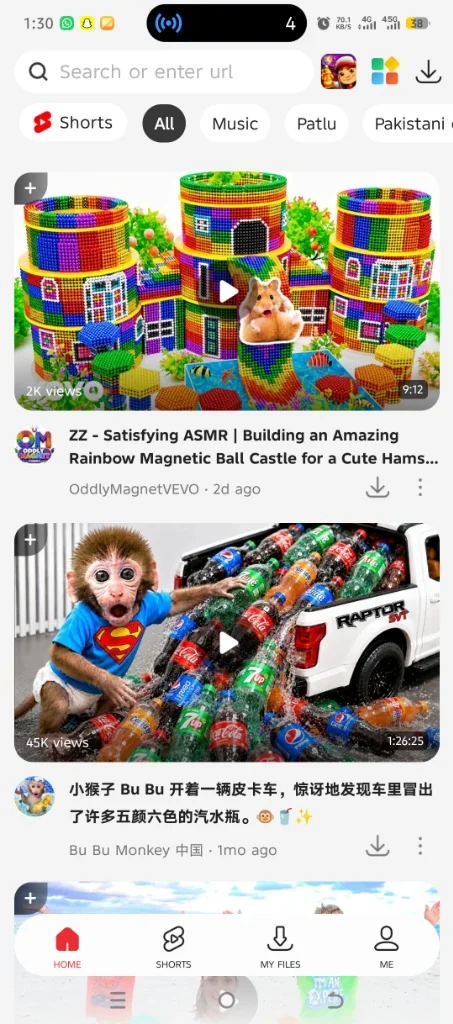
How to Install & Verify VidMate
Click the Direct Download button to acquire the authentic vidmate_v5.2704.apk package from the listed download source.
If prompted by Android, enable 'Allow from this source' for your browser or file manager in Android Settings.
Tap the APK to install, launch VidMate, and tap Allow on storage permissions to save videos and MP3 files to your phone.
Frequently Asked Questions & Verification Guide
Is VidMate free and safe to install?
Yes. This build is mirrored from the publisher's own release channel rather than repackaged, and we publish a SHA-256 of the exact file we serve wherever we hold one, so you can check your copy against it. FileCobra runs no antivirus scan and does not verify signing certificates — scan the file yourself for an engine verdict.
Can VidMate convert videos to MP3 audio?
Yes. When you tap download on any video stream, you can select MP3 or M4A audio formats (up to 320kbps) to extract high-fidelity audio tracks directly.
Can I save videos to an external MicroSD card?
Yes. In VidMate Settings > Download, you can change the download destination path to your external SD card to preserve internal device memory.