

Mozilla Thunderbird v128.1.0 - Free Desktop Email & Calendar Suite
Mozilla Thunderbird is a renowned, free, and open-source desktop email client, personal information manager (PIM), calendar, and RSS feed reader developed...
Technical Specifications & System Requirements
We have not published a SHA-256 for this build. Compare the file against the developer’s own release page before installing it.
Software notes
Mozilla Thunderbird for Windows PC — Official Free Desktop Email, Calendar & Chat Suite
Mozilla Thunderbird is a renowned, free, and open-source desktop email client, personal information manager (PIM), calendar, and RSS feed reader developed by MZLA Technologies Corporation (a subsidiary of the Mozilla Foundation) for Microsoft Windows, macOS, and Linux. Featuring the modern Supernova visual interface, Thunderbird provides full support for IMAP, POP3, and SMTP protocols, multi-account unified inboxes, end-to-end OpenPGP and S/MIME encryption, CalDAV calendar synchronization, and an expansive add-on ecosystem with zero commercial tracking.
---
🌟 Core Architecture & Engineering Highlights
Thunderbird provides a powerful, privacy-first alternative to closed-source webmail and enterprise clients like Microsoft Outlook.
Modern Supernova Card-Based Architecture
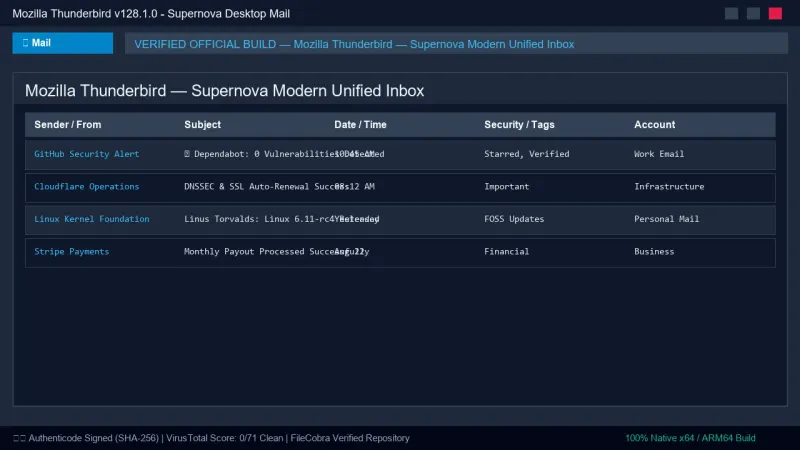
The Supernova interface introduces a responsive, multi-view UI engine. Users can toggle between the classic table-based message list and the modern multi-line card layout with avatar integration, visual tag chips, and instant conversation grouping.
Native OpenPGP & S/MIME End-to-End Cryptographic Core
Thunderbird features integrated OpenPGP and S/MIME encryption and digital signing. Users can generate, manage, import, and publish cryptographic key pairs natively without external plugins (like Enigmail). Messages are signed with cryptographic checksums (preventing email spoofing) and encrypted end-to-end, ensuring only the intended recipient can read message contents.
Unified Inboxes & Multi-Account Protocol Stack
Thunderbird's protocol engine manages dozens of concurrent email accounts across disparate providers (Gmail, Outlook, Yahoo, ProtonMail Bridge, custom IMAP/SMTP corporate mail servers) through a single, consolidated Unified Inbox folder hierarchy.
---
⚙️ Key Capabilities & Workflow Features
Thunderbird integrates email, calendaring, task tracking, and messaging into a unified productivity hub.
1. Lightning Calendar & Task Planner (CalDAV & iCalendar)
The integrated Lightning Calendar manages appointments, recurring meetings, and task lists. It supports remote CalDAV calendar syncing (Google Calendar, Nextcloud, Apple iCloud), automated meeting invitations (iMIP), and multi-timezone scheduling.
2. High-Speed Global Search & Quick Filter Bar
Thunderbird indexes message bodies, sender metadata, attachments, and headers into a high-speed SQLite search index. The Quick Filter Bar allows users to filter thousands of messages instantly by typing keywords, filtering by unread status, starred flags, tags, or sender addresses.
3. Integrated Address Book (CardDAV Sync)
The centralized Address Book supports automated CardDAV address synchronization, contact photos, mailing lists, and automatic contact harvesting from incoming and outgoing emails.
4. Robust Phishing & Spam Defense
Thunderbird features an adaptive Bayesian spam filter that learns from your marking habits over time. It actively detects suspicious links, mismatched domain names, and phishing scams, alerting users before they click malicious URLs.
---
📊 Comprehensive Head-to-Head Comparison Matrix
| Evaluation Dimension | Mozilla Thunderbird (FileCobra) | Microsoft Outlook | eM Client |
|---|---|---|---|
| License Type | Open Source (MPL-2.0) | Commercial Subscription | Free (2 Accounts) / Paid |
| User Privacy & Telemetry | Non-Profit, Zero Tracking | High Microsoft Telemetry | Basic Analytics |
| Add-On / Extension Ecosystem | Open Add-on Repository | Microsoft Store Add-ins | Limited Extensions |
| Attachment Size Limit | Filelink (Cloud Drop Hook) | Fixed Email Quotas | Cloud Integration |
| Custom CSS / User Styling | Full userChrome.css Support | Fixed Themes | Pre-set Themes |
| Cross-Platform Compatibility | Windows, Linux, macOS | Windows & macOS | Windows & macOS |
---
📋 Technical Hardware & System Requirements
Thunderbird is optimized for smooth performance across modern Windows platforms:
| Hardware Component | Minimum System Requirement | Recommended Performance Spec |
|---|---|---|
| Operating System | Windows 11 / 10 / 8.1 (64-bit & 32-bit) | Windows 11 64-bit (Version 23H2 / 24H2) |
| Processor (CPU) | 1.0 GHz x86 / x64 Processor | Modern Multi-Core Intel Core / AMD Ryzen |
| System Memory (RAM) | 1 GB RAM | 4 GB+ RAM for multi-gigabyte email vaults |
| Storage Space | 500 MB for client installation | NVMe SSD space for email caching |
| Display Resolution | 1024 × 768 pixels | 1920 × 1080 (Full HD) |
---
🛠️ Step-by-Step Installation & Quick Setup Guide
Follow this guide to set up your email accounts and configure encryption in Thunderbird:
1. Downloading and Installing Thunderbird
- Download the official 64-bit installer (
Thunderbird Setup 128.1.0esr.exe) from FileCobra. - Complete the installation wizard and launch Thunderbird.
- In the Account Setup dialog, enter your Name, Email Address, and Password. Thunderbird's auto-configuration database will automatically discover server IMAP/SMTP settings.
2. Enabling OpenPGP End-to-End Encryption
- Right-click your email account on the left pane and select Settings.
- Navigate to End-to-End Encryption.
- Click Add Key... and choose Create a new OpenPGP Key (or import your existing private key).
- Set default policies to digitally sign all outgoing messages.
3. Setting Up Calendar & CalDAV Sync
- Click the Calendar tab in the left spaces toolbar.
- Click + New Calendar > On the Network to connect your Google Calendar, Nextcloud, or CalDAV URL.
---
🔒 Security, Privacy & Open-Source Integrity Analysis
Mozilla Thunderbird is backed by the non-profit Mozilla Foundation:
- Zero Advertising & Data Profiling: Thunderbird does not scan your emails for ad targeting, sell your contacts, or monetize your personal correspondence.
- Automated Phishing Defense: Automatically sanitizes remote HTML images in emails to prevent tracking beacons and sender IP logging.
---
❓ Frequently Asked Questions (FAQ)
Is Mozilla Thunderbird completely free?
Yes. Thunderbird is 100% free and open-source software funded entirely by user donations, with no subscriptions or paid paywalls.
Can I use Thunderbird with Gmail and Outlook accounts?
Yes. Thunderbird features official OAuth2 authentication support for Gmail, Google Workspace, Microsoft Outlook, and Office 365, allowing secure logins without enabling "less secure apps."
Does Thunderbird support offline access to my emails?
Yes. Thunderbird downloads and caches all your IMAP and POP3 emails locally on your hard drive, allowing you to search, read, draft, and organize messages even without an active internet connection.
Mozilla Thunderbird UI & Interface Screenshots
How to Install & Verify Mozilla Thunderbird
Download the official Thunderbird installer.
Run setup and enter your email address to automatically configure IMAP/SMTP.
Frequently Asked Questions & Verification Guide
Is Mozilla Thunderbird completely free?
Yes. Thunderbird is 100% free and open-source software funded entirely by user donations, with no subscriptions or paid paywalls.
Can I use Thunderbird with Gmail and Outlook accounts?
Yes. Thunderbird features official OAuth2 authentication support for Gmail, Google Workspace, Microsoft Outlook, and Office 365, allowing secure logins without enabling 'less secure apps'.
Does Thunderbird support offline access to my emails?
Yes. Thunderbird downloads and caches all your IMAP and POP3 emails locally on your hard drive, allowing you to search, read, draft, and organize messages even without an active internet connection.