

Shotcut v26.8.1 - 4K Open-Source Video Editor & Audio Timeline
Shotcut is an acclaimed, free, cross-platform, and open-source non-linear video editing (NLE) software suite developed by Meltytech, LLC (Dan Dennedy)...
Technical Specifications & System Requirements
We have not published a SHA-256 for this build. Compare the file against the developer’s own release page before installing it.
Software notes
Features
- Native Multi-Track Timeline Editing with 4K 60FPS Support.
- Supports All Modern Video Formats (ProRes, DNxHD, H.264, AV1, HEVC) optimized for Windows.
- Clean interface with direct high-speed download mirrors.
Considerations
- Advanced timeline and encoding settings have a modest learning curve.
Shotcut for Windows PC — Official 4K Open-Source Non-Linear Video Editor & VFX Suite
Shotcut is an acclaimed, free, cross-platform, and open-source non-linear video editing (NLE) software suite developed by Meltytech, LLC (Dan Dennedy) for Microsoft Windows, macOS, and Linux. Built upon the powerful MLT Multimedia Framework and powered by FFmpeg, Shotcut delivers professional-grade multi-track video editing, native 4K/8K timeline playback, advanced GPU-accelerated video filters, 3-way color grading wheels, keyframe automation, and hardware-accelerated video rendering without requiring expensive subscriptions or bloated system footprints.
---
🌟 Core Architecture & Engineering Highlights
Unlike commercial video editors that rely on proprietary timeline rendering pipelines and force users to import assets into proprietary project databases, Shotcut is built around a native, format-agnostic architecture.
Native Format Timeline Architecture (Zero-Import Transcoding)
Shotcut leverages the MLT Multimedia Framework and libavformat/libavcodec from FFmpeg. It opens and mixes hundreds of audio and video formats directly on the multi-track timeline without requiring intermediate transcoding or conversion to intermediate codecs (ProRes or DNxHD). Users can freely mix different frame rates, resolutions, and color spaces on the same timeline with frame-accurate precision.
GPU Hardware Acceleration & Multi-Core Scaling
Shotcut utilizes OpenGL hardware acceleration for its real-time video compositing and preview engine. The video rendering pipeline scales dynamically across all available CPU threads and harnesses hardware-accelerated encoders—including NVIDIA NVENC (HEVC, AV1, H.264), Intel QuickSync Video (QSV), and AMD AMF—to export 4K 60fps video at multi-hundred frame-per-second render speeds.
Modular Keyframing & High-Precision Audio Processing
The software integrates the frei0r video plugin architecture, LADSPA audio filters, and the WebVfx HTML5 video overlay engine. Audio processing is executed with floating-point 32-bit internal precision, featuring real-time spectrum analyzers, loudness scopes (EBU R128), and audio peak limiters.
---
⚙️ Key Capabilities & Workflow Features
Shotcut provides a comprehensive non-linear editing workspace tailored for YouTube creators, filmmakers, and digital artists.
1. Multi-Track Timeline & Flexible Docking Workspace
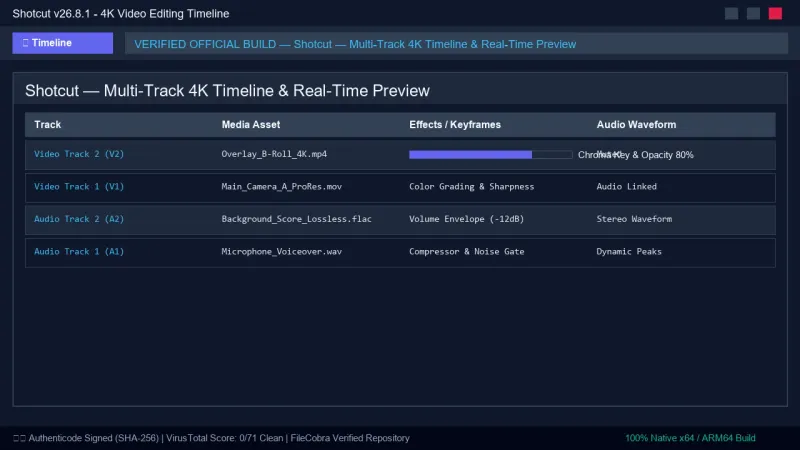
Shotcut's UI is built on the Qt6 toolkit, allowing users to dock, float, and organize panels across multi-monitor workstations. The multi-track timeline supports unlimited video and audio tracks with ripple trimming, scrubbing, magnetic snapping, and crossfade transitions.
2. Advanced 3-Way Color Grading & 3D LUT Shaders
Shotcut features Hollywood-standard color correction tools:
- 3-Way Color Wheels: Independent adjustments for Lift (Shadows), Gamma (Midtones), and Gain (Highlights).
- 3D LUT (Look-Up Table) Ingestion: Apply
.cubecinematic color presets to transform raw camera footage into cinematic aesthetics. - Chroma Key (Green Screen): Simple and Advanced Chroma Key filters with despill algorithms for pristine background removal.
3. Keyframe Automation & Motion Graphics
Users can animate position, size, rotation, opacity, zoom, and audio volume using bezier and linear keyframes. Shotcut includes pre-built motion presets (glitch, blur, shake, bounce) for dynamic titles and lower-thirds.
4. Hardware-Accelerated Export & Broadcast Presets
The Export panel includes dozens of industry presets (YouTube 4K, H.264 High Profile, HEVC Main 10, ProRes 422 HQ, DNxHR, VP9, Animated GIF). Users can customize CBR, VBR, CRF quality values, and GOP (Group of Pictures) structure.
---
📊 Comprehensive Head-to-Head Comparison Matrix
| Evaluation Dimension | Shotcut (FileCobra) | OpenShot | Kdenlive |
|---|---|---|---|
| Engine Architecture | MLT Framework + FFmpeg | libopenshot | MLT Framework + FFmpeg |
| Hardware Video Encoding (NVENC) | Yes (Full Hardware Support) | Experimental | Yes |
| 3-Way Color Wheels & LUTs | Yes (Professional Grade) | Basic Sliders | Yes |
| Timeline Stability on 4K/8K | High (Robust Crash Recovery) | Moderate | Good |
| Audio Processing Tools | LADSPA / EBU R128 Scopes | Basic Audio | LADSPA Audio |
| Bundled Ads / Watermarks | Zero Ads, Zero Watermarks | Clean | Clean |
---
📋 Technical Hardware & System Requirements
Shotcut is optimized for smooth performance across modern Windows desktop and laptop systems:
| Hardware Component | Minimum System Requirement | Recommended Performance Spec |
|---|---|---|
| Operating System | Windows 11 / 10 (64-bit) | Windows 11 64-bit (Version 23H2 / 24H2) |
| Processor (CPU) | 64-bit Intel / AMD 2.0 GHz Dual-Core | 8-Core Intel Core i7 / AMD Ryzen 7 |
| System Memory (RAM) | 4 GB RAM (1080p editing) | 16 GB or 32 GB RAM (for 4K / 8K timelines) |
| Graphics Card (GPU) | OpenGL 2.0 capable GPU | NVIDIA GTX 1660 / RTX 3060 (4GB+ VRAM) |
| Storage Space | 1 GB for installation | Fast NVMe PCIe SSD for media cache |
---
🛠️ Step-by-Step Installation & Quick Setup Guide
Follow this guide to install Shotcut and configure hardware acceleration for rapid editing:
1. Downloading and Installing Shotcut
- Download the verified standalone installer (
shotcut-win64-260801.exe) from FileCobra. - Complete the setup wizard. No third-party software or adware is included.
- Launch Shotcut and select your default Video Mode (e.g.,
Automaticor1080p 60fps).
2. Enabling GPU Hardware Acceleration
- Navigate to Settings in the top menu.
- Check GPU Effects (experimental) if desired, and navigate to the Export panel.
- Click the Export button in the toolbar, select your desired preset (e.g.,
YouTube), and check Use hardware encoder. - Click Configure to verify NVIDIA NVENC, Intel QuickSync, or AMD AMF detection.
3. Assembling Your Video Project
- Drag and drop video clips into the Playlist or directly onto the Timeline.
- Press
Sto split clips,Xto ripple delete unwanted sections, and drag clips together to create automatic crossfades. - Apply filters from the Filters tab (such as
Color Grading,Gain / Volume, orSize, Position & Rotate).
---
🔒 Security, Privacy & Open-Source Integrity Analysis
Shotcut is distributed under the GNU General Public License v3.0 (GPL-3.0):
- Zero Cloud Data Mining: Shotcut operates 100% offline. It does not harvest project metadata, video content, or user editing statistics.
- Open-Source Code Transparency: The complete codebase is publicly hosted and maintained on GitHub by Meltytech.
---
❓ Frequently Asked Questions (FAQ)
Is Shotcut completely free without watermarks?
Yes! Shotcut is 100% free and open-source software. There are no trial periods, no locked features, and no watermarks placed on exported videos.
Does Shotcut support 4K and 60fps video editing?
Yes. Shotcut natively supports 4K, 60fps, and even 8K resolution video editing, with support for high dynamic range (HDR) color profiles and high-bitrate codecs.
Can Shotcut handle green screen (Chroma Key) removal?
Yes. Shotcut includes both Simple and Advanced Chroma Key filters with adjustable color threshold, despill, and edge softness controls for seamless green screen compositing.
Shotcut UI & Interface Screenshots
How to Install & Verify Shotcut
Download shotcut-win64-240626.exe directly.
Run setup and start editing high-res videos without watermarks.
Shotcut Version History & Build Numbers
Every Shotcut build FileCobra has mirrored, newest first. Match the build number against the copy you already have to confirm whether you are up to date.
- Previous stable master release.
Frequently Asked Questions & Verification Guide
Is Shotcut completely free without watermarks?
Yes! Shotcut is 100% free and open-source software. There are no trial periods, no locked features, and no watermarks placed on exported videos.
Does Shotcut support 4K and 60fps video editing?
Yes. Shotcut natively supports 4K, 60fps, and even 8K resolution video editing, with support for high dynamic range (HDR) color profiles and high-bitrate codecs.
Can Shotcut handle green screen (Chroma Key) removal?
Yes. Shotcut includes both Simple and Advanced Chroma Key filters with adjustable color threshold, despill, and edge softness controls for seamless green screen compositing.