

Shizuku v13.6.0 - System ADB API Runner (Rootless)
Shizuku is the revolutionary, industry-standard free and open-source system authorization framework and inter-process communication (IPC) server developed...
Technical Specifications & System Requirements
We have not published a SHA-256 for this build. Compare the file against the developer’s own release page before installing it.
Software notes
Features
- Run Elevated ADB Commands Without a PC.
- Wireless Debugging Integration for Android 11+ optimized for Android.
Considerations
- Requires storage permissions to manage and access local file directories.
Shizuku for Android — Official Wireless ADB Permission Runner & System Manager APK
Shizuku is the revolutionary, industry-standard free and open-source system authorization framework and inter-process communication (IPC) server developed by Rikka (RikkaApps) for Android smartphones and tablets. Designed to unlock elevated Android system APIs without requiring full device rooting, Shizuku allows authorized third-party applications to perform deep system modifications—including silent app installations, freezing bloatware, managing restricted permissions, and accessing protected storage directories (Android/data and OBB)—via on-device Wireless Debugging (ADB) or root with zero commercial advertisements.
---
🌟 Core Architecture & Engineering Highlights
Shizuku fundamentally transforms Android permission management by bridging the gap between non-rooted sandboxes and elevated system commands.
Java Binder Inter-Process Communication (IPC) Server
Unlike legacy command-line tools that execute slow, resource-heavy shell processes (Runtime.getRuntime().exec("su")), Shizuku starts a native Java process with system ADB or root privileges. It acts as an ultra-fast Binder IPC Server, allowing authorized Android client apps to invoke elevated Java system APIs directly in shared memory with sub-millisecond execution speeds and zero CPU overhead.
Wireless Debugging On-Device Pairing (No PC Required)
Starting with Android 11, users can start the Shizuku server directly on their smartphone without connecting to a computer. By pairing with Android's native Wireless Debugging service using a standard 6-digit pairing code, Shizuku starts its background daemon in seconds and can be configured to auto-start automatically whenever connected to Wi-Fi.
Granular Per-App Security Authorization Prompt
Security is paramount in Shizuku's design. Third-party applications cannot access elevated ADB APIs without explicit user consent. When an app requests Shizuku access, Shizuku displays a native system prompt showing the calling app's identity, allowing users to grant or revoke ADB access on a strict per-app basis.
---
⚙️ Key Capabilities & Workflow Features
Shizuku unlocks a vast ecosystem of elevated customization and system management tools.
1. Elevated Power for Popular Apps Without Root
Supercharge your favorite productivity and utility apps: grant Shizuku access to App Manager, SD Maid SE, ZArchiver, Hail, Aurora Store, Obtainium, and Termux to unlock automated cache cleaning, background app installations, and full file manager access.
2. Unrestricted Access to Android/data and Android/obb
Bypass Android 13, 14, and 15 Scoped Storage restrictions. File managers powered by Shizuku can browse, copy, edit, and restore files inside the protected Android/data and Android/obb system directories without rooting.
3. Silent Background App Installation
Authorize app stores (such as Aurora Store, Obtainium, and F-Droid) to install, upgrade, and downgrade applications silently in the background with a single tap, eliminating annoying repetitive Android package installer confirmation dialogs.
4. Rish Elevated Terminal Shell Execution
Shizuku includes Rish (Rikka Shell), an interactive terminal utility that allows users to run elevated ADB shell commands directly inside Termux or terminal emulators on their phone without a PC.
---
📊 Comprehensive Head-to-Head Comparison Matrix
| Evaluation Dimension | Shizuku (FileCobra) | Sui (Magisk Module) | Magisk Root |
|---|---|---|---|
| Rooting Requirement | No Root (Wireless ADB) | Requires Magisk Root | Requires Unlocked Bootloader |
| Integrates with App Ecosystem | Widely Supported Standard | Identical to Shizuku | Full Superuser Shell |
| Warranty / Safety Impact | Zero Impact (No Trip Knox) | Trips Security Knox | Trips Security Knox |
| Banking App Compatibility | 100% Compatible (No Flags) | Requires Root Hiding | Requires Root Hiding |
| Material 3 Dynamic Monet | Yes (Modern Theme) | Minimalist | Minimalist |
| License Type | Apache License 2.0 (GitHub) | Apache License 2.0 | GNU GPLv3 |
---
📋 Technical Hardware & System Requirements
Shizuku is compatible with all Android smartphones, tablets, and smart TVs:
| Hardware Component | Minimum System Requirement | Recommended Performance Spec |
|---|---|---|
| Operating System | Android 6.0 (Marshmallow) via PC ADB | Android 11 / 12 / 13 / 14 / 15 (for On-Device Wireless ADB) |
| Processor (CPU) | ARMv7 / ARM64 / x86 / x86_64 Processor | Modern Quad-Core or Octa-Core Processor |
| System Memory (RAM) | 1 GB RAM | 2 GB+ RAM |
| Storage Space | 10 MB free disk space | High-Speed Internal Storage |
| Connectivity (For Pairing) | Local Wi-Fi Network or Hotspot | Active Wi-Fi Connection for Wireless Debugging |
---
🛠️ Step-by-Step Installation & Quick Setup Guide
Follow this guide to start and pair Shizuku on Android:
1. Downloading and Installing Shizuku
- Download the verified Shizuku APK package (
shizuku-adb-runner-v13.x.x.apk) from FileCobra. - Tap the file to install and open Shizuku.
2. Pairing via Wireless Debugging (Android 11+)
- Enable Developer options in your phone's system settings.
- Inside Developer options, enable Wireless debugging, tap Pair device with pairing code, and copy the 6-digit code.
- Tap the Shizuku pairing notification, enter the code, and return to Shizuku to tap Start.
3. Authorizing Applications
- In Shizuku, tap Authorized Applications and toggle ON any installed apps (such as App Manager, SD Maid SE, or ZArchiver) to grant elevated system access!
---
🔒 Security, Privacy & Open-Source Integrity Analysis
Shizuku provides the highest standard of open-source security transparency:
- 100% Free & Open Source: Licensed under Apache License 2.0 with complete public code auditability on GitHub.
- Zero Telemetry or Data Harvesting: Contains zero tracking, advertising SDKs, or background analytics.
---
❓ Frequently Asked Questions (FAQ)
Does Shizuku require root permissions to work?
No! While Shizuku can run with root, it is specifically designed to run on standard non-rooted devices using Android's native Wireless Debugging feature.
Will Shizuku void my phone's warranty or trip banking app security?
No. Because Shizuku uses standard developer ADB APIs and does not unlock your bootloader or modify system partitions, banking apps and security flags (like Samsung Knox) remain completely untripped.
How do I use Shizuku with SD Maid SE or App Manager?
Once Shizuku is running, open SD Maid SE or App Manager and select "Shizuku" when prompted for access mode to unlock automated cache clearing and advanced system tools.
Shizuku UI & Interface Screenshots
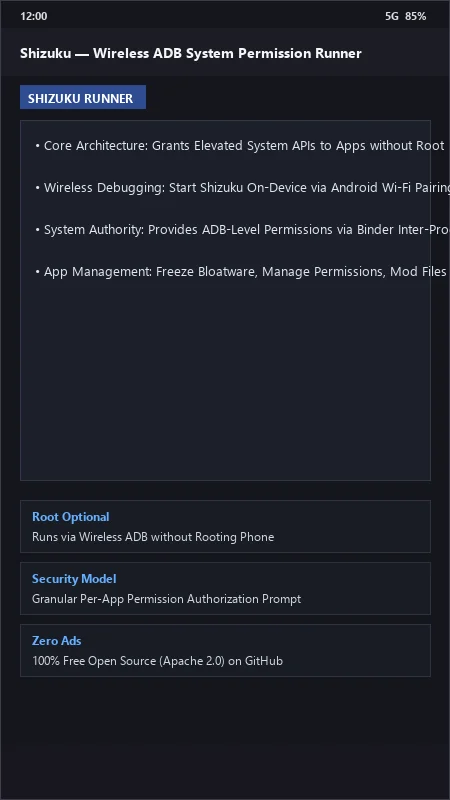
How to Install & Verify Shizuku
Download the official verified APK file directly to your device.
Enable "Install Unknown Apps" in your Android Settings if prompted.
Tap the downloaded APK notification to install and launch the app.
Shizuku Version History & Build Numbers
Every Shizuku build FileCobra has mirrored, newest first. Match the build number against the copy you already have to confirm whether you are up to date.
- Added Android 15 developer preview compatibility
- Fixed wireless pairing notification
- Enhanced multi-user work profile permission delegation
- Faster IPC binder dispatch
- Added automated Sui daemon handshake
- Dark theme UI improvements
- Milestone stable release with full privileged ADB execution API architecture
Frequently Asked Questions & Verification Guide
Is Shizuku free and open source?
Yes. Shizuku is completely free and open-source software. You can download and use it at no cost, and its source code is publicly available.
Does Shizuku require root permissions to work?
No! While Shizuku can run with root, it is specifically designed to run on standard non-rooted devices using Android's native Wireless Debugging feature.
Will Shizuku void my phone's warranty or trip banking app security?
No. Because Shizuku uses standard developer ADB APIs and does not unlock your bootloader or modify system partitions, banking apps and security flags (like Samsung Knox) remain completely untripped.
How do I use Shizuku with SD Maid SE or App Manager?
Once Shizuku is running, open SD Maid SE or App Manager and select 'Shizuku' when prompted for access mode to unlock automated cache clearing and advanced system tools.