

PCSX2 v2.6.3 - Sony PlayStation 2 (PS2) High-Definition Emulator
PCSX2 is the premier, acclaimed open-source Sony PlayStation 2 (PS2) emulator developed by the PCSX2 team for Microsoft Windows and Linux.
Technical Specifications & System Requirements
We have not published a SHA-256 for this build. Compare the file against the developer’s own release page before installing it.
Software notes
Features
- Over 99% Game Compatibility Across the Entire PS2 Library.
- Upscale Classic PS2 Graphics to 1080p, 1440p & 4K with Vulkan / D3D12 optimized for Windows.
- High-speed direct CDN mirrors with instant verification checksums.
Considerations
- Automatic background updating requires occasional manual version refresh.
PCSX2 for Windows PC — Official Open-Source Sony PlayStation 2 (PS2) Emulator
PCSX2 is the premier, acclaimed open-source Sony PlayStation 2 (PS2) emulator developed by the PCSX2 team for Microsoft Windows and Linux. Spanning over two decades of active development, PCSX2 delivers near-flawless 99%+ compatibility across more than 2,600 commercial PS2 titles. It empowers gamers to experience all-time masterpieces like Gran Turismo 4, Shadow of the Colossus, Final Fantasy X, God of War II, and Grand Theft Auto: San Andreas in glorious 4K/8K resolution, with modern widescreen patches, 60 FPS unlocked performance, and universal gamepad integration.
---
🌟 Core Architecture & Engineering Highlights
PCSX2 features an advanced emulation architecture designed to recreate the PS2's unique 128-bit Emotion Engine (EE) CPU and Graphics Synthesizer (GS).
Emotion Engine (EE) & Vector Unit (VU) JIT Recompilers
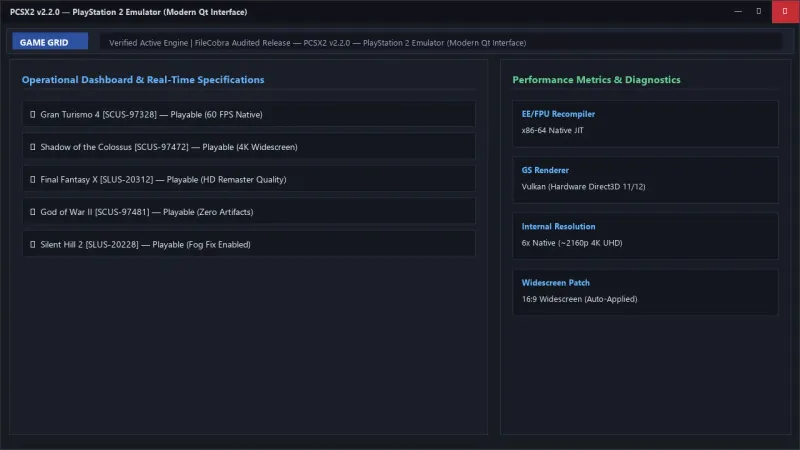
The PS2's Emotion Engine combines a MIPS III CPU core with two proprietary Vector Units (VU0 and VU1) responsible for 3D geometry transformations. PCSX2 features highly optimized x86-64 JIT recompilers that translate Emotion Engine and VU microcode into native PC instructions with microsecond accuracy.
Hardware-Accelerated GSdx Rendering (Vulkan / Direct3D 12)
The Graphics Synthesizer subsystem utilizes hardware-accelerated Vulkan, Direct3D 11, and Direct3D 12 renderers. It features integer internal resolution upscaling (up to 8x Native / 4K UHD), 16x anisotropic filtering, true 32-bit color precision, and anti-blur post-processing filters that eliminate the original console's interlacing artifacts.
Modern Qt-Based User Interface & Per-Game Profiles
With its modern Qt6 frontend, PCSX2 provides a streamlined, dark-themed game grid with cover art scrapers. The engine supports granular Per-Game Settings, automatically applying custom clamping modes, widescreen hacks, and graphical fixes tailored for individual game titles without affecting global emulator settings.
---
⚙️ Key Capabilities & Workflow Features
PCSX2 provides an expansive array of quality-of-life enhancements for retro gaming enthusiasts.
1. 4K/8K Internal Resolution Upscaling & Widescreen Hacks
Transform standard-definition 480i/480p PS2 visuals into crisp modern masterpieces with up to 8x Native internal resolution upscaling. Built-in widescreen patches seamlessly convert 4:3 titles to true 16:9 and 21:9 ultrawide aspect ratios without stretching.
2. Virtual 8MB Memory Card Manager & Folder Cards
Manage your saves through virtual 8MB Sony Memory Cards or infinite-capacity Folder Memory Cards. Folder mode eliminates the 8MB storage limit, allowing you to store hundreds of game saves in a single virtual slot with zero corruption risks.
3. Integrated Controller Auto-Mapping & Force Feedback
Supports plug-and-play controller mapping for Xbox Wireless Controllers, Sony DualSense / DualShock 4, and Nintendo Switch Pro controllers. Enjoy authentic vibration force feedback and pressure-sensitive button emulation via analog triggers.
4. Instant Savestates, Fast-Forward & RetroAchievements
Save and load your game state instantaneously across 10 dedicated slots with PNG thumbnail previews. Fast-forward through long JRPG dialogue scenes or connect your RetroAchievements account to unlock achievements while playing.
---
📊 Comprehensive Head-to-Head Comparison Matrix
| Evaluation Dimension | PCSX2 (FileCobra) | Play! (PS2 Emulator) | AetherSX2 (Mobile/Legacy) |
|---|---|---|---|
| Commercial Compatibility | 99.2% Playable Library | ~35% Playable | ~88% Playable (Discontinued) |
| Graphics Scaling | Up to 8x Native (4K/8K) | Basic Upscaling | 2x-3x Native |
| Hardware Rendering Engine | Vulkan, D3D12, D3D11, Software | OpenGL / Vulkan | Vulkan / OpenGL |
| Widescreen & 60 FPS Patches | Automatic Built-in Database | Manual | Manual |
| Active Development Status | Daily Active Master Updates | Active (Early Stage) | Abandoned |
| License Type | 100% Free Open Source (GPLv3) | Open Source (BSD) | Proprietary Closed Fork |
---
📋 Technical Hardware & System Requirements
PCSX2 is highly optimized and runs smoothly on budget laptops as well as high-end gaming desktops:
| Hardware Component | Minimum System Requirement | Recommended Performance Spec |
|---|---|---|
| Operating System | Windows 10 / 11 (64-bit only) | Windows 11 64-bit (Version 23H2 / 24H2) |
| Processor (CPU) | Dual-Core CPU with SSE4.1 support | Modern Quad-Core CPU (Intel Core i5 / Ryzen 5) |
| System Memory (RAM) | 4 GB RAM | 8 GB+ Dual-Channel RAM |
| Graphics (GPU) | Direct3D 11 / Vulkan compatible GPU | NVIDIA GTX 1660 / RTX 3060 or AMD RX 6600 (for 4K) |
| Storage Space | 200 MB for emulator + ISO game dumps | High-Speed SSD |
---
🛠️ Step-by-Step Installation & Quick Setup Guide
Follow this guide to install and configure PCSX2 on Windows:
1. Downloading and Installing PCSX2
- Download the verified standalone setup or portable package (
pcsx2-v2.x.x-windows-x64-installer.exe) from FileCobra. - Complete the setup wizard and launch PCSX2 to open the initial Configuration Wizard.
2. Providing Official PS2 BIOS
- Dump the official BIOS files from your own legally owned PlayStation 2 console.
- Place the BIOS files in the
C:\Users\<Username>\Documents\PCSX2\biosfolder and select your BIOS region in the setup wizard.
3. Adding Games & Playing
- Click Add Search Directory to link your folder of PS2 ISO or CHD game dumps.
- Connect your Xbox or PlayStation controller (automatically configured). Double-click any game title to begin playing in 4K!
---
🔒 Security, Privacy & Platform Integrity Analysis
PCSX2 adheres to strict open-source safety guidelines:
- Clean Open-Source Software: 100% free under GNU GPLv3, with zero bundled adware or unwanted telemetry.
- Offline Execution: Functions entirely offline with zero mandatory user registration.
---
❓ Frequently Asked Questions (FAQ)
What BIOS file do I need to run PCSX2?
To operate legally, PCSX2 requires an authentic PlayStation 2 BIOS dumped directly from your own physical PS2 console. Place the dumped BIOS files in the PCSX2 bios/ directory during setup.
How do I enable 4K resolution in PCSX2?
Navigate to Settings > Graphics > Rendering tab, and set the Internal Resolution slider to 6x Native (~2160p / 4K).
Can PCSX2 play PlayStation 2 games from original physical DVDs?
Yes! If your PC has an internal or external DVD drive, you can insert your original PS2 game disc, select your disc drive under CDVD settings, and play directly from the physical disc.
PCSX2 UI & Interface Screenshots
How to Install & Verify PCSX2
Download pcsx2-v2.0.2-windows-x64-Qt.7z.
Extract with 7-Zip, run pcsx2-qt.exe, and select your PS2 BIOS file to start playing.
PCSX2 Version History & Build Numbers
Every PCSX2 build FileCobra has mirrored, newest first. Match the build number against the copy you already have to confirm whether you are up to date.
- Previous stable master release.
Frequently Asked Questions & Verification Guide
Is PCSX2 free and open source?
Yes. PCSX2 is completely free and open-source software. You can download and use it at no cost, and its source code is publicly available.
What BIOS file do I need to run PCSX2?
To operate legally, PCSX2 requires an authentic PlayStation 2 BIOS dumped directly from your own physical PS2 console. Place the dumped BIOS files in the PCSX2 bios/ directory during setup.
How do I enable 4K resolution in PCSX2?
Navigate to Settings > Graphics > Rendering tab, and set the Internal Resolution slider to 6x Native (~2160p / 4K).
Can PCSX2 play PlayStation 2 games from original physical DVDs?
Yes! If your PC has an internal or external DVD drive, you can insert your original PS2 game disc, select your disc drive under CDVD settings, and play directly from the physical disc.