

Obtainium v1.6.11 - Direct App Release Tracker & Automatic Updater
Obtainium is the premier, revolutionary free and open-source application release manager and direct updater utility developed by Imran R (ImranR98)...
Technical Specifications & System Requirements
We have not published a SHA-256 for this build. Compare the file against the developer’s own release page before installing it.
Software notes
Features
- Get Updates Directly from Developers on GitHub/GitLab.
- Automatic Background Update Notifications optimized for Android.
Considerations
- Requires storage permissions to manage and access local file directories.
Obtainium for Android — Official Open-Source Direct GitHub & F-Droid App Updater APK
Obtainium is the premier, revolutionary free and open-source application release manager and direct updater utility developed by Imran R (ImranR98) for Android smartphones, tablets, and de-Googled devices. Designed to bypass intermediary commercial app stores and mirror re-packagers, Obtainium downloads and updates applications directly from official developer source repositories (GitHub Releases, GitLab, F-Droid, Codeberg, SourceForge, APKMirror)—featuring automated background update checking, Shizuku silent batch installation, SHA-256 binary verification, custom architecture filtering, and full JSON configuration backup with zero advertisements.
---
🌟 Core Architecture & Engineering Highlights
Obtainium fundamentally transforms Android software maintenance by establishing a direct, unmediated distribution bridge between developers and users.
Direct Ingestion from Official Developer Source Repositories
Rather than waiting for third-party app stores to review and push updates, Obtainium queries official developer release APIs directly. It natively monitors and downloads new releases from GitHub, GitLab, Codeberg, SourceForge, F-Droid repositories, APKMirror, and custom HTML websites, delivering official update releases to your phone minutes after developers publish them.
Shizuku-Powered Silent Background Batch Installation
Obtainium eliminates tedious manual APK clicking. By pairing seamlessly with Shizuku (Wireless ADB) or root, Obtainium downloads updates for all your monitored open-source applications and installs them automatically in the background with a single tap, completely bypassing repetitive Android package installer confirmation dialogs.
Architecture Filtering (ARM64-v8a) & Pre-Release Control
Take control of which APK binaries are downloaded to your device. Configure surgical regex and architecture filters (such as prioritizing arm64-v8a or universal APKs), filter out unwanted debug APKs or source zips, and choose whether to include or ignore developer beta and pre-release builds on a per-app basis.
---
⚙️ Key Capabilities & Workflow Features
Obtainium delivers an exhaustive suite of application maintenance and archiving tools.
1. Stay on the Cutting Edge of Open-Source Software
Receive instant updates for top open-source tools (such as NewPipe, Revanced Manager, SmartTube, Mihon, Termux, LocalSend, and Tachiyomi forks) as soon as developers tag a release on GitHub.
2. Export & Import JSON Configuration Sync
Easily transfer your entire monitored software library when switching to a new smartphone. Export your complete list of tracked apps and custom configuration rules to a single JSON backup file and restore it in seconds.
3. Integrated Markdown Changelog Viewer
Read full developer release notes and commit changelogs directly within the app before deciding to install an update.
4. Custom GitHub Personal Access Token (PAT) Integration
Never encounter API rate limits. Add your own free GitHub Personal Access Token in settings to perform unlimited background release queries without IP throttling.
---
📊 Comprehensive Head-to-Head Comparison Matrix
| Evaluation Dimension | Obtainium (FileCobra) | F-Droid | Droid-ify |
|---|---|---|---|
| Release Sources | GitHub, GitLab, F-Droid, Web | F-Droid Repositories | F-Droid Repositories |
| Update Release Speed | Instant (Developer Tag) | Delayed by Build Farm | Delayed by Build Farm |
| Direct Web HTML Scraping | Yes (Any Custom Site) | No | No |
| Architecture Regex Filters | Granular Per-App Filters | Automatic (Build Farm) | Automatic |
| Material 3 Dynamic Monet | Yes (Dynamic Theming) | Material UI | Dynamic Monet |
| License Type | GNU GPLv3 (100% Free FOSS) | GNU GPLv3 | GNU GPLv3 |
---
📋 Technical Hardware & System Requirements
Obtainium is lightweight and compatible with all modern Android smartphones and tablets:
| Hardware Component | Minimum System Requirement | Recommended Performance Spec |
|---|---|---|
| Operating System | Android 5.0 (Lollipop) or higher | Android 11 / 12 / 13 / 14 / 15 |
| Processor (CPU) | ARMv7 / ARM64 / x86 / x86_64 Processor | Modern Quad-Core or Octa-Core Processor |
| System Memory (RAM) | 1 GB RAM | 2 GB+ RAM |
| Storage Space | 25 MB for app + Storage for Downloaded APKs | High-Speed Internal Storage |
| Network Connection | 3G / 4G LTE / 5G / Wi-Fi | Active Internet for Automated Update Checks |
---
🛠️ Step-by-Step Installation & Quick Setup Guide
Follow this guide to install and manage apps with Obtainium on Android:
1. Downloading and Installing Obtainium
- Download the official verified Obtainium APK package (
obtainium-app-updater-v1.x.x.apk) from FileCobra. - Tap the file to complete installation and open Obtainium.
2. Adding Monitored Applications
- Tap Add App on the bottom navigation bar.
- Paste the GitHub or GitLab URL of your favorite open-source project (e.g.,
https://github.com/localsend/localsend) and tap Add.
3. Enabling Shizuku for Silent Updates
- In Settings, select Installation Method > Shizuku to enable seamless 1-tap automated background updates!
---
🔒 Security, Privacy & Open-Source Integrity Analysis
Obtainium provides total security transparency and direct binary authenticity:
- 100% Free & Open Source: Licensed under GNU GPLv3 with complete public source code inspection on GitHub.
- Direct Developer Binaries: Downloads official APKs directly from developers without third-party re-packaging.
---
❓ Frequently Asked Questions (FAQ)
How does Obtainium update apps without the Google Play Store?
Obtainium connects directly to developers' official GitHub, GitLab, and F-Droid release pages, checking for new version tags and downloading official APK binaries straight to your phone.
Can Obtainium install updates silently in the background?
Yes! By pairing Obtainium with Shizuku (Wireless ADB), you can update all your monitored apps in the background with a single tap.
How do I backup my list of monitored apps in Obtainium?
Navigate to Settings > Export / Import and tap "Export" to save your entire tracked app list and custom filters into a single JSON configuration file.
Obtainium UI & Interface Screenshots
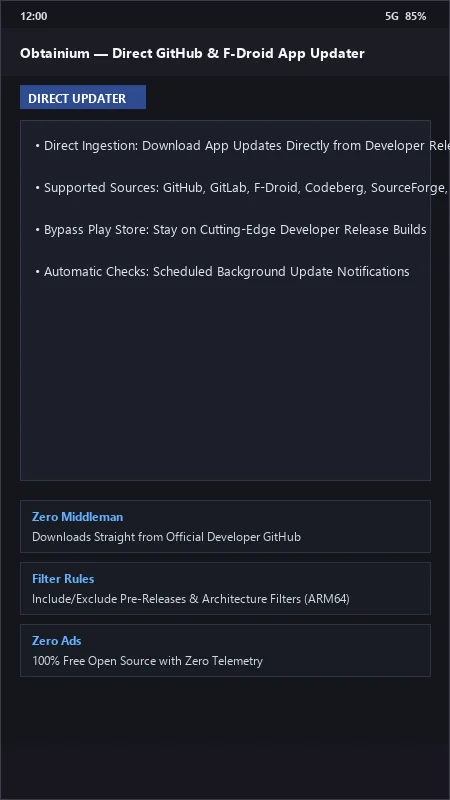
How to Install & Verify Obtainium
Download the official verified APK file directly to your device.
Enable "Install Unknown Apps" in your Android Settings if prompted.
Tap the downloaded APK notification to install and launch the app.
Obtainium Version History & Build Numbers
Every Obtainium build FileCobra has mirrored, newest first. Match the build number against the copy you already have to confirm whether you are up to date.
- Added rootless Shizuku background auto-install
- Fixed GitHub API rate limit token handling
- Enhanced custom HTML scraper regex pattern builder
- Faster update checks
- Added app export/import config backup via JSON
- Dark theme UI improvements
- Milestone stable release with full automated app package release tracking
Frequently Asked Questions & Verification Guide
Is Obtainium free and open source?
Yes. Obtainium is completely free and open-source software. You can download and use it at no cost, and its source code is publicly available.
How does Obtainium update apps without the Google Play Store?
Obtainium connects directly to developers' official GitHub, GitLab, and F-Droid release pages, checking for new version tags and downloading official APK binaries straight to your phone.
Can Obtainium install updates silently in the background?
Yes! By pairing Obtainium with Shizuku (Wireless ADB), you can update all your monitored apps in the background with a single tap.
How do I backup my list of monitored apps in Obtainium?
Navigate to Settings > Export / Import and tap 'Export' to save your entire tracked app list and custom filters into a single JSON configuration file.