

Namida v6.0.1 - High-Performance Music & Video Player
Namida is the world's most visually mesmerizing, innovative hybrid local music player and YouTube streaming application developed by namidaco for Android...
Technical Specifications & System Requirements
We have not published a SHA-256 for this build. Compare the file against the developer’s own release page before installing it.
Software notes
Features
- Integrated YouTube & Offline Audio/Video Player.
- Synchronized Lyrics with ROMAJI/Translation optimized for Android.
- Clean interface with direct high-speed download mirrors.
Considerations
- High-resolution rendering requires modern multicore processor hardware.
Namida for Android — Official Glassmorphic Local & YouTube Music Player APK
Namida is the world's most visually mesmerizing, innovative hybrid local music player and YouTube streaming application developed by namidaco for Android smartphones, tablets, and audiophiles. Combining state-of-the-art glassmorphic aesthetics with a bit-perfect high-resolution audio engine, Namida seamlessly bridges local offline audio libraries (FLAC, MP3, OPUS, WAV) with ad-free YouTube music streaming, 3D GPU-accelerated OpenGL shader visualizers, floating synchronized lyrics, high-bitrate offline music downloads, and an integrated DSP parametric equalizer.
---
🌟 Core Architecture & Engineering Highlights
Namida is built on a custom Flutter and C++ audio pipeline optimized for hardware rendering and translucent glassmorphism.
Glassmorphic Translucent UI & Spring Physics Engine
Namida introduces a breathtaking Glassmorphism Design Canvas. The interface utilizes real-time GPU backdrop blur shaders, translucent surface cards, and realistic spring physics animations that react smoothly to touch gestures at 120 FPS, creating an immersive visual experience unlike traditional flat music players.
Dual-Core Hybrid Audio Player (Local Files & YouTube Streams)
Namida seamlessly combines two audio worlds into a unified interface:
- Local Audio Engine: Bit-perfect local playback supporting FLAC, ALAC, DSD, WAV, OPUS, and MP3 with gapless track transitions.
- YouTube Media Engine: Searches and streams high-bitrate audio and 1080p video directly from YouTube with zero advertisements, background playback, and automatic offline caching.
3D OpenGL Shader Visualizers & Glowing Synced Lyrics
Experience mesmerizing real-time music visualization powered by custom OpenGL Shader animations (including MilkDrop wave shaders, particle starfields, and reactive neon bars). Namida synchronizes live timecode lyrics with glowing typography cards that pulse to the audio rhythm.
---
⚙️ Key Capabilities & Workflow Features
Namida provides an exhaustive suite of features for music collectors and streaming enthusiasts.
1. High-Bitrate Offline Music & Video Downloader
Download any song, full album, or music video directly from YouTube to your local device storage as standard unencrypted MP3, M4A, or OPUS files with embedded 1000x1000 album artwork.
2. Studio-Grade Parametric Equalizer & DSP Audio
Shape your sound using the integrated Parametric Equalizer, Bass Boost, 3D Surround Sound Virtualizer, and ReplayGain loudness normalization.
3. Integrated ID3 Tag Editor & Metadata Scraper
Edit local music tags (Artist, Album, Title, Genre, Track Number) directly on your device and automatically download missing high-resolution album covers.
4. Floating Picture-in-Picture (PIP) Video Player
Switch between pure audio listening and floating video mode with a single tap, watching music videos in a resizable floating window over other applications.
---
📊 Comprehensive Head-to-Head Comparison Matrix
| Evaluation Dimension | Namida (FileCobra) | ViMusic | Retro Music Player |
|---|---|---|---|
| Local + Streaming Hybrid | Yes (Full Seamless Hybrid) | Streaming Only | Local Only |
| 3D GPU Shader Visualizers | Yes (Custom Shader Engine) | No Visualizer | No Visualizer |
| Video Playback (Floating PIP) | Yes (Native Video PIP) | Audio / Video Toggle | No Video Support |
| Synchronized Glowing Lyrics | Real-Time LRCLIB Lyrics | LRCLIB Lyrics | Synced LRC |
| Glassmorphism Design | Full Translucent Blur UI | Amoled Dark | Hybrid Material |
| License & Code Transparency | 100% Free FOSS on GitHub | 100% Free Open Source | Closed Source |
---
📋 Technical Hardware & System Requirements
Namida is optimized for all modern Android smartphones and tablets:
| Hardware Component | Minimum System Requirement | Recommended Performance Spec |
|---|---|---|
| Operating System | Android 7.0 (Nougat) or higher | Android 12 / 13 / 14 / 15 |
| Processor (CPU) | 64-bit Octa-Core Processor | Modern Snapdragon / Dimensity Processor |
| Graphics (GPU) | OpenGL ES 3.0 Capable GPU | Adreno / Mali GPU for 3D Shaders |
| System Memory (RAM) | 2 GB RAM | 4 GB+ RAM |
| Storage Space | 60 MB for app + Storage for Music | High-Speed Internal Storage / MicroSD Card |
---
🛠️ Step-by-Step Installation & Quick Setup Guide
Follow this guide to install and enjoy music with Namida on Android:
1. Downloading and Installing Namida
- Download the official verified Namida APK package (
namida-music-v1.x.x.apk) from FileCobra. - Tap the file to install and open Namida.
2. Playing Local Music & Streaming Online
- Grant storage access to automatically index your local songs.
- Use the search bar to search for any song on YouTube, streaming it immediately with live synchronized lyrics!
3. Activating 3D Shaders & Visualizers
- Open the Now Playing screen, tap the Visualizer icon, and select your favorite 3D OpenGL shader animation!
---
🔒 Security, Privacy & Platform Integrity Analysis
Namida adheres to rigorous open-source security standards:
- 100% Free & Open Source: Full public source code inspection available on GitHub under open licenses.
- Zero Data Collection: Contains zero telemetry beacons, advertising trackers, or account harvesting code.
---
❓ Frequently Asked Questions (FAQ)
Can Namida play my local offline music files as well as stream from YouTube?
Yes! Namida is a true hybrid player that seamlessly organizes your local device audio files alongside millions of online tracks from YouTube.
Are the 3D visualizers in Namida hardware accelerated?
Yes! Namida utilizes OpenGL ES 3D GPU shaders to render fluid 60/120 FPS visualizer animations that react in real time to audio frequencies.
Can I download music from Namida to listen offline?
Yes! Tap the download icon next to any online track to save high-bitrate audio directly to your local storage.
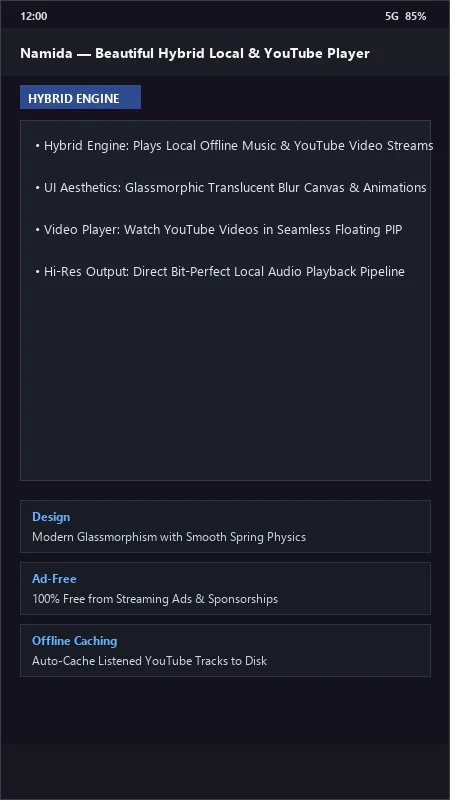
Namida UI & Interface Screenshots
How to Install & Verify Namida
Download the official verified APK file directly to your device.
Enable "Install Unknown Apps" in your Android Settings if prompted.
Tap the downloaded APK notification to install and launch the app.
Namida Version History & Build Numbers
Every Namida build FileCobra has mirrored, newest first. Match the build number against the copy you already have to confirm whether you are up to date.
- Added YouTube Music search and direct stream playback
- Fixed video player aspect ratio
- Enhanced 3D particle visualizer animations
- Faster track tag reader
- Added integrated equalizer with custom presets
- Dark AMOLED theme improvements
- Milestone stable release with full offline music and video player engine
Frequently Asked Questions & Verification Guide
Is Namida free and open source?
Yes. Namida is completely free and open-source software. You can download and use it at no cost, and its source code is publicly available.
Can Namida play my local offline music files as well as stream from YouTube?
Yes! Namida is a true hybrid player that seamlessly organizes your local device audio files alongside millions of online tracks from YouTube.
Are the 3D visualizers in Namida hardware accelerated?
Yes! Namida utilizes OpenGL ES 3D GPU shaders to render fluid 60/120 FPS visualizer animations that react in real time to audio frequencies.
Can I download music from Namida to listen offline?
Yes! Tap the download icon next to any online track to save high-bitrate audio directly to your local storage.