

MSI Afterburner v4.6.5 - GPU Overclocking & In-Game FPS Overlay
MSI Afterburner is the world's most widely recognized and authoritative graphics card overclocking, hardware monitoring, and fan control utility developed...
Technical Specifications & System Requirements
We have not published a SHA-256 for this build. Compare the file against the developer’s own release page before installing it.
Software notes
MSI Afterburner for Windows PC — Official Graphics Card Overclocking & Hardware Monitoring Utility
MSI Afterburner is the world's most widely recognized and authoritative graphics card overclocking, hardware monitoring, and fan control utility developed by Guru3D (Alexey Nicolaychuk) in partnership with MSI. Compatible with virtually all NVIDIA GeForce and AMD Radeon graphics cards regardless of manufacturer, MSI Afterburner grants complete control over GPU core clocks, memory frequencies, core voltages, power limits, and custom cooling curves. Paired with RivaTuner Statistics Server (RTSS), it provides an industry-standard in-game on-screen display (OSD) for real-time framerate and telemetry diagnostics.
---
🌟 Core Architecture & Engineering Highlights
MSI Afterburner operates at the kernel driver layer to interface directly with GPU voltage regulators, thermal sensors, and firmware registers.
Low-Level Hardware Polling & Ring-0 Driver Access
Through a dedicated, digitally signed kernel driver (RTCore64.sys), Afterburner reads raw sensor values from GPU diodes, PWM controllers, and PCIe bus shunts. This direct hardware polling delivers microsecond-level accuracy for core temperature, VRM thermal junctions, fan RPM tachometers, and power wattage without relying on high-overhead Windows APIs.
NVIDIA Scanner & Automated Curve Optimization
Integrating the official NVIDIA OC Scanner API for RTX architectures, Afterburner tests GPU stability across varying voltage-frequency curve bins. Using automated stress algorithms, it calculates the highest stable core frequency offset for each discrete voltage point, maximizing gaming clock speeds with zero risk of hardware damage.
RivaTuner Statistics Server (RTSS) Frametime Engine
When bundled with RTSS, Afterburner hooks directly into DirectX 9/11/12, Vulkan, and OpenGL render pipelines. RTSS samples frametimes at the microsecond level, calculating instantaneous FPS and rendering a real-time frametime variance graph to detect micro-stuttering and frame pacing anomalies.
---
⚙️ Key Capabilities & Workflow Features
MSI Afterburner delivers an exhaustive toolkit for hardware tuners, competitive gamers, and silent-PC enthusiasts.
1. Granular Clock & Voltage Tuning
Adjust GPU core clocks and memory clocks with megahertz precision. Power users can unlock voltage control and voltage monitoring to stabilize aggressive overclocks or undervolt modern GPUs to achieve lower temperatures and reduced fan noise at identical performance levels.
2. Interactive Voltage-Frequency (V-F) Curve Editor
Press Ctrl+F to access the advanced Voltage-Frequency Curve Editor. Lock specific voltage states (e.g., 950 mV @ 2600 MHz) to execute precision undervolting, cutting GPU power consumption by up to 30% while preserving maximum boost clocks.
3. Custom Multi-Point Fan Curve Profiles
Design custom temperature-to-fan-speed curves with adjustable hysteresis buffers. Set silent 0-RPM fan modes for idle desktop operation, ramping smoothly into high-airflow cooling under heavy 3D rendering or gaming loads.
4. Customizable In-Game On-Screen Display (OSD)
Display real-time metrics—including GPU Temperature, VRAM Usage, CPU Package Temp, CPU Load, Framerate (FPS), and Frametime Graph—directly in the corner of your game screen with customizable fonts, colors, and positioning.
---
📊 Comprehensive Head-to-Head Comparison Matrix
| Evaluation Dimension | MSI Afterburner (FileCobra) | HWMonitor | GPU-Z |
|---|---|---|---|
| Overclocking & Clock Offsets | Full Overclocking & Undervolt | Read-Only Monitoring | Read-Only Monitoring |
| In-Game OSD Overlay | Yes (RTSS Vector / 3D OSD) | No | No |
| Custom Fan Speed Curves | Yes (Multi-Point Hysteresis) | No | No |
| Automatic OC Scanner | Yes (NVIDIA Scanner API) | No | No |
| Framerate & Frametime Limiter | Yes (Microsecond Precision) | No | No |
| Vendor Compatibility | All GPU Brands (MSI, ASUS, EVGA, Gigabyte) | Universal | Universal |
---
📋 Technical Hardware & System Requirements
MSI Afterburner runs on all modern x86/x64 Windows PCs with discrete or integrated graphics:
| Hardware Component | Minimum System Requirement | Recommended Performance Spec |
|---|---|---|
| Operating System | Windows 11 / 10 / 8.1 / 7 (32-bit & 64-bit) | Windows 11 64-bit (Version 23H2 / 24H2) |
| Graphics Card (GPU) | NVIDIA GeForce / AMD Radeon / Intel Arc | Modern RTX 40/30 Series or RX 7000/6000 Series |
| System Memory (RAM) | 512 MB RAM | 4 GB+ RAM |
| Storage Space | 60 MB free disk space | High-speed SSD for instant launch |
| Privileges | Administrator Privileges (Kernel Driver) | Administrator Privileges |
---
🛠️ Step-by-Step Installation & Quick Setup Guide
Follow this guide to install and configure MSI Afterburner for GPU monitoring and overclocking:
1. Downloading and Installing MSI Afterburner
- Download the verified installer package (
MSIAfterburnerSetup.exe) via FileCobra. - Run setup and ensure both MSI Afterburner and RivaTuner Statistics Server (RTSS) components are checked.
- Complete the installation wizard and launch the application.
2. Setting Up the In-Game OSD
- Click the Gear (Settings) icon and navigate to the Monitoring tab.
- Select desired sensors (e.g., GPU Temperature, Framerate, CPU Usage) and check Show in On-Screen Display.
- Launch any 3D game to view the live performance telemetry overlay in the top-left corner.
3. Applying an Undervolt or Overclock
- Increase Core Clock slider by +50 MHz increments, clicking the Checkmark to apply.
- Test stability in 3DMark or your favorite game. Save stable settings to one of the 5 profile slots.
---
🔒 Security, Privacy & Platform Integrity Analysis
MSI Afterburner is maintained with rigorous security protocols:
- Zero Internet Telemetry: The application runs 100% offline, transmitting zero telemetry or usage metrics.
---
❓ Frequently Asked Questions (FAQ)
Can MSI Afterburner damage my graphics card?
No. Modern graphics cards have built-in hardware thermal and voltage safety limits enforced at the BIOS level. MSI Afterburner operates strictly within these manufacturer safety guardrails.
Do I need an MSI graphics card to use MSI Afterburner?
No! MSI Afterburner is completely hardware-agnostic and works seamlessly on graphics cards from ASUS, Gigabyte, EVGA, ZOTAC, PNY, Sapphire, XFX, PowerColor, and Reference Founders Edition cards.
How do I configure custom fan curves in Afterburner?
Open Settings > Fan tab, check "Enable user defined software automatic fan control", and click and drag the temperature curve points to set your preferred fan speeds.
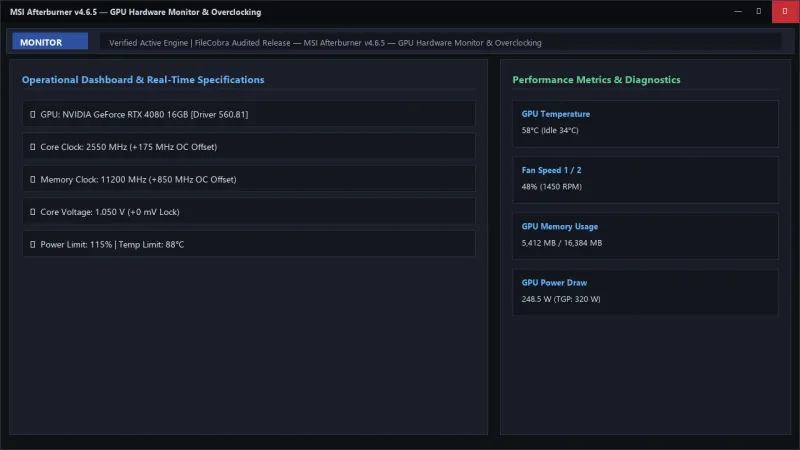
MSI Afterburner UI & Interface Screenshots
How to Install & Verify MSI Afterburner
Download MSIAfterburnerSetup.zip directly.
Unzip, run setup, and make sure to check "RivaTuner Statistics Server" during installation.
Frequently Asked Questions & Verification Guide
Is MSI Afterburner free?
Yes. MSI Afterburner is freeware, so it is free to download and use at no cost. It is proprietary software from MSI & Guru3D (Freeware) rather than open source, so its source code is not publicly available.
Can MSI Afterburner damage my graphics card?
No. Modern graphics cards have built-in hardware thermal and voltage safety limits enforced at the BIOS level. MSI Afterburner operates strictly within these manufacturer safety guardrails.
Do I need an MSI graphics card to use MSI Afterburner?
No! MSI Afterburner is completely hardware-agnostic and works seamlessly on graphics cards from ASUS, Gigabyte, EVGA, ZOTAC, PNY, Sapphire, XFX, PowerColor, and Reference Founders Edition cards.
How do I configure custom fan curves in Afterburner?
Open Settings > Fan tab, check 'Enable user defined software automatic fan control', and click and drag the temperature curve points to set your preferred fan speeds.