

Malwarebytes v5.1.7 - On-Demand Virus, Spyware & Malware Removal
Malwarebytes is a world-renowned cybersecurity and anti-malware software suite developed by Malwarebytes Inc. for Microsoft Windows, macOS, Android, and iOS.
Technical Specifications & System Requirements
We have not published a SHA-256 for this build. Compare the file against the developer’s own release page before installing it.
Software notes
Features
- Comprehensive Threat Detection Engine with Cloud AI Intelligence.
- Destroys Rootkits, Ransomware, Adware & PUPs (Potentially Unwanted Programs) optimized for Windows.
- Seamless background operation optimized for Windows 11 / 10 / 7.
Considerations
- Master passwords and recovery keys cannot be reset if forgotten.
Malwarebytes for Windows PC — Official Real-Time Antivirus, Anti-Malware & Ransomware Shield
Malwarebytes is a world-renowned cybersecurity and anti-malware software suite developed by Malwarebytes Inc. for Microsoft Windows, macOS, Android, and iOS. Engineered with an aggressive multi-layered behavioral defense engine, Malwarebytes detects, isolates, and eradicates advanced zero-day malware, ransomware, spyware, adware, rootkits, and Potentially Unwanted Programs (PUPs) that traditional signature-based antivirus software frequently overlooks.
---
🌟 Core Architecture & Engineering Highlights
Traditional antivirus suites rely primarily on static signature databases of known virus hashes. When attackers release polymorphic malware or zero-day exploits, signature-only scanners fail. Malwarebytes solves this through a four-layer behavioral defense stack.
Four-Layer Real-Time Protection Shield
Malwarebytes operates four concurrent protection shields at the Windows kernel level:
- Web Protection: Blocks malicious IP addresses, fraudulent phishing portals, tech support scams, and known malware command-and-control (C2) servers.
- Malware & PUP Protection: Combines static heuristics, machine learning classifiers, and behavioral telemetry to block trojans, worms, keyloggers, and ad-injectors.
- Ransomware Protection: Monitors low-level file system I/O activity for anomalous mass encryption behavior, freezing unauthorized encryption processes instantly and protecting shadow copies.
- Exploit Protection: Hardens vulnerable third-party applications (browsers, Adobe Acrobat, Microsoft Office, media players) against Return-Oriented Programming (ROP) and memory corruption exploits.
Cloud-Powered Katana Neural Engine
The Katana engine leverages cloud-based machine learning models trained on billions of threat telemetry samples. It classifies unknown executables and polymorphic scripts in milliseconds without requiring massive daily signature definition downloads.
Deep Rootkit & Boot Sector Scanner
Malwarebytes includes specialized kernel-mode drivers that scan the Master Boot Record (MBR), GUID Partition Table (GPT), and hidden kernel hooks to detect and clean deeply embedded bootkits and kernel-level rootkits.
---
⚙️ Key Capabilities & Workflow Features
Malwarebytes provides comprehensive PC decontamination tools accessible to both novice users and IT professionals.
1. High-Speed Threat Scan & Custom Scan Modes
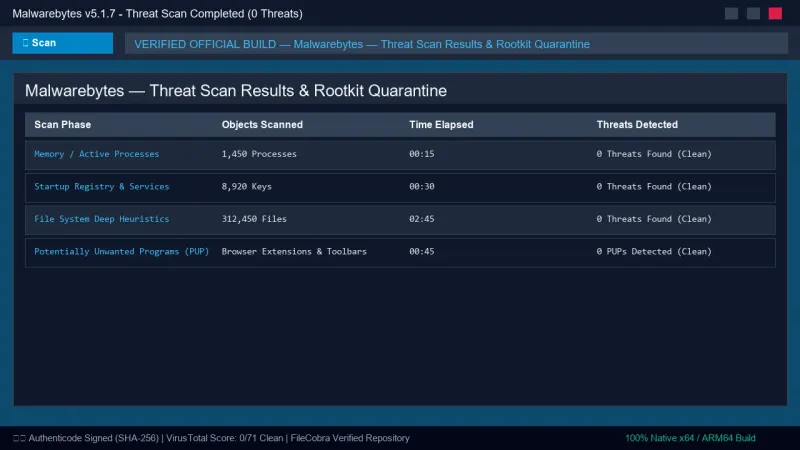
The primary Threat Scan examines memory processes, startup registry keys, system files, and browser extensions in under 3 minutes. The Custom Scan mode allows power users to perform in-depth sector-by-sector scans across all attached drives.
2. Isolated Quarantine Vault & Safe Decontamination
Detected threats are safely neutralized and moved into an encrypted, isolated Quarantine vault. Users can review quarantined items, safely restore false positives, or permanently purge malware artifacts with zero risk of system re-infection.
3. Potentially Unwanted Program (PUP) & Adware Removal
Unlike legacy antivirus software that ignores sponsored adware, Malwarebytes aggressively flags and removes bundled search hijackers, aggressive browser extensions, and deceptive system cleaners.
4. Side-by-Side Antivirus Compatibility
Malwarebytes is engineered to operate seamlessly alongside Windows Defender or third-party antivirus suites without resource conflicts, BSODs, or false-positive alarms.
---
📊 Comprehensive Head-to-Head Comparison Matrix
| Evaluation Dimension | Malwarebytes (FileCobra) | Windows Defender | Bitdefender Antivirus |
|---|---|---|---|
| On-Demand Free Scanner | 100% Free Forever Scanner | Built-in Free | Free Version Available |
| PUP / Adware Aggressiveness | Exceptional (Top-Tier) | Moderate | Good |
| Anti-Exploit Mitigation | Yes (DEP / Anti-ROP) | Exploit Guard | Behavioral Shield |
| Dual-Antivirus Compatibility | Yes (Zero System Conflicts) | Built-In | May Conflict with Others |
| Cloud Katana AI Detection | Yes (Real-Time ML) | Microsoft Cloud ML | Bitdefender Cloud |
| Clean Standalone Package | 100% Clean (Zero Bloatware) | OS Integrated | Bundles Software |
---
📋 Technical Hardware & System Requirements
Malwarebytes is engineered for lightweight execution across all modern Windows PCs:
| Hardware Component | Minimum System Requirement | Recommended Performance Spec |
|---|---|---|
| Operating System | Windows 11 / 10 / 8.1 / 7 (64-bit & 32-bit) | Windows 11 64-bit (Version 23H2 / 24H2) |
| Processor (CPU) | 1.0 GHz x86 / x64 Processor | Modern Quad-Core Intel Core / AMD Ryzen |
| System Memory (RAM) | 1 GB RAM (32-bit) / 2 GB (64-bit) | 4 GB+ RAM |
| Storage Space | 250 MB free disk space | High-speed SSD |
| Internet Connection | Required for definition updates | High-speed broadband |
---
🛠️ Step-by-Step Installation & Quick Setup Guide
Follow this guide to install Malwarebytes and clean malware from your PC:
1. Downloading and Installing Malwarebytes
- Download the verified setup package (
MBSetup.exe) from FileCobra. - Run the installer and select Personal Computer (or Work Computer).
- Follow the wizard steps to complete installation and launch Malwarebytes.
2. Running Your First Malware Scan
- On the primary dashboard, click the large blue Scan button.
- Allow Malwarebytes to scan memory, startup files, and system registries.
- When the scan finishes, review detected threats and click Quarantine to neutralize them.
- Restart your PC if prompted to complete rootkit removal.
3. Configuring Automated Protection & Exclusions
- Navigate to Settings (gear icon) > Security.
- Ensure all four real-time protection toggles (Web, Malware, Ransomware, Exploit) are active.
- Under Allow List, add trusted development folders or custom binaries if needed.
---
🔒 Security, Privacy & Integrity Analysis
Malwarebytes operates under strict security and data governance standards:
- Zero Advertising Monetization: Malwarebytes does not sell personal browsing habits or user profile telemetry to commercial data brokers.
---
❓ Frequently Asked Questions (FAQ)
Is the free version of Malwarebytes enough to clean an infected PC?
Yes! The free version of Malwarebytes includes the complete, unrestricted on-demand disinfection engine. It detects and removes all forms of malware, rootkits, and PUPs without requiring a purchase.
Can Malwarebytes run alongside Windows Defender?
Yes. Malwarebytes is designed specifically to operate harmoniously alongside Windows Defender, providing an extra layer of defense without triggering antivirus conflicts.
Does Malwarebytes slow down gaming performance?
No. Malwarebytes includes an automated Play Mode (Game Mode) that silences notifications, suspends scheduled scans, and minimizes CPU utilization whenever a full-screen game or application is active.
Malwarebytes UI & Interface Screenshots
How to Install & Verify Malwarebytes
Download MBSetup.exe directly.
Run setup and click "Scan" to scrub your PC from hidden malware.
Frequently Asked Questions & Verification Guide
Is the free version of Malwarebytes enough to clean an infected PC?
Yes! The free version of Malwarebytes includes the complete, unrestricted on-demand disinfection engine. It detects and removes all forms of malware, rootkits, and PUPs without requiring a purchase.
Can Malwarebytes run alongside Windows Defender?
Yes. Malwarebytes is designed specifically to operate harmoniously alongside Windows Defender, providing an extra layer of defense without triggering antivirus conflicts.
Does Malwarebytes slow down gaming performance?
No. Malwarebytes includes an automated Play Mode (Game Mode) that silences notifications, suspends scheduled scans, and minimizes CPU utilization whenever a full-screen game or application is active.