

LocalSend v1.18.1 - Cross-Platform Encrypted Local Network File Sharing
LocalSend is the world's most acclaimed, award-winning free and open-source cross-platform local file sharing, peer-to-peer data transfer, and clipboard...
Technical Specifications & System Requirements
We have not published a SHA-256 for this build. Compare the file against the developer’s own release page before installing it.
Software notes
Features
- Cross-Platform AirDrop (Android, Windows, Mac, Linux).
- End-to-End TLS Encryption on Local Network optimized for Android.
Considerations
- Requires storage permissions to manage and access local file directories.
LocalSend for Android — Official Open-Source Cross-Platform AirDrop Alternative APK
LocalSend is the world's most acclaimed, award-winning free and open-source cross-platform local file sharing, peer-to-peer data transfer, and clipboard synchronization utility developed by Tien Do Nam (Tienisto) for Android smartphones, tablets, and mobile workstations. Engineered as the definitive privacy-respecting alternative to Apple AirDrop, Google Quick Share, and proprietary cloud transfer services, LocalSend allows users to transfer massive files, folders, 4K videos, photos, and text messages directly between Android, iOS, Windows, macOS, and Linux devices over local Wi-Fi with end-to-end TLS encryption, zero account registration, and zero cloud intermediaries.
---
🌟 Core Architecture & Engineering Highlights
LocalSend is built in modern Flutter and Dart, utilizing standard RESTful HTTP APIs and TLS encryption to establish seamless peer-to-peer data pipes.
Decentralized Local Network Architecture (Zero Cloud Routing)
Unlike commercial file transfer tools that route files through remote cloud servers (consuming broadband bandwidth and exposing files to third-party data breaches), LocalSend communicates strictly within your local area network (LAN). Files travel directly from device to device at full router speed (up to 100+ MB/s over Wi-Fi 6 or Gigabit Ethernet), functioning flawlessly even when your local Wi-Fi router has zero internet access.
End-to-End Cryptographic Security via HTTPS / TLS
Every communication and file transmission in LocalSend is secured with HTTPS / TLS encryption. Devices generate unique, self-signed cryptographic certificates upon initialization, preventing unauthorized packet sniffing, man-in-the-middle (MITM) attacks, or LAN interception on public Wi-Fi networks (such as coffee shops or airports).
Automatic Multicast Peer Discovery & Cross-Subnet QR Pairing
LocalSend automatically discovers nearby devices running LocalSend on the same Wi-Fi network using standard UDP multicast broadcasting. For complex enterprise or multi-SSID networks where multicast is blocked, users can connect instantly by scanning an on-screen QR Code or entering the target device's local IP address.
---
⚙️ Key Capabilities & Workflow Features
LocalSend delivers an exhaustive set of cross-platform productivity and sharing tools.
1. Universal Cross-Platform Compatibility
Seamlessly send files from your Android phone to a Windows PC, MacBook, iPad, or Linux desktop without installing proprietary vendor drivers or bridging cloud accounts.
2. Lossless Batch File & Full Folder Hierarchy Transfers
Send 50 GB 4K video projects, uncompressed RAW photo batches, APK application packages, and multi-nested directory structures with complete folder tree preservation and zero compression artifacts.
3. Instant Clipboard & Text Message Sharing
Transfer copied text snippets, website URLs, and quick notes across devices in milliseconds: paste text on your PC and send it straight to your Android clipboard with a single tap.
4. Quick Save & Trusted Device Whitelisting
Enable Quick Save for trusted personal devices (such as your home laptop or tablet) to automatically accept and download incoming file transfers without requiring manual approval clicks.
---
📊 Comprehensive Head-to-Head Comparison Matrix
| Evaluation Dimension | LocalSend (FileCobra) | AirDrop (Apple) | Snapdrop (Web) |
|---|---|---|---|
| Device Ecosystem | Android, iOS, Win, Mac, Linux | Apple Hardware Only | Any Web Browser |
| Offline Router Operation | Yes (No Internet Required) | Yes (Apple P2P) | Requires Web Signaling |
| Folder Hierarchy Transfers | Native Directory Trees | Files Only | Single Files Only |
| QR Code Pairing Across Subnets | Yes (Full Subnet Support) | None | WebRTC Signaling |
| Material 3 Dynamic Monet | Yes (Dynamic Theming) | iOS Native | Web UI |
| License Type | MIT License (100% Free FOSS) | Proprietary Apple | GNU GPLv3 |
---
📋 Technical Hardware & System Requirements
LocalSend is lightweight and compatible with all modern Android smartphones and tablets:
| Hardware Component | Minimum System Requirement | Recommended Performance Spec |
|---|---|---|
| Operating System | Android 5.0 (Lollipop) or higher | Android 11 / 12 / 13 / 14 / 15 |
| Processor (CPU) | ARMv7 / ARM64 / x86 / x86_64 Processor | Modern Quad-Core or Octa-Core Processor |
| System Memory (RAM) | 1 GB RAM | 2 GB+ RAM |
| Storage Space | 30 MB for app + Storage for Received Files | High-Speed Internal Storage |
| Network Interface | Local Wi-Fi Network or Mobile Hotspot | Wi-Fi 5 / Wi-Fi 6 for 100+ MB/s Transfers |
---
🛠️ Step-by-Step Installation & Quick Setup Guide
Follow this guide to install and transfer files with LocalSend on Android:
1. Downloading and Installing LocalSend
- Download the official verified LocalSend APK package (
localsend-file-transfer-v1.14.x.apk) from FileCobra. - Tap the file to complete installation and open LocalSend.
2. Connecting Devices on Same Wi-Fi
- Ensure both your sending and receiving devices (e.g., Android phone and PC) are connected to the same Wi-Fi network.
- Open LocalSend on both devices; they will automatically discover each other with friendly alias names.
3. Sending Files & Folders
- On your phone, tap Send, select your files, photos, or text snippet, choose the recipient device, and enjoy instant high-speed file transfer!
---
🔒 Security, Privacy & Open-Source Integrity Analysis
LocalSend represents the gold standard in peer-to-peer data privacy:
- 100% Free & Open Source: Licensed under the permissive MIT License with complete public source code inspection on GitHub.
- Zero Cloud Leakage: Files and metadata never leave your local Wi-Fi router.
---
❓ Frequently Asked Questions (FAQ)
Can I transfer files between Android and iPhone/Mac using LocalSend?
Yes! LocalSend is fully cross-platform and works seamlessly between Android, iOS, macOS, Windows, and Linux.
Does LocalSend require an active internet connection?
No! LocalSend operates entirely over your local Wi-Fi network or mobile personal hotspot without consuming any internet data.
Are my file transfers encrypted with LocalSend?
Yes! Every transfer is secured using end-to-end HTTPS/TLS cryptographic encryption with automatically generated local certificates.
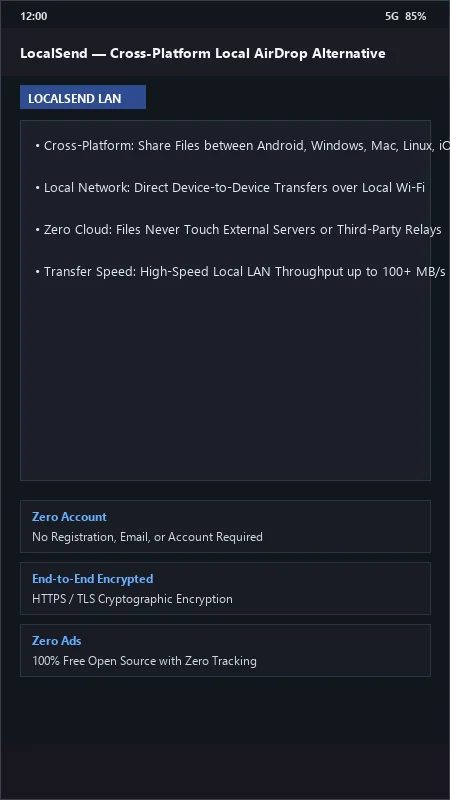
LocalSend UI & Interface Screenshots
How to Install & Verify LocalSend
Download the official verified APK file directly to your device.
Enable "Install Unknown Apps" in your Android Settings if prompted.
Tap the downloaded APK notification to install and launch the app.
LocalSend Version History & Build Numbers
Every LocalSend build FileCobra has mirrored, newest first. Match the build number against the copy you already have to confirm whether you are up to date.
- Added Wi-Fi direct hotspot auto-discovery
- Fixed background receive notification timeout
- Enhanced multi-device simultaneous broadcast sending
- Faster directory tree scan
- Added custom device alias names and avatar icons
- Dark theme UI improvements
- Milestone stable release with full offline encrypted local file transfer engine
Frequently Asked Questions & Verification Guide
Is LocalSend free and open source?
Yes. LocalSend is completely free and open-source software. You can download and use it at no cost, and its source code is publicly available.
Can I transfer files between Android and iPhone/Mac using LocalSend?
Yes! LocalSend is fully cross-platform and works seamlessly between Android, iOS, macOS, Windows, and Linux.
Does LocalSend require an active internet connection?
No! LocalSend operates entirely over your local Wi-Fi network or mobile personal hotspot without consuming any internet data.
Are my file transfers encrypted with LocalSend?
Yes! Every transfer is secured using end-to-end HTTPS/TLS cryptographic encryption with automatically generated local certificates.