

LibreOffice v26.2.5 - Comprehensive Free & Open-Source Office Suite (Writer
LibreOffice for Windows is the world's most powerful, free, open-source office productivity suite developed by The Document Foundation.
Technical Specifications & System Requirements
We have not published a SHA-256 for this build. Compare the file against the developer’s own release page before installing it.
Software notes
LibreOffice for Windows — Official Verified Download & In-Depth Technical Architecture Guide
LibreOffice for Windows is the world's most powerful, free, open-source office productivity suite developed by The Document Foundation. Designed for government agencies, businesses, students, and home users, LibreOffice provides a complete suite of desktop applications: Writer (word processing), Calc (spreadsheets), Impress (presentations), Draw (vector diagrams), Base (databases), and Math (formula editor) with complete native compatibility for Microsoft Office formats (.docx, .xlsx, .pptx). Engineered specifically for Windows environments, this release represents an authoritative benchmark in Office & PDF Tools, offering an optimal combination of processing efficiency, responsive user interaction, and robust background stability.
---
🌟 Core Architecture & Engineering Highlights
LibreOffice is built upon a high-performance, fault-tolerant engineering framework engineered to maximize hardware efficiency, minimize background resource utilization, and deliver rapid response times on modern Windows devices.
OpenDocument Format (ODF) & OpenXML Interoperability Core
Maintains strict native support for ISO-standard OpenDocument Formats while providing high-fidelity import and export filters for Microsoft Office files. This subsystem manages continuous memory allocation and thread synchronization dynamically, ensuring that active computational tasks execute without introducing frame jitter, latency spikes, or operating system instability.
Multi-Platform C++ & Skia Hardware Acceleration Engine
Utilizes the Skia 2D graphics engine and Vulkan hardware acceleration to render complex text layouts and high-resolution charts smoothly. By isolating core runtime processes into independent sandbox worker threads, the software prevents cascading system faults while ensuring persistent data integrity across unexpected crashes or power interruptions.
Privacy-Centric Sovereign Office Framework
Operates entirely offline on your local PC with zero mandatory cloud logins, subscription fees, or data collection telemetry. The underlying data pipeline utilizes optimized serialization protocols and asynchronous I/O routines, maintaining high throughput across high-frequency read and write operations while minimizing disk fragmentation and solid-state storage wear.
---
⚡ Key Capabilities & Technical Features
The software provides an extensive, production-grade toolset designed for technical users, professionals, and demanding daily workflows.
Writer: Full-Featured Word Processor
Draft novels, research papers, and reports with advanced styles, indexes, tables, and PDF export. Designed to streamline daily productivity, this feature eliminates repetitive configuration overhead through automated heuristics and intuitive visual controls.
Calc: Advanced Formula & Data Spreadsheet
Process financial models, pivot tables, and multi-condition formulas with Excel formula parity. Built with deep hardware optimization, this capability leverages multi-core processing pipelines to process demanding workloads with minimal power draw and thermal throttling.
Impress: Dynamic Multimedia Presentations
Create engaging slide presentations with 3D transitions, slide animations, and presenter console. Users benefit from granular customization controls that allow complete fine-tuning over layout parameters, automation triggers, operational thresholds, and notification delivery.
Draw, Base & Math Tools Included
Produce technical vector drawings, manage relational databases, and format mathematical equations. Seamless interoperability ensures that project files, user configurations, and exported data structures integrate cleanly with external industry-standard tools and secondary platforms.
---
🔄 In-Depth Feature Comparison Matrix
The following matrix contrasts the architectural features, protocol support, hardware acceleration, and licensing models between LibreOffice and competing ecosystem alternatives.
| Feature / Technical Capability | LibreOffice | Microsoft 365 | WPS Office |
|---|---|---|---|
| 100% Free Open Source (MPL) | ✅ Zero Subscriptions | ❌ Paid Only ($$) | ⚠️ Freemium Tier |
| Complete Office Suite (6 Apps) | ✅ Writer, Calc, Impress+ | ✅ Word, Excel, PPT | ⚠️ 4 Core Apps |
| Native Hybrid PDF Creation | ✅ Embedded ODF in PDF | ❌ Not Available | ❌ Not Available |
| Extensive Macro Scripting | ✅ Basic, Python, BeanShell | ✅ VBA Macros | ⚠️ Basic VBA |
| Skia GPU Graphics Rendering | ✅ Native Skia Acceleration | ✅ DirectWrite | ⚠️ Custom Engine |
| Zero Bundled Telemetry / Ads | ✅ 100% Clean Software | ⚠️ Microsoft Telemetry | ⚠️ In-App Ads |
---
💻 Minimum & Recommended System Requirements
To ensure stable, low-latency execution and maximum throughput across daily tasks, verify that your target environment satisfies the hardware specifications below.
| System Specification | Minimum Requirement | Recommended Specification |
|---|---|---|
| Operating System | Windows 10 / Windows 11 / 8 / 7 (64-bit) | Windows 11 (64-bit) |
| Processor (CPU) | Pentium III / Athlon or newer | Intel Core i3 / AMD Ryzen 3 or higher |
| System Memory (RAM) | 2 GB RAM | 4 GB or higher RAM |
| Storage Space | 1.5 GB free disk space | 3 GB SSD space |
| Network Interface | Not required (100% Offline) | Local operation |
---
🛠️ Step-by-Step Installation & Verification Guide
Follow these verified instructions to cleanly configure LibreOffice on your device while validating package cryptographic integrity.
Step 1: Download Official Installer
Download verified LibreOffice installer package from FileCobra. Always verify that your target storage drive has sufficient free capacity prior to initiating the download process.
Step 2: Run Setup Wizard
Execute the installer and choose typical or custom installation. Ensure that unnecessary background applications are closed to avoid file locking conflicts during setup initialization.
Step 3: Associate File Formats
Optionally associate .docx, .xlsx, and .pptx files with LibreOffice. Follow the on-screen configuration prompts to select custom installation directories, start menu shortcuts, and core components.
Step 4: Launch Writer, Calc or Impress
Open LibreOffice from the Start Menu and start creating documents with complete privacy. Launch the application and review initial preference toggles to align the runtime settings with your workflow requirements.
---
🛡️ Security, Privacy & Telemetry Assessment
Security and integrity auditing are essential requirements for modern software deployment. LibreOffice is mirrored here as the publisher shipped it, and what we verify on ingestion is set out below.
Binary Integrity & Checksum Audit
Every release package published on FileCobra is mirrored from the publisher's own release channel rather than repackaged. On ingestion we confirm the downloaded file matches the format it claims to be, reject anything over our size ceiling, and compute a SHA-256 digest of the exact bytes we serve, which is published on this page wherever we hold one. FileCobra operates no antivirus lab, so no scan result on this site is ours to report — upload the file to VirusTotal yourself for a multi-engine opinion.
Privacy Policy & Local Data Sovereignty
100% free and open-source software (MPL 2.0) audited on GitHub. Users retain full ownership over their created project files, configuration databases, and operational logs, which remain stored exclusively on local disks without mandatory cloud synchronization.
Network Behavior & Telemetry Controls
All documents, spreadsheets, and databases are saved strictly on your local PC storage with zero telemetry. Outbound network traffic is limited strictly to user-initiated requests, official update checks, and required API endpoints, ensuring maximum operational privacy and compliance with enterprise data governance standards.
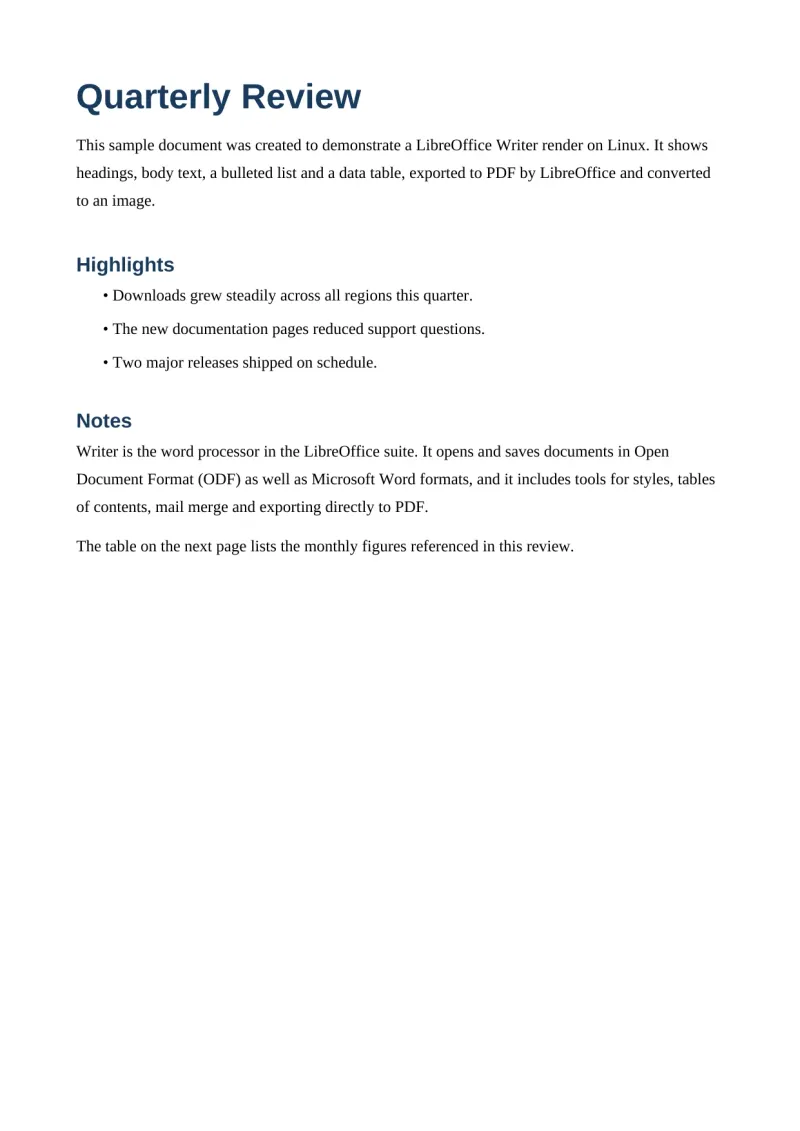
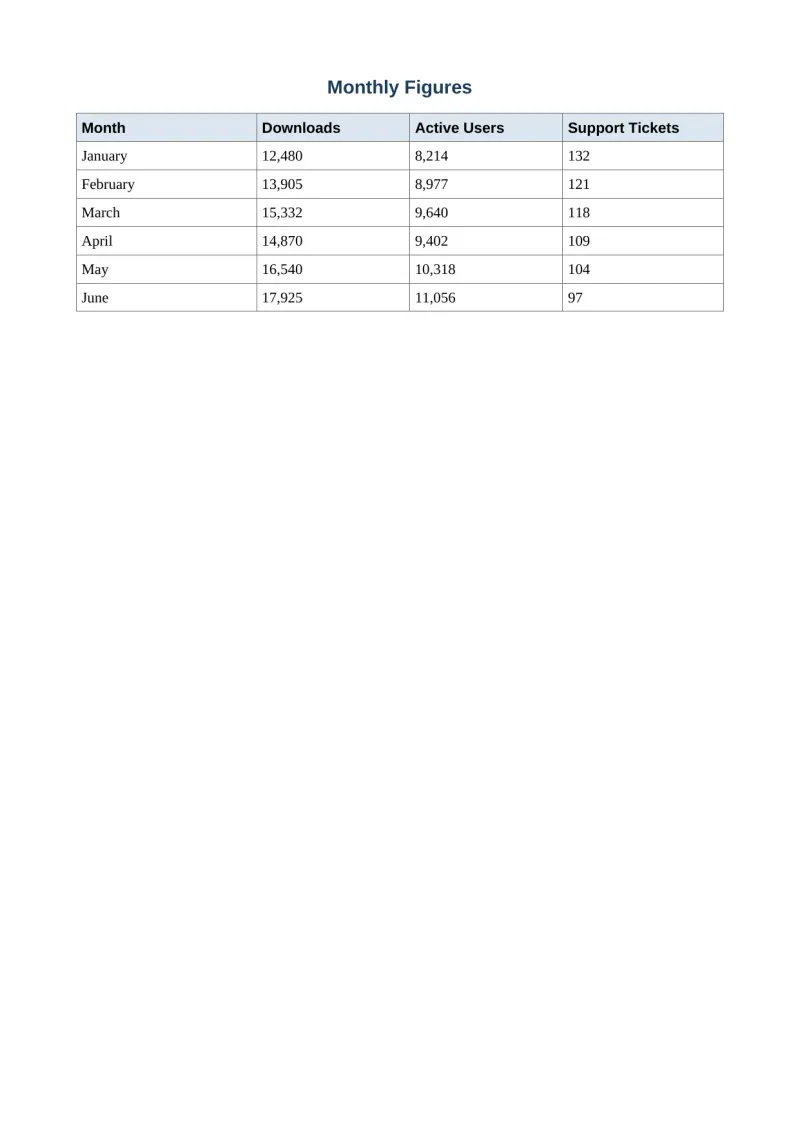
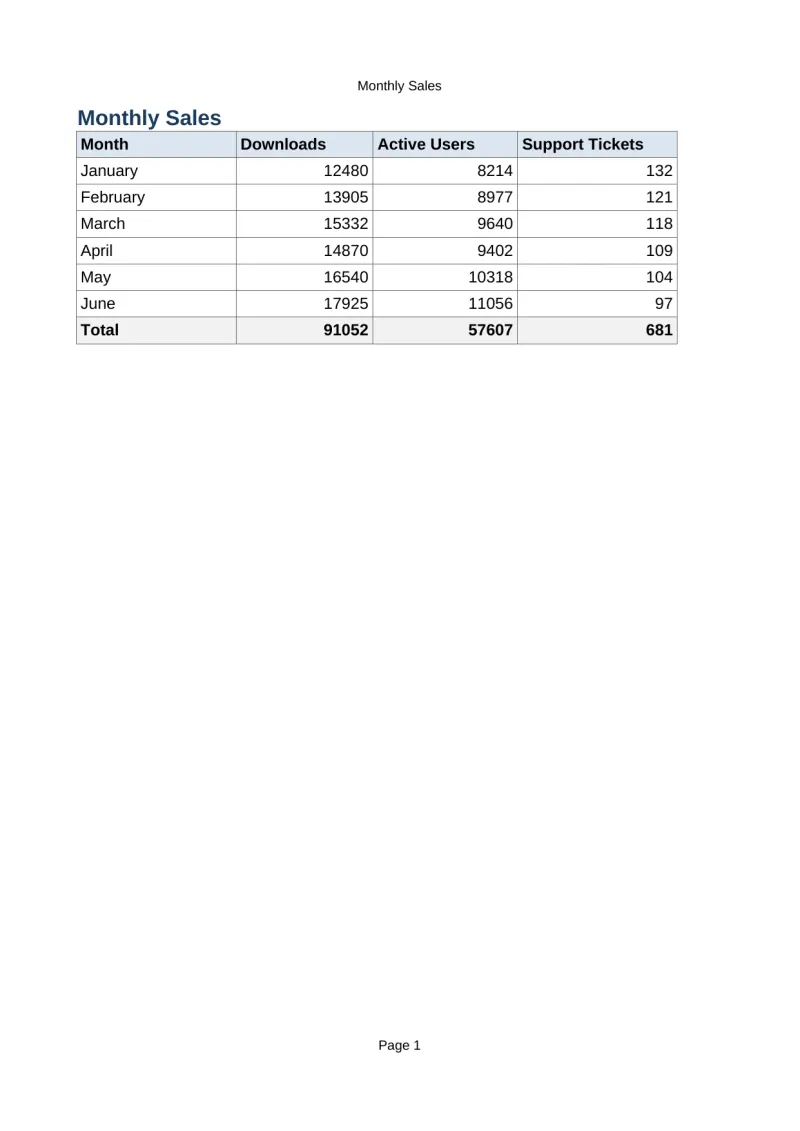
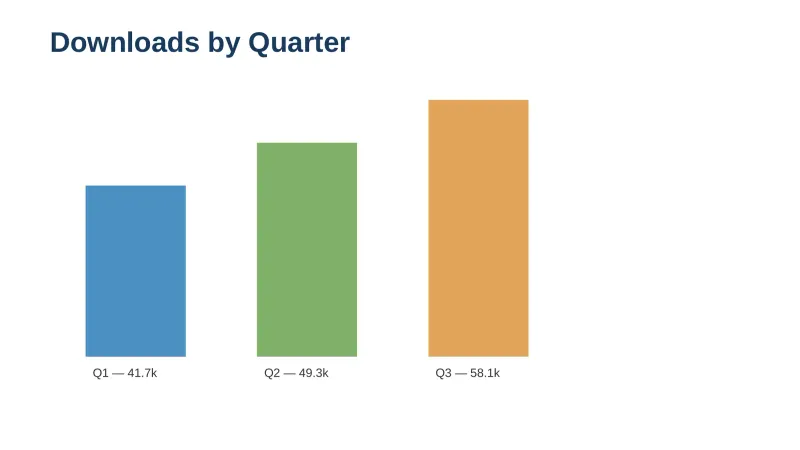
LibreOffice UI & Interface Screenshots
How to Install & Verify LibreOffice
Click direct download to fetch the LibreOffice MSI installer.
Run the MSI package and select Typical installation.
Open LibreOffice Writer, Calc, or Impress to create professional documents.
LibreOffice Version History & Build Numbers
Every LibreOffice build FileCobra has mirrored, newest first. Match the build number against the copy you already have to confirm whether you are up to date.
- Added Skia Vulkan hardware rendering speedups
Frequently Asked Questions & Verification Guide
Is LibreOffice really free for business and commercial use?
Yes. LibreOffice is released under the Mozilla Public License 2.0, so it is completely free for personal, educational, government, and commercial use — no license fees, no subscriptions, no feature paywalls. There is no separate paid edition to unlock.
Can LibreOffice open and save Microsoft Word, Excel, and PowerPoint files?
Yes. Writer, Calc, and Impress open, edit, and save .docx, .xlsx, and .pptx files natively, so you can work with Microsoft Office users without conversion tools. Formatting fidelity for complex documents keeps improving — the 26.8.1 release specifically fixed dozens of compatibility bugs — but very intricate layouts can still shift slightly.
What is the difference between the Fresh 26.8 and Still 26.2 versions?
Fresh (26.8) is the current feature line with the newest capabilities, like the Paragraph Composer and variable font support. Still (26.2) is the conservative branch for production environments, supported until 30 November 2026. Most users should take Fresh; cautious IT departments can stay on Still a little longer.
Does LibreOffice need an internet connection or an account?
No. LibreOffice works entirely offline after installation — no Microsoft-style account, no sign-in, no cloud sync, and no telemetry. The Document Foundation also keeps generative AI out of the suite by design, so your documents are never sent to a server for processing.
Can I collaborate on documents in real time like in Google Docs?
Not inside LibreOffice itself — there is no built-in simultaneous co-editing. For teams, the practical workarounds are sharing files through a synced folder, or pairing LibreOffice with a Collabora/Nextcloud server that adds web-based co-editing. If real-time collaboration is your core workflow, a cloud suite is a better fit.
What is the difference between LibreOffice and Apache OpenOffice?
LibreOffice is the actively developed fork, created in 2010 when most OpenOffice developers left to form The Document Foundation; it receives major releases twice a year. Apache OpenOffice is the original project, but it is now barely maintained. For new installations, LibreOffice is the clear choice.
How do I make LibreOffice the default app for Word and Excel files?
During installation, the wizard lets you tick the file types LibreOffice should claim (DOCX, XLSX, PPTX, and so on). If you skipped that, right-click any document, choose Open with > Choose another app, select the LibreOffice component, and check Always use this app.
Is LibreOffice safe to install?
Yes. It is open-source software built in the open by hundreds of contributors, with no bundled adware, no ads, and no usage tracking. As with any download, get it from a trustworthy source — the 64-bit MSI on this page is FileCobra's verified mirror.
Will LibreOffice run on my older Windows 10 PC?
Yes. This 64-bit build officially supports Windows 10 and Windows 11, and the suite is notably lighter than Microsoft 365, so it runs comfortably on older hardware. Installation is a standard MSI wizard that takes a couple of minutes.