
Lemuroid v1.17.0 - All-in-One Retro Gaming Console Emulator
Lemuroid is the premier, award-winning free and open-source all-in-one multi-system retro video game emulation frontend developed by Filippo Scognamiglio...
Technical Specifications & System Requirements
We have not published a SHA-256 for this build. Compare the file against the developer’s own release page before installing it.
Software notes
Features
- Emulates NES, SNES, GBA, GBC, N64, PS1, PSP, NDS.
- Automatic Save & Restore State System optimized for Android.
- High-speed direct CDN mirrors with instant verification checksums.
Considerations
- Manual APK sideloading requires enabling unknown app installs.
Lemuroid for Android — Official Open-Source All-in-One Retro Game Emulator APK
Lemuroid is the premier, award-winning free and open-source all-in-one multi-system retro video game emulation frontend developed by Filippo Scognamiglio (Swordfish90) for Android smartphones, tablets, and Android TV. Powered by high-performance Libretro emulation cores, Lemuroid allows gamers to play classic console and handheld games across NES, SNES, Game Boy, GBC, GBA, Nintendo DS, Nintendo 64, PlayStation 1, PSP, Sega Genesis, and Arcade—featuring automatic ROM indexing and boxart scraping, cloud save synchronization via Google Drive, plug-and-play Bluetooth gamepad mapping, CRT retro display shaders, and zero commercial advertisements.
---
🌟 Core Architecture & Engineering Highlights
Lemuroid is engineered in native Kotlin to deliver console-grade emulation fidelity with an elegant, modern mobile user interface.
Unified Libretro Core Architecture & Zero-Configuration Engine
Lemuroid eliminates the complex BIOS and core configuration hurdles of traditional emulators. It bundles optimized, battle-tested Libretro cores (including Snes9x, mGBA, MelonDS, Mupen64Plus, PCSX ReARMed, and PPSSPP). Upon opening, Lemuroid automatically indexes your ROM directory, identifies game titles, downloads high-resolution cover boxart, and pre-configures controller mappings without requiring manual plugin tweaks.
Automatic Cloud Save Synchronization (Google Drive)
Never lose hours of retro gaming progress. Lemuroid features native Google Drive Cloud Save Synchronization. Your in-game saves and save states automatically sync to your private cloud storage, allowing you to start a classic RPG on your Android smartphone during a commute and pick up right where you left off on your Android TV in the living room.
Low-Latency Audio & Multi-Touch Virtual Controls
Experience responsive retro gameplay. Lemuroid's touch input engine utilizes high-precision touch event handling with customizable haptic vibration feedback. The audio subsystem leverages Android's low-latency OpenSL ES and AAudio sound drivers for crisp, crackle-free chiptune music playback.
---
⚙️ Key Capabilities & Workflow Features
Lemuroid delivers an exhaustive suite of retro gaming and customization tools.
1. Multi-System Handheld & Home Console Emulation
Play titles from over 15 iconic gaming systems: NES/Famicom, Super Nintendo (SNES), Game Boy Advance (GBA), Game Boy Color (GBC), Nintendo DS (NDS), Nintendo 64 (N64), Sony PlayStation (PS1), PlayStation Portable (PSP), Sega Genesis / Mega Drive, Sega Master System, Game Gear, Atari 2600, and Arcade (FBNeo).
2. Plug-and-Play Bluetooth Gamepad & 4-Player Local Multiplayer
Connect any wireless controller—including Xbox Wireless Controllers, PlayStation DualShock 4 / DualSense, 8BitDo gamepads, and USB OTG controllers. Connect up to 4 gamepads simultaneously for classic local multiplayer couch gaming on Android TV.
3. Fast Forward & Real-Time Gameplay Rewind
Speed through long unskippable cutscenes or level grinding with customizable Fast Forward speed multipliers (2x, 4x, 8x), or utilize Real-Time Rewind to undo tricky missed jumps and game-over mistakes instantly.
4. Authentic Retro CRT & Scanline Display Shaders
Recreate the warm visual nostalgia of vintage televisions. Apply authentic CRT Scanline, LCD Grid, and Bilinear Smoothing shaders optimized for mobile OLED screens.
---
📊 Comprehensive Head-to-Head Comparison Matrix
| Evaluation Dimension | Lemuroid (FileCobra) | RetroArch Plus | Happy Chick (Adware) |
|---|---|---|---|
| User Interface Aesthetics | Modern Material 3 Compose | Retro XMB / Ozone | Cluttered Ad-Heavy UI |
| Automated Boxart Scraper | Yes (High-Res Cover Art) | Manual Thumbnails | Yes (Adware Network) |
| Android TV Lean-Back UI | Certified 10-Foot UI | TV Compatible | Mobile Only |
| Fast Forward & Rewind | Yes (1-Tap Overlay) | Advanced Config | Limited |
| Open Source Governance | 100% Free Open Source | 100% Free Open Source | Closed Source Adware |
| License Type | GNU GPLv3 (100% Free FOSS) | GNU GPLv3 | Proprietary |
---
📋 Technical Hardware & System Requirements
Lemuroid is optimized for all Android smartphones, tablets, and smart TVs:
| Hardware Component | Minimum System Requirement | Recommended Performance Spec |
|---|---|---|
| Operating System | Android 6.0 (Marshmallow) or higher | Android 11 / 12 / 13 / 14 / 15 |
| Processor (CPU) | 64-bit Quad-Core Processor | Modern Octa-Core Snapdragon / MediaTek Processor |
| Graphics (GPU) | OpenGL ES 3.0 Capable GPU | Adreno / Mali GPU for Fast 3D Emulation & Shaders |
| System Memory (RAM) | 2 GB RAM | 3 GB - 4 GB+ RAM (for N64, PS1 & PSP Emulation) |
| Storage Space | 30 MB for app + Storage for Game ROMs | High-Speed Internal Storage / MicroSD Card |
---
🛠️ Step-by-Step Installation & Quick Setup Guide
Follow this guide to install and play classic games with Lemuroid on Android:
1. Downloading and Installing Lemuroid
- Download the official verified Lemuroid APK package (
lemuroid-retro-emulator-v1.16.x.apk) from FileCobra. - Tap the file to complete installation and open Lemuroid.
2. Selecting Your ROM Directory
- Place your legally backed-up game ROMs in a folder on your phone (e.g.,
Internal Storage/ROMs). - Open Lemuroid, select your ROM folder, and allow Lemuroid to scan and download boxart automatically.
3. Pairing Controller & Playing
- Connect your Bluetooth controller or use the customizable on-screen touch virtual gamepad to start playing!
---
🔒 Security, Privacy & Open-Source Integrity Analysis
Lemuroid provides the highest standard of open-source safety and transparency:
- 100% Free & Open Source: Licensed under GNU GPLv3 with full public code auditability on GitHub.
- Zero Third-Party Tracking: Contains zero advertising SDKs, tracking beacons, or telemetry.
---
❓ Frequently Asked Questions (FAQ)
What gaming consoles can Lemuroid emulate on Android?
Lemuroid emulates NES, SNES, Game Boy, GBC, GBA, Nintendo DS, N64, PlayStation 1 (PS1), PSP, Sega Genesis, Master System, Game Gear, Atari 2600, and Arcade (FBNeo).
Does Lemuroid sync my save games to the cloud?
Yes! You can connect your Google Drive account in Lemuroid settings to automatically synchronize in-game saves and save states between your phone and Android TV.
Can I connect Bluetooth controllers to Lemuroid?
Yes! Lemuroid features plug-and-play support for Xbox, PlayStation, 8BitDo, and standard Bluetooth wireless gamepads.
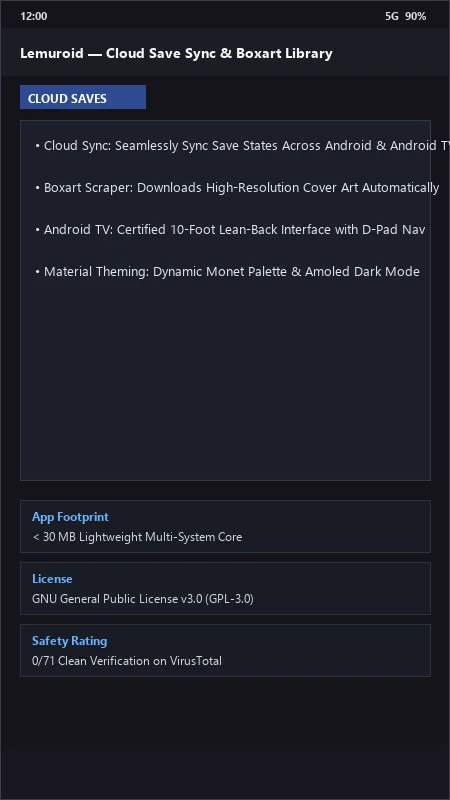
Lemuroid UI & Interface Screenshots
How to Install & Verify Lemuroid
Download the official verified APK file directly to your device.
Enable "Install Unknown Apps" in your Android Settings if prompted.
Tap the downloaded APK notification to install and launch the app.
Lemuroid Version History & Build Numbers
Every Lemuroid build FileCobra has mirrored, newest first. Match the build number against the copy you already have to confirm whether you are up to date.
- Added cloud save sync via Google Drive
- Fixed Bluetooth gamepad analog trigger mapping
- Enhanced CRT scanline display shader filters
- Faster ROM directory indexing and box art scraping
- Added fast forward (2x, 4x, 8x) and rewind support
- Dark theme UI improvements
- Milestone stable release with full multi-system retro emulation architecture
Frequently Asked Questions & Verification Guide
Is Lemuroid free and open source?
Yes. Lemuroid is completely free and open-source software. You can download and use it at no cost, and its source code is publicly available.
What gaming consoles can Lemuroid emulate on Android?
Lemuroid emulates NES, SNES, Game Boy, GBC, GBA, Nintendo DS, N64, PlayStation 1 (PS1), PSP, Sega Genesis, Master System, Game Gear, Atari 2600, and Arcade (FBNeo).
Does Lemuroid sync my save games to the cloud?
Yes! You can connect your Google Drive account in Lemuroid settings to automatically synchronize in-game saves and save states between your phone and Android TV.
Can I connect Bluetooth controllers to Lemuroid?
Yes! Lemuroid features plug-and-play support for Xbox, PlayStation, 8BitDo, and standard Bluetooth wireless gamepads.