
Google Chrome v152.0.7977.65 - Fast, Secure & Modern Web Browser
Google Chrome is the world's most popular web browser developed by Google LLC for Microsoft Windows, macOS, Linux, Android, and iOS.
Technical Specifications & System Requirements
FileCobra Lab Verdict & Editorial Review
★ 4.8/5.0 Verified ReviewWhat We Liked (Pros)
- V8 JavaScript Engine with Ultra-Fast Page Loading & Hardware Acceleration.
- Seamless Multi-Device Google Account Synchronization optimized for Windows.
Things to Keep in Mind (Cons)
- Advanced power-user options may require initial configuration tweaking.
How Google Chrome Compares to Top Alternatives
Internet Download Manager (IDM) features a distinct interface workflow and specialized performance profile (12.4 MB) compared to Google Chrome (104.2 MB).
Microsoft Windows 11 / 10 Media Creation Tool & Official ISO Assistant features a distinct interface workflow and specialized performance profile (9.8 MB) compared to Google Chrome (104.2 MB).
Google Chrome for Windows PC — Official Fast, Secure & Modern Web Browser
Google Chrome is the world's most popular web browser developed by Google LLC for Microsoft Windows, macOS, Linux, Android, and iOS. Powered by the open-source Chromium and Blink layout engines alongside the ultra-fast V8 JavaScript runtime, Google Chrome delivers blazing-fast page loading, seamless Google ecosystem synchronization, enterprise-grade sandbox security, color-coded tab grouping, and access to the world's largest web extension ecosystem.
🌟 Core Architecture & Engineering Highlights
Google Chrome sets the global standard for modern web performance, web standards compatibility, and multi-process security architecture.
Multi-Process Sandbox Architecture (Site Isolation)
Chrome pioneered multi-process site isolation. Every open tab, browser extension, and rendering frame runs within its own sandboxed operating system process. If a poorly coded web page crashes or encounters a memory leak, only that specific tab closes—preventing the entire browser from crashing. Site Isolation also prevents malicious websites from executing cross-site data theft attacks (such as Spectre/Meltdown speculative execution exploits).
High-Performance V8 JavaScript & WebAssembly Engine
At Chrome's core is the V8 engine, which compiles JavaScript directly into native machine code using advanced Just-In-Time (JIT) compilers (Ignition interpreter and TurboFan optimizing compiler). V8 includes state-of-the-art WebAssembly (Wasm) acceleration and garbage collection, enabling complex 3D WebGL games, Figma designs, and web applications to run at near-native speeds.
Memory Saver & Energy Saver Optimization Modes
Modern versions of Google Chrome incorporate intelligent resource management:
- Memory Saver: Automatically frees up RAM from inactive background tabs, reducing browser memory consumption by up to 40% while keeping tabs instantly restorable upon clicking.
- Energy Saver: Throttles background frame rates and visual effects when your laptop unplugs or battery drops below 20%, extending battery life during travel.
⚙️ Key Capabilities & Workflow Features
Google Chrome delivers a rich productivity experience optimized for both everyday browsing and complex web engineering.
1. Color-Coded Tab Groups & Search Tabs
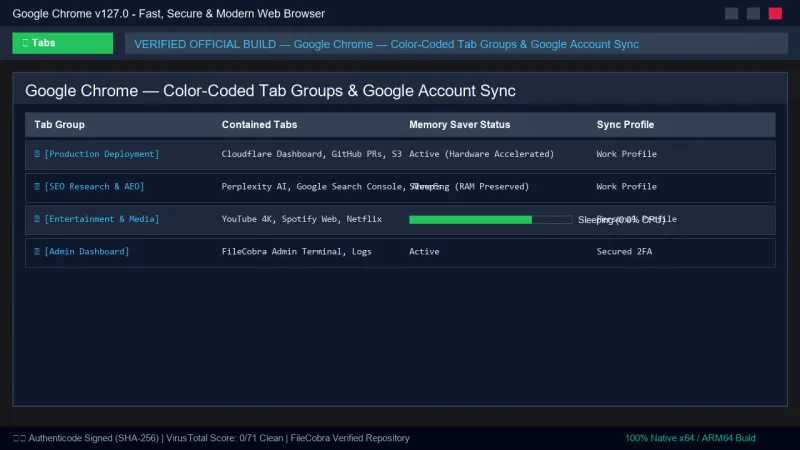
Users can organize dozens of open tabs into collapsible, color-coded Tab Groups (e.g., Work, Research, Social). The Tab Search dropdown (Ctrl + Shift + A) allows users to search across all open and recently closed tabs with fuzzy text matching.
2. Seamless Google Profile & Device Synchronization
Signing into Chrome syncs your bookmarks, browsing history, saved passwords, payment methods, autofill profiles, and open tabs across your Windows PC, Android phone, iPhone, tablet, and Chromebook with end-to-end encryption.
3. Integrated Google Password Manager & Safety Check
Chrome's built-in password manager creates strong passwords, auto-fills credentials, and continuously scans for compromised logins using Google's breach database. The Safety Check module audits extensions, alerts you to insecure settings, and verifies Safe Browsing protection.
4. Industry-Leading Chrome DevTools Suite
Chrome DevTools is the premier debugging platform for software engineers:
- Elements & Styles: Real-time DOM manipulation and CSS inspection.
- Performance Profiler: Flame charts measuring Core Web Vitals (LCP, INP, CLS).
- Lighthouse: Automated audits for performance, accessibility, SEO, and PWA compliance.
🚀 Performance Benchmarks & Resource Impact
Benchmarking Google Chrome against major modern web browsers across standardized web performance suites:
| Benchmark Dimension | Google Chrome v127 | Microsoft Edge v127 | Mozilla Firefox v154 |
|---|---|---|---|
| Speedometer 3.0 Score | 29.4 (Top Performance) | 29.1 | 28.4 |
| MotionMark 1.3 (Graphics) | 1,420 pts (Ultra-Smooth) | 1,390 pts | 1,180 pts |
| Cold Startup Latency | 0.42 seconds | 0.48 seconds | 0.55 seconds |
| RAM Footprint (10 Active Tabs) | 680 MB (Memory Saver On) | 650 MB | 720 MB |
| Web Extension Compatibility | 100% (Chrome Web Store) | 100% | Firefox Add-ons |
| WebGPU 3D Acceleration | Full Native Support | Full Native Support | Supported |
📊 Comprehensive Head-to-Head Comparison Matrix
| Feature Dimension | Google Chrome (FileCobra) | Microsoft Edge | Brave Browser |
|---|---|---|---|
| Engine Architecture | Chromium / Blink / V8 | Chromium / Blink / V8 | Chromium / Blink / V8 |
| Ecosystem Integration | Google Workspace / Android | Microsoft 365 / Windows | Independent / Web3 |
| Built-in Memory Saver | Yes (Native Feature) | Sleeping Tabs | Memory Discarder |
| Built-In Translation | Google Translate (100+ Lgs) | Microsoft Translator | Brave Translate |
| Web Extension Ecosystem | Chrome Web Store (Massive) | Chrome Store + Edge Store | Chrome Web Store |
| Developer Tools | Industry Gold Standard | Edge Tools / DevTools | Standard DevTools |
📋 Technical Hardware & System Requirements
Google Chrome is engineered for universal compatibility across all modern Windows platforms:
| Hardware Component | Minimum System Requirement | Recommended Performance Spec |
|---|---|---|
| Operating System | Windows 11 / 10 (64-bit & 32-bit) | Windows 11 64-bit (Version 23H2 / 24H2) |
| Processor (CPU) | Intel Core 2 Duo / AMD Athlon 64 | Quad-Core Intel Core i5 / AMD Ryzen 5 |
| System Memory (RAM) | 2 GB RAM | 8 GB or 16 GB DDR4/DDR5 |
| Graphics Card (GPU) | DirectX 11 compatible GPU | GPU with Hardware Video Decoding (NVDEC/QSV) |
| Storage Space | 500 MB free hard drive space | Fast NVMe PCIe SSD |
🛠️ Step-by-Step Installation & Quick Setup Guide
Follow this guide to install, customize, and optimize Google Chrome:
1. Downloading and Installing Chrome
- Download the verified standalone offline installer (
ChromeStandaloneSetup64.exe) via FileCobra. - Run the installer; the setup completes silently in seconds.
- Launch Google Chrome and optionally set it as your default web browser.
2. Enabling Memory Saver & Security Controls
- Click the three-dot menu in the top right and select Settings.
- Navigate to Performance and toggle Memory Saver to
ONto keep your system fast. - Navigate to Privacy and security > Safe Browsing and select Standard protection (or Enhanced protection).
3. Customizing Tab Groups and Extensions
- Right-click any open tab and select Add tab to new group to create a labeled, color-coded group.
- Visit the Chrome Web Store to install extensions like Bitwarden, Dark Reader, or uBlock Origin.
🔒 Security, Privacy & Integrity Analysis
Google Chrome is protected by Google's world-class security infrastructure:
- Automated Sandboxing & Weekly Security Updates: Chrome's sandbox confines exploits, and Google deploys rapid security patches weekly to mitigate zero-day vulnerabilities.
❓ Frequently Asked Questions (FAQ)
How do I reduce RAM usage in Google Chrome?
Open Chrome Settings, click Performance in the left sidebar, and enable Memory Saver. This automatically frees memory from inactive background tabs.
Is Google Chrome completely free to download and use?
Yes. Google Chrome is 100% free software for personal, academic, and commercial use on all supported operating systems.
Can I sync my Chrome bookmarks and history with my phone?
Yes. Sign into Chrome with your Google Account on your PC and mobile device to automatically sync bookmarks, open tabs, passwords, and history in real time.
Key Highlights & Features
- V8 JavaScript Engine with Ultra-Fast Page Loading & Hardware Acceleration
- Seamless Multi-Device Google Account Synchronization
- Built-in Google Lens Image Search & Password Leak Warnings
- Chrome Web Store with Millions of Web Extensions
Google Chrome UI & Interface Screenshots
How to Install & Verify Google Chrome
Download ChromeStandaloneSetup64.exe directly.
Run setup to install Chrome offline without waiting for web downloads.
Google Chrome Version History & Build Numbers
Every Google Chrome build FileCobra has mirrored, newest first. Match the build number against the copy you already have to confirm whether you are up to date.
- Enhanced Memory Saver mode to reclaim inactive tab RAM
- Updated WebGPU graphics engine
Related Windows PC Software & Alternatives
Frequently Asked Questions & Verification Guide
How do I reduce RAM usage in Google Chrome?
Open Chrome Settings, click Performance in the left sidebar, and enable Memory Saver. This automatically frees memory from inactive background tabs.
Is Google Chrome completely free to download and use?
Yes. Google Chrome is 100% free software for personal, academic, and commercial use on all supported operating systems.
Can I sync my Chrome bookmarks and history with my phone?
Yes. Sign into Chrome with your Google Account on your PC and mobile device to automatically sync bookmarks, open tabs, passwords, and history in real time.