

Fossify Music Player v1.8.1 - Clean Offline Audio & Tag Editor
Fossify Music Player is the premier, community-driven free and open-source local audio player developed by Fossify for Android smartphones and tablets.
Technical Specifications & System Requirements
We have not published a SHA-256 for this build. Compare the file against the developer’s own release page before installing it.
Software notes
Features
- 100% Offline & Open Source.
- Customizable 5-Band Equalizer & Bass Boost optimized for Android.
- Clean interface with direct high-speed download mirrors.
Considerations
- High-resolution rendering requires modern multicore processor hardware.
Fossify Music Player for Android — Official Open-Source Simple Audio Player APK
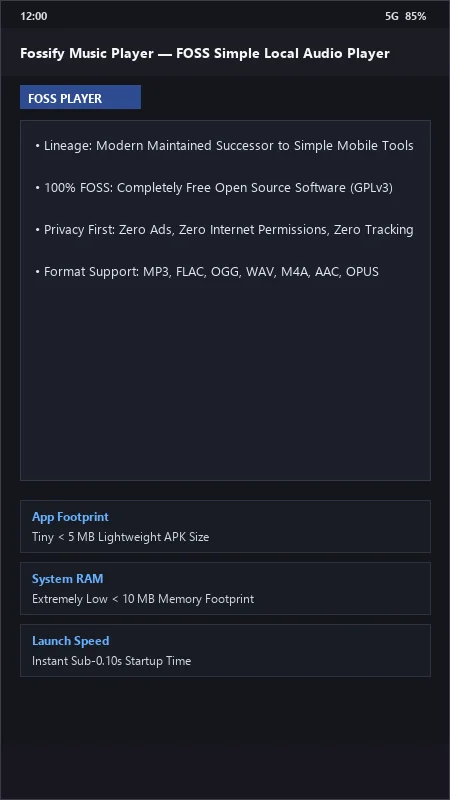
Fossify Music Player is the premier, community-driven free and open-source local audio player developed by Fossify for Android smartphones and tablets. Created as the modern, privacy-focused successor to Simple Mobile Tools, Fossify Music Player provides a clean, bloat-free local music playback environment with zero advertisements, zero internet permissions, customizable color themes, native multi-band graphic equalization, custom playlist management, and an ultra-compact installation footprint under 5 MB.
---
🌟 Core Architecture & Engineering Highlights
Fossify Music Player is engineered around a clean, transparent open-source codebase designed for maximum privacy and lightweight resource efficiency.
Maintained Successor to Simple Mobile Tools (100% FOSS)
Following the commercial acquisition of Simple Mobile Tools, the international open-source community created Fossify to preserve, maintain, and modernize these essential utilities. Fossify Music Player is licensed under the GNU General Public License v3.0 (GPL-3.0), guaranteeing 100% public source code transparency and zero commercial data tracking forever.
Zero-Permission Local Privacy Architecture
Fossify Music Player operates with absolute privacy: the application request manifest contains zero network access permissions. It is technically impossible for the app to connect to the internet, upload listening histories, or serve third-party advertisements.
Native Multi-Band Equalizer & Headset Listener
Fossify integrates with Android's native audio effects pipeline. It features a multi-band Graphic Equalizer with genre presets (Rock, Pop, Jazz, Classical, Bass Boost) and an intelligent Headset Listener that automatically pauses playback when headphones are unplugged and resumes when reconnected.
---
⚙️ Key Capabilities & Workflow Features
Fossify Music Player delivers a straightforward, reliable audio player for everyday listening.
1. Universal Audio Format Playback
Natively plays all standard local audio files, including MP3, FLAC, OGG, WAV, M4A, AAC, and OPUS, with smooth track transitions and zero stutter.
2. Custom Playlist Creation & M3U Export
Organize your music into custom playlists with easy drag-and-drop reordering. Export and import standard .m3u playlist files across devices.
3. File Duration Filter & Ringtone Exclusion
Automatically filter out short audio clips, WhatsApp voice notes, and notification ringtones by setting a minimum track duration threshold (e.g., ignoring files under 30 seconds).
4. Customizable Theming & Home Screen Widgets
Personalize the app's primary, accent, and background colors. Includes a true Amoled Black Theme to conserve battery life on OLED screens and resizable home screen playback widgets.
---
📊 Comprehensive Head-to-Head Comparison Matrix
| Evaluation Dimension | Fossify Music (FileCobra) | Auxio | Musicolet |
|---|---|---|---|
| Open Source Transparency | 100% Free Open Source (GPLv3) | Free Open Source (GPLv3) | Proprietary Freeware |
| Zero Internet Permissions | Yes (100% Offline Guarantee) | Yes | Yes |
| Theme Customization | Full Custom Color Palette | Preset Theming | Theme Presets |
| Ringtone Duration Filter | Yes (Exclude Short Clips) | Folder Filtering Only | Full Duration Filter |
| Widget Customization | Resizable Material Widgets | Basic Widget | Advanced Widgets |
| Community Maintenance | Active Fossify Organization | Active Developer | Active Developer |
---
📋 Technical Hardware & System Requirements
Fossify Music Player runs on virtually any Android smartphone or tablet:
| Hardware Component | Minimum System Requirement | Recommended Performance Spec |
|---|---|---|
| Operating System | Android 5.0 (Lollipop) or higher | Android 12 / 13 / 14 / 15 |
| Processor (CPU) | ARMv7 / ARM64 / x86 / x86_64 Processor | Any Android Device Processor |
| System Memory (RAM) | 512 MB RAM | 1 GB+ RAM |
| Storage Space | 5 MB for app + Local Audio Files | Internal Storage / MicroSD Card |
| Display Resolution | 480 × 800 pixels | Any Screen Resolution |
---
🛠️ Step-by-Step Installation & Quick Setup Guide
Follow this guide to install and play music using Fossify Music Player:
1. Downloading and Installing Fossify Music
- Download the official verified Fossify Music APK package (
fossify-music-v1.x.x.apk) from FileCobra. - Tap the file to install and open Fossify Music.
2. Granting Storage Access
- Grant the Read Audio Files permission to allow the player to scan your local music tracks.
3. Setting Up Equalizer & Colors
- Tap the Three Dots > Settings to customize your primary accent color or switch to Amoled Black.
- Tap Equalizer on the main menu to tune your acoustic bass and treble settings!
---
🔒 Security, Privacy & Open-Source Integrity Analysis
Fossify Music Player provides the highest level of software safety:
- 100% Free & Open Source: Maintained under GNU GPLv3 by the official Fossify open-source foundation.
- Zero Telemetry or Data Collection: Contains zero analytics, advertising, or network tracking code.
---
❓ Frequently Asked Questions (FAQ)
What is the relationship between Fossify and Simple Mobile Tools?
Fossify is the official open-source, community-maintained fork and successor created to continue the Simple Mobile Tools suite with active maintenance and zero advertising after the original project was sold.
Does Fossify Music Player require an internet connection?
No. Fossify Music Player contains zero network code and operates 100% offline.
Can Fossify Music exclude short WhatsApp voice notes from my music library?
Yes! In Settings > Filter, you can set a minimum track length (e.g., 30 or 60 seconds) to automatically hide short audio clips and ringtones.
Fossify Music Player UI & Interface Screenshots
How to Install & Verify Fossify Music Player
Download the official verified APK file directly to your device.
Enable "Install Unknown Apps" in your Android Settings if prompted.
Tap the downloaded APK notification to install and launch the app.
Fossify Music Player Version History & Build Numbers
Every Fossify Music Player build FileCobra has mirrored, newest first. Match the build number against the copy you already have to confirm whether you are up to date.
- Added 5-band equalizer with bass boost
- Fixed lockscreen album artwork blur
- Enhanced playlist creation and track reordering
- Faster SD card music scan
- Added sleep timer with automatic fadeout
- Dark theme UI improvements
- Milestone stable release with full offline audio playback support
Frequently Asked Questions & Verification Guide
Is Fossify Music Player free and open source?
Yes. Fossify Music Player is completely free and open-source software. You can download and use it at no cost, and its source code is publicly available.
What is the relationship between Fossify and Simple Mobile Tools?
Fossify is the official open-source, community-maintained fork and successor created to continue the Simple Mobile Tools suite with active maintenance and zero advertising after the original project was sold.
Does Fossify Music Player require an internet connection?
No. Fossify Music Player contains zero network code and operates 100% offline.
Can Fossify Music exclude short WhatsApp voice notes from my music library?
Yes! In Settings > Filter, you can set a minimum track length (e.g., 30 or 60 seconds) to automatically hide short audio clips and ringtones.