

Epic Games Launcher v16.11.0 - Free Weekly Games & Unreal Engine Store
The Epic Games Launcher is the premier digital PC storefront, gaming platform, and Unreal Engine 5 development hub created by Epic Games for Microsoft...
Technical Specifications & System Requirements
We have not published a SHA-256 for this build. Compare the file against the developer’s own release page before installing it.
Software notes
Features
- Free AAA & Indie PC Games Claimable Every Single Thursday.
- Home to Fortnite, Rocket League, Fall Guys & Unreal Engine 5 optimized for Windows.
- High-speed direct CDN mirrors with instant verification checksums.
Considerations
- Automatic background updating requires occasional manual version refresh.
Epic Games Launcher for Windows PC — Official Unreal Engine Hub & Gaming Storefront
The Epic Games Launcher is the premier digital PC storefront, gaming platform, and Unreal Engine 5 development hub created by Epic Games for Microsoft Windows and macOS. Powering the global gaming community, the launcher provides access to mega-hit titles like Fortnite, Rocket League, and Fall Guys, a curated catalog of major AAA and indie releases, famous Weekly Free PC Games, and the central management console for downloading Unreal Engine versions, Megascans assets, and developer tools.
---
🌟 Core Architecture & Engineering Highlights
The Epic Games Launcher is built with a high-performance desktop framework that integrates the Unreal Engine backend architecture with global cloud content distribution networks.
High-Throughput Chunk-Based CDN Ingestion
The Epic Games Launcher utilizes advanced multi-stream content distribution networks (powered by Amazon CloudFront and Fastly edge nodes). Downloads are segmented into cryptographically hashed delta chunks, allowing the client to update multi-gigabyte games by downloading only the exact modified file blocks rather than redownloading massive pak files.
Integrated Unreal Engine 5 Hub & Marketplace
For game developers, 3D artists, and architectural visualizers, the launcher serves as the official distribution engine for Unreal Engine 5. Manage multiple parallel installations of Unreal Engine (e.g., UE 5.4, 5.3, 4.27), access thousands of free Quixel Megascans photogrammetry assets, and download plugins from the Unreal Engine Marketplace.
Cloud Saves & Cross-Platform Epic Online Services (EOS)
Integrating Epic Online Services (EOS), the launcher provides cross-platform multiplayer matchmaking, friends lists, voice chat integration, and automated cloud save synchronization across PC, PlayStation, Xbox, and Nintendo Switch ecosystems.
---
⚙️ Key Capabilities & Workflow Features
The Epic Games Launcher offers an expansive suite of gaming and game creation capabilities.
1. Legendary Weekly Free Games Program
Every Thursday, Epic Games releases one or two fully licensed, commercial PC games completely free of charge. Once claimed, these games remain permanently in your library forever with zero expiration dates or hidden subscription fees.
2. Epic Mega Sales & 5% Epic Rewards Cashback
Enjoy industry-leading seasonal promotions, including the famous Epic Mega Sale with recurring discount coupons. Every purchase automatically earns 5% back in Epic Rewards, which can be redeemed on future game purchases or in-game cosmetics.
3. Granular Download Throttling & File Verification
Control background download speeds to prevent network congestion while working or streaming. The automated Verify tool scans local game installations using block-level SHA-256 checksums to repair corrupted files without redownloading entire games.
4. Direct Quixel Bridge & Twinmotion 3D Integration
Seamlessly install and launch real-time architectural visualization tools like Twinmotion and access the entire Quixel Megascans photorealistic 3D asset library with direct single-click export into your active Unreal Engine projects.
---
📊 Comprehensive Head-to-Head Comparison Matrix
| Evaluation Dimension | Epic Games Launcher (FileCobra) | Steam | GOG Galaxy |
|---|---|---|---|
| Exclusive Flagship Titles | Fortnite, Unreal Engine 5 | CS2, Dota 2, Half-Life | Cyberpunk, Witcher (DRM-Free) |
| Free Games Program | Guaranteed Free Weekly Games | Free-to-Play Titles | Occasional Free Giveaways |
| Cashback Rewards Program | 5% Epic Rewards on All Buys | Steam Points (Cosmetic Only) | No Cashback |
| Game Engine Management | Unreal Engine 5 / Twinmotion | None | None |
| Cross-Platform Sync | Epic Online Services (EOS) | Steam Cloud | GOG Cloud |
| Account Security & 2FA | SMS, Email, Authenticator App | Steam Guard Mobile | Email 2FA |
---
📋 Technical Hardware & System Requirements
The Epic Games Launcher runs smoothly on all modern Windows gaming PCs:
| Hardware Component | Minimum System Requirement | Recommended Performance Spec |
|---|---|---|
| Operating System | Windows 10 / 11 (64-bit only) | Windows 11 64-bit (Version 23H2 / 24H2) |
| Processor (CPU) | Dual-Core 2.0 GHz x64 Processor | Multi-core Intel Core i5 / AMD Ryzen 5 or higher |
| System Memory (RAM) | 2 GB RAM | 8 GB - 16 GB RAM (for Game Development) |
| Storage Space | 1 GB for launcher installation | High-speed NVMe PCIe SSD for Games/UE5 |
| Graphics (GPU) | DirectX 11 compatible GPU | DirectX 12 / Vulkan capable GPU |
---
🛠️ Step-by-Step Installation & Quick Setup Guide
Follow this guide to install and configure the Epic Games Launcher:
1. Downloading and Installing the Launcher
- Download the official verified standalone installer (
EpicInstaller.msi) from FileCobra. - Launch the installer, select your preferred installation folder, and allow the client to download initial components.
2. Logging In & Claiming Your First Free Game
- Sign in with your Epic Games account (or log in via Google, Xbox, PlayStation, Nintendo, or Steam).
- Enable Two-Factor Authentication (2FA) in your Account Security settings to unlock free games and Fortnite gifting.
- Navigate to the Store tab, scroll to the Free Games section, and click on this week's free title to add it permanently to your library.
3. Configuring Game Installations
- Click Library to view your claimed and purchased titles.
- Click Install on any game and select your high-speed SSD partition to begin high-speed downloading!
---
🔒 Security, Privacy & Platform Integrity Analysis
Epic Games maintains top-tier cybersecurity protocols across its platform:
- Two-Factor Authentication (2FA): Enforces industry-standard TOTP authenticator app and SMS verification.
- Enterprise CDN Security: All game binaries and engine updates are signed with valid digital certificates and served over encrypted HTTPS streams.
---
❓ Frequently Asked Questions (FAQ)
Are the weekly free games on the Epic Games Launcher really free forever?
Yes! When you claim a free game during its featured week on the Epic Games Store, the game is added permanently to your personal account library with zero subscription fees or time limits.
Can I install Unreal Engine 5 without installing games?
Yes. The Epic Games Launcher has a dedicated Unreal Engine tab where you can download, manage, and launch Unreal Engine versions, sample projects, and marketplace assets independently of game installations.
How do I move installed Epic games to another hard drive?
You can easily move games by navigating to Library, clicking the three dots (...) next to the game title, selecting Manage, and clicking Move to choose a new destination folder on another drive.
Epic Games Launcher UI & Interface Screenshots
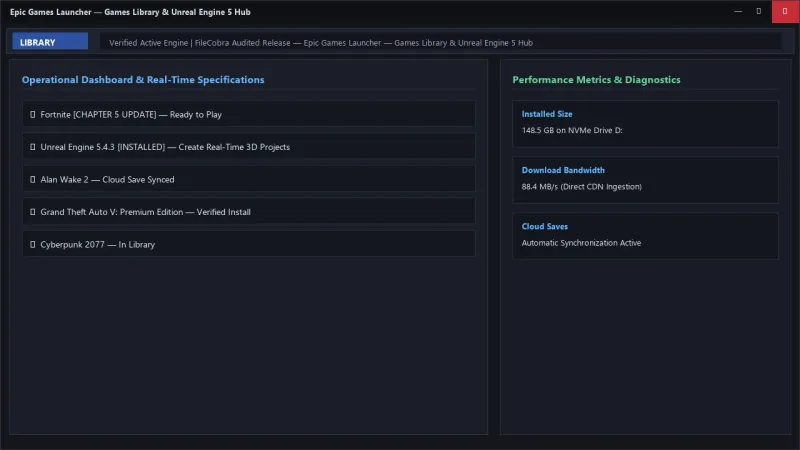
How to Install & Verify Epic Games Launcher
Download EpicGamesLauncherInstaller.msi directly.
Run setup, sign in, and claim free weekly PC games directly to your account.
Frequently Asked Questions & Verification Guide
Is Epic Games Launcher free?
Yes. Epic Games Launcher is freeware, so it is free to download and use at no cost. It is proprietary software from Epic Games Inc. (Freeware) rather than open source, so its source code is not publicly available.
Are the weekly free games on the Epic Games Launcher really free forever?
Yes! When you claim a free game during its featured week on the Epic Games Store, the game is added permanently to your personal account library with zero subscription fees or time limits.
Can I install Unreal Engine 5 without installing games?
Yes. The Epic Games Launcher has a dedicated Unreal Engine tab where you can download, manage, and launch Unreal Engine versions, sample projects, and marketplace assets independently of game installations.
How do I move installed Epic games to another hard drive?
You can easily move games by navigating to Library, clicking the three dots (...) next to the game title, selecting Manage, and clicking Move to choose a new destination folder on another drive.