

Dolphin Emulator v2407 - Nintendo GameCube & Wii HD Emulator
Dolphin Emulator is the premier, globally acclaimed open-source Nintendo GameCube and Wii emulator developed by the Dolphin Community for Microsoft Windows...
Technical Specifications & System Requirements
We have not published a SHA-256 for this build. Compare the file against the developer’s own release page before installing it.
Software notes
Features
- Render GameCube & Wii Games in Crisp 4K / 60FPS HD with Anti-Aliasing.
- Full Support for Real Wii Remotes, Mayflash GameCube Adapters & Xbox/PS5 Controllers optimized for Windows.
- High-speed direct CDN mirrors with instant verification checksums.
Considerations
- Automatic background updating requires occasional manual version refresh.
Dolphin Emulator for Windows PC — Official Open-Source Nintendo GameCube & Wii Emulator
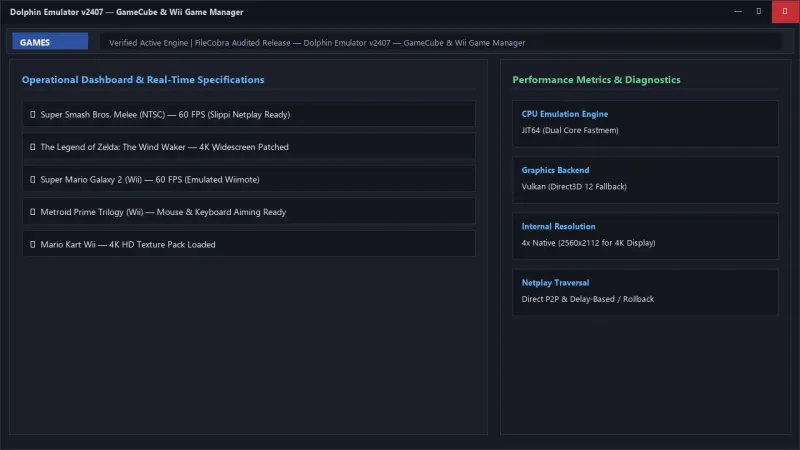
Dolphin Emulator is the premier, globally acclaimed open-source Nintendo GameCube and Wii emulator developed by the Dolphin Community for Microsoft Windows, Linux, and macOS. Achieving unprecedented levels of emulation accuracy and performance, Dolphin enables PC gamers to experience iconic masterpieces like Super Smash Bros. Melee, The Legend of Zelda: The Wind Waker, Super Mario Galaxy 1 & 2, Metroid Prime Trilogy, and Mario Kart Wii in stunning 4K and 8K resolutions, with 60 FPS widescreen patches, custom high-definition texture pack loading, and native USB GameCube controller adapter polling.
---
🌟 Core Architecture & Engineering Highlights
Dolphin's architecture is engineered around high-precision emulation of Nintendo's custom IBM PowerPC Broadway/Gekko CPUs and ATI Hollywood/Flipper graphics processors.
High-Performance JIT64 Binary Translation Engine
Dolphin features an advanced 64-bit Just-In-Time (JIT64) dynamic recompiler that translates Nintendo GameCube/Wii PowerPC instructions directly into optimized x86-64 machine code. Operating with dual-core fastmem memory management, Dolphin delivers locked 60 FPS performance while maintaining cycle-accurate instruction timing.
Hybrid Ubershaders & Modern Graphics Backends
To conquer the long-standing problem of shader compilation stuttering during gameplay, Dolphin implements groundbreaking Hybrid Ubershaders. Operating across modern Vulkan, Direct3D 11, and Direct3D 12 backends, Ubershaders emulate the entire GameCube/Wii pixel rendering pipeline on your GPU until background threads compile specialized native host shaders.
Direct USB GameCube Adapter & Bluetooth Passthrough
For competitive gaming and esports (including the Slippi Melee tournament ecosystem), Dolphin supports raw Linux/Windows USB polling for the official Nintendo Wii U / Switch GameCube Adapter. By bypassing standard Windows driver latency, Dolphin reads analog trigger and stick inputs at a blistering 1000 Hz (1 ms response time).
---
⚙️ Key Capabilities & Workflow Features
Dolphin delivers an expansive suite of graphic enhancements and control configurations.
1. 4K/8K Internal Resolution Scaling & Post-Processing
Scale internal rendering resolution up to 8x Native (~5K / 8K resolution) for ultra-crisp polygonal geometry. Apply modern post-processing filters, including FXAA, MSAA anti-aliasing, 16x anisotropic filtering, and custom color grading shaders.
2. Custom High-Definition Texture Pack Loading
Revitalize classic games with community-curated 4K HD texture packs. Dolphin loads high-resolution PNG and DDS textures directly into GPU VRAM in real time, transforming 20-year-old titles into modern visual showcases with photorealistic text, UI, and environmental textures.
3. Emulated & Real Wii Remote Bluetooth Passthrough
Connect real physical Nintendo Wii Remotes with MotionPlus and Nunchuks via Bluetooth passthrough, or emulate the infrared pointer and motion gestures using a standard mouse, keyboard, or modern PlayStation DualSense / Xbox controller.
4. Integrated P2P Rollback Netplay & Slippi Integration
Play multiplayer GameCube and Wii titles over the internet with friends via low-latency peer-to-peer Netplay. The Project Slippi fork of Dolphin provides rollback netplay, automated replay recording (.slp), and matchmaking for competitive Super Smash Bros. Melee.
---
📊 Comprehensive Head-to-Head Comparison Matrix
| Evaluation Dimension | Dolphin (FileCobra) | Cemu (Wii U) | PCSX2 (PS2) |
|---|---|---|---|
| Emulated Systems | Nintendo GameCube & Wii | Nintendo Wii U | Sony PlayStation 2 |
| Hardware Graphics API | Vulkan, Direct3D 12, D3D11, OGL | Vulkan & OpenGL | Vulkan, D3D12, D3D11 |
| Online Rollback Netplay | Native P2P & Slippi Rollback | Pretendo Network | PCSX2 Online Plugins |
| Raw USB Controller Polling | Yes (1000 Hz Native Driver) | XInput / DirectInput | DirectInput / XInput |
| Texture Replacement Engine | Dynamic Resource Prefetch | Graphic Packs (Fast) | Texture Replacement |
| License & Governance | 100% Free Open Source (GPLv2) | Free Open Source (MPL 2.0) | Free Open Source (GPLv3) |
---
📋 Technical Hardware & System Requirements
Dolphin is highly optimized and compatible with a wide range of Windows PC specifications:
| Hardware Component | Minimum System Requirement | Recommended Performance Spec |
|---|---|---|
| Operating System | Windows 10 / 11 64-bit | Windows 11 64-bit (Version 23H2 / 24H2) |
| Processor (CPU) | Dual-Core x64 CPU with SSE4.2 | Quad-Core Modern CPU (Intel Core i5 / Ryzen 5) |
| System Memory (RAM) | 2 GB RAM | 8 GB+ RAM |
| Graphics (GPU) | Direct3D 11 / Vulkan 1.1 GPU | NVIDIA RTX 3060 / AMD RX 6600 or higher (for 4K) |
| Storage Space | 200 MB for emulator + Game dumps | High-Speed NVMe PCIe SSD |
---
🛠️ Step-by-Step Installation & Quick Setup Guide
Follow this guide to install and configure Dolphin Emulator on Windows:
1. Downloading and Installing Dolphin
- Download the verified standalone setup or 7-Zip build (
dolphin-x64-v2407.exe) from FileCobra. - Extract or install Dolphin into a dedicated folder and launch
Dolphin.exe.
2. Setting Up Graphics & Vulkan Backend
- Click Graphics on the toolbar, set Backend to Vulkan, and choose your dedicated graphics card.
- Under the Enhancements tab, set Internal Resolution to 3x Native (1080p) or 4x Native (1440p / 4K).
3. Adding Games & Mapping Controllers
- Click Paths > Add and select your folder of GameCube/Wii ISO, RVZ, or WBFS game dumps.
- Click Controllers to configure your GameCube Adapter or map your Xbox / PlayStation controller buttons. Double-click any game to launch!
---
🔒 Security, Privacy & Platform Integrity Analysis
Dolphin is developed under rigorous open-source standards:
- Clean Open-Source Codebase: Licensed under GNU GPLv2 with complete public GitHub auditability.
- Zero Telemetry & Offline Execution: The emulator operates completely offline and collects zero personal data.
---
❓ Frequently Asked Questions (FAQ)
What is the RVZ format in Dolphin?
RVZ is an advanced, lossless compression format developed by the Dolphin team that shrinks GameCube and Wii game dumps by up to 70% while preserving exact cryptographic data integrity and supporting instant playback.
Do I need a Wii Sensor Bar to play Wii games on PC?
If you want to use a real physical Wii Remote pointer, you can use an inexpensive USB wireless sensor bar or two lit candles (which emit the infrared light needed by the Wiimote). Alternatively, you can map the IR pointer to your PC mouse!
Can Dolphin run at 60 FPS in games that originally ran at 30 FPS?
Yes! Dolphin includes community-curated 60 FPS Action Replay and Gecko cheat codes that unlock 60 FPS rendering in games like The Legend of Zelda: The Wind Waker and Super Mario Sunshine.
Dolphin Emulator UI & Interface Screenshots
How to Install & Verify Dolphin Emulator
Download dolphin-master-2407-160-x64.7z.
Extract with 7-Zip, run Dolphin.exe, and configure your controller to launch games.
Frequently Asked Questions & Verification Guide
Is Dolphin Emulator free and open source?
Yes. Dolphin Emulator is completely free and open-source software. You can download and use it at no cost, and its source code is publicly available.
What is the RVZ format in Dolphin?
RVZ is an advanced, lossless compression format developed by the Dolphin team that shrinks GameCube and Wii game dumps by up to 70% while preserving exact cryptographic data integrity and supporting instant playback.
Do I need a Wii Sensor Bar to play Wii games on PC?
If you want to use a real physical Wii Remote pointer, you can use an inexpensive USB wireless sensor bar or two lit candles (which emit the infrared light needed by the Wiimote). Alternatively, you can map the IR pointer to your PC mouse!
Can Dolphin run at 60 FPS in games that originally ran at 30 FPS?
Yes! Dolphin includes community-curated 60 FPS Action Replay and Gecko cheat codes that unlock 60 FPS rendering in games like The Legend of Zelda: The Wind Waker and Super Mario Sunshine.