

App Manager v4.1.0 - Full APK Inspector, Tracker Blocker & Auditor
App Manager is the premier, enterprise-grade free and open-source application management suite, package inspector, and privacy hardening toolkit developed...
Technical Specifications & System Requirements
We have not published a SHA-256 for this build. Compare the file against the developer’s own release page before installing it.
Software notes
Features
- Full Manifest, DEX, Signatures & Certificate Viewer.
- Block Individual Trackers, Activities & Services optimized for Android.
Considerations
- Requires storage permissions to manage and access local file directories.
App Manager for Android — Official Open-Source Package Auditor, Tracker Blocker & Manager APK
App Manager is the premier, enterprise-grade free and open-source application management suite, package inspector, and privacy hardening toolkit developed by Muntashir Al-Islam (MuntashirAkon) for Android smartphones, tablets, and security researchers. Combining the capabilities of a full package manager, manifest viewer, background component blocker, tracker scanner, and permissions controller, App Manager gives users uncompromised control over their device's installed software—operating across No-Root, Wireless ADB, Shizuku, and Full Root modes with zero telemetry or advertisements.
---
🌟 Core Architecture & Engineering Highlights
App Manager is engineered as the ultimate Swiss Army knife for Android package analysis, security audits, and bloatware removal.
Multi-Mode Privilege Execution Engine (No-Root / ADB / Shizuku / Root)
App Manager dynamically adapts to your device's security environment. On standard non-rooted phones, it utilizes standard system APIs; on Android 11+ devices, it pairs with Shizuku (Wireless ADB) to unlock batch operations, component inspection, and silent installs; on rooted devices (Magisk / KernelSU / APatch), it unlocks raw root capabilities to freeze system apps, block embedded advertising receivers, and modify APK signatures directly on system partitions.
Real-Time Component Blocker & Anti-Tracker Scanner
Take control of what installed applications run in the background. App Manager decodes application packages to list every Activity, Service, Broadcast Receiver, and Content Provider. Users can surgically disable aggressive background analytics daemons (such as Firebase Analytics, Facebook SDK, AppsFlyer, Mixpanel) with a single toggle while keeping the main application fully operational.
Deep Manifest Decompiler & AppOps Permission Controller
Inspect the exact internal workings of any installed APK. App Manager includes a built-in AXML decompiler that renders human-readable AndroidManifest.xml files, shared C/C++ native .so libraries, and cryptographic signing certificates. It provides direct control over Android's hidden AppOps (Application Operations) framework, allowing you to revoke background clipboard access, location polling, and sensor usage.
---
⚙️ Key Capabilities & Workflow Features
App Manager delivers an exhaustive toolkit for power users, developers, and privacy advocates.
1. Freeze & Uninstall System Bloatware
Eliminate unwanted pre-installed carrier apps, manufacturer bloatware, and battery-draining background processes. Freeze (disable) apps with a single tap, or completely uninstall them for the current user profile.
2. Complete APK, Split-APKS & App Bundle Backup
Backup any installed application to device storage: export standard standalone APKs, modern Split-APK bundles (APKS / APKM), and internal application user data (on rooted or ADB systems) with encrypted tarball compression.
3. Integrated Logcat & Real-Time System Terminal
Debug app crashes and monitor background network queries in real time using the built-in, color-coded Logcat terminal, with customizable tag filtering and regex search.
4. Custom APK Signer & Security Certificate Inspector
Inspect SHA-256 certificate fingerprints to verify whether an APK matches official upstream developers. Sign modified APK packages directly on your phone using custom RSA test keys.
---
📊 Comprehensive Head-to-Head Comparison Matrix
| Evaluation Dimension | App Manager (FileCobra) | Hail (App Freezer) | MyAPK (Play Store) |
|---|---|---|---|
| Component Blocking (Services) | Full Component Blocker | Freeze Only | Inspector Only |
| AppOps Permissions Control | Comprehensive AppOps | Basic | Read-Only |
| Manifest & Native Lib Viewer | Real-Time Decompiler | None | Basic Manifest |
| APK Signing & Modding | Built-in Signer Utility | None | None |
| Material 3 Theming | Amoled Black & Monet | Material UI | Standard Dark |
| License Type | GNU GPLv3 (100% Free FOSS) | GNU GPLv3 | Proprietary |
---
📋 Technical Hardware & System Requirements
App Manager runs smoothly across all Android smartphones, tablets, and smart TVs:
| Hardware Component | Minimum System Requirement | Recommended Performance Spec |
|---|---|---|
| Operating System | Android 5.0 (Lollipop) or higher | Android 11 / 12 / 13 / 14 / 15 |
| Processor (CPU) | ARMv7 / ARM64 / x86 / x86_64 Processor | Modern Quad-Core or Octa-Core Processor |
| System Memory (RAM) | 1 GB RAM | 2 GB+ RAM |
| Storage Space | 30 MB free disk space | High-Speed Internal Storage |
| Operation Mode | No-Root (Standard) | Shizuku (Wireless ADB) or Root for Full Capabilities |
---
🛠️ Step-by-Step Installation & Quick Setup Guide
Follow this guide to install and configure App Manager on Android:
1. Downloading and Installing App Manager
- Download the official verified App Manager APK package (
app-manager-foss-v3.x.x.apk) from FileCobra. - Tap the file to install and open App Manager.
2. Selecting Mode & Granting Permissions
- On initial launch, grant Usage Access or pair with Shizuku (or Root) to unlock elevated system inspection.
3. Blocking Trackers & Freezing Bloatware
- Select any application, tap the Components tab, and toggle OFF advertising and analytics tracking services.
- Long-press pre-installed bloatware apps on the main list to Freeze (Disable) them instantly!
---
🔒 Security, Privacy & Open-Source Integrity Analysis
App Manager is developed with the highest open-source security rigor:
- 100% Free & Open Source: Licensed under GNU GPLv3 with full public source code inspection on GitHub.
- Zero Third-Party Analytics: Contains zero tracking SDKs, analytics beacons, or telemetry.
---
❓ Frequently Asked Questions (FAQ)
Can App Manager disable background tracking SDKs in my apps?
Yes! In App Manager, tap on any app, open the "Components" tab, and you can selectively turn off tracking activities, broadcast receivers, and background analytics services.
Does App Manager work without rooting my phone?
Yes! App Manager works on standard non-rooted phones for package inspection, and pairs with Shizuku (Wireless ADB) to unlock bloatware freezing and silent backups without root.
Can App Manager backup Split-APKs (APKS bundles)?
Yes! App Manager can extract and backup modern multi-part Android App Bundles (Split-APKs) as single installable files.
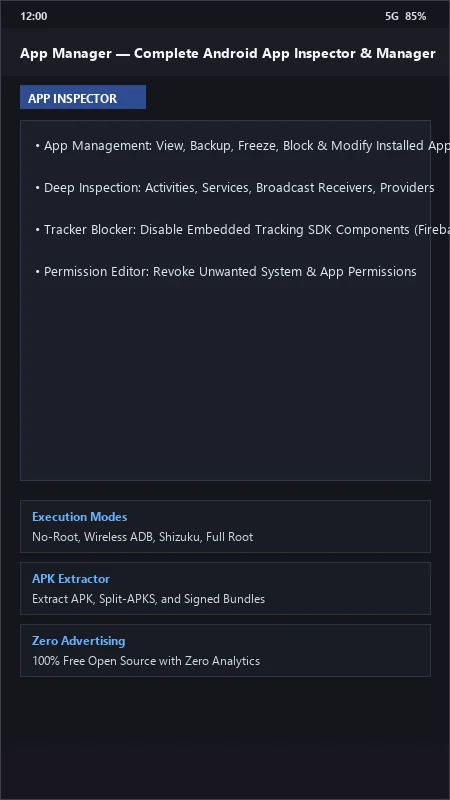
App Manager UI & Interface Screenshots
How to Install & Verify App Manager
Download the official verified APK file directly to your device.
Enable "Install Unknown Apps" in your Android Settings if prompted.
Tap the downloaded APK notification to install and launch the app.
App Manager Version History & Build Numbers
Every App Manager build FileCobra has mirrored, newest first. Match the build number against the copy you already have to confirm whether you are up to date.
- Added rootless Shizuku batch app freezer and uninstaller
- Fixed DEX signature verify
- Enhanced Exodus Privacy tracker scanner signature database
- Faster APK backup extraction
- Added activities, services, receivers, and providers toggle
- Dark AMOLED theme improvements
- Milestone stable release with full application auditing and security hardening pipeline
Frequently Asked Questions & Verification Guide
Is App Manager free and open source?
Yes. App Manager is completely free and open-source software. You can download and use it at no cost, and its source code is publicly available.
Can App Manager disable background tracking SDKs in my apps?
Yes! In App Manager, tap on any app, open the 'Components' tab, and you can selectively turn off tracking activities, broadcast receivers, and background analytics services.
Does App Manager work without rooting my phone?
Yes! App Manager works on standard non-rooted phones for package inspection, and pairs with Shizuku (Wireless ADB) to unlock bloatware freezing and silent backups without root.
Can App Manager backup Split-APKs (APKS bundles)?
Yes! App Manager can extract and backup modern multi-part Android App Bundles (Split-APKs) as single installable files.