

AnyDesk v8.0.10 - Ultra-Fast Remote Desktop & Screen Sharing
AnyDesk is an industry-leading, proprietary remote desktop software and collaborative IT support suite developed by AnyDesk Software GmbH for Microsoft...
Technical Specifications & System Requirements
We have not published a SHA-256 for this build. Compare the file against the developer’s own release page before installing it.
Software notes
AnyDesk for Windows PC — Official High-Speed Remote Desktop & IT Support Suite
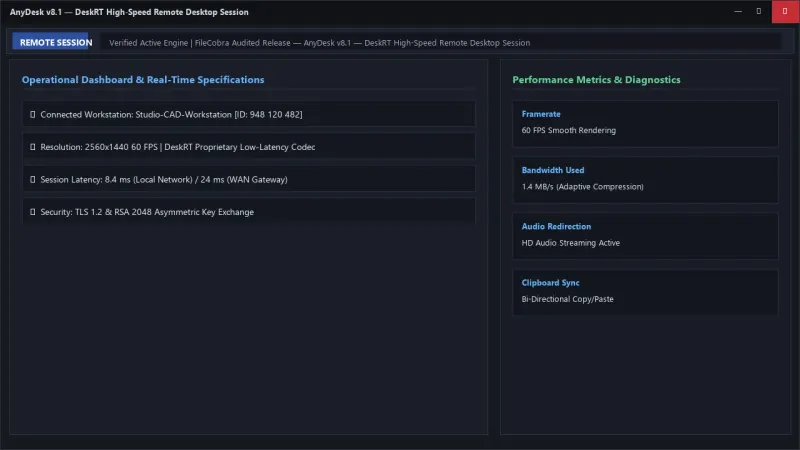
AnyDesk is an industry-leading, proprietary remote desktop software and collaborative IT support suite developed by AnyDesk Software GmbH for Microsoft Windows, macOS, Linux, Android, and iOS. Engineered around the proprietary DeskRT video codec, AnyDesk provides near-zero latency screen sharing, smooth 60 FPS remote workstation control, bi-directional file transfers, and secure unattended access across local office networks and global wide-area connections with TLS 1.2 military-grade encryption.
---
🌟 Core Architecture & Engineering Highlights
AnyDesk stands out for its high framerate and low bandwidth consumption, engineered from the ground up to outperform traditional RDP and VNC protocols.
DeskRT Low-Latency Video Compression Engine
At the core of AnyDesk is DeskRT, a specialized video codec designed specifically for graphical user interfaces. Rather than compressing full video frames, DeskRT isolates only the changing pixel rectangles (such as mouse movement, window scrolling, or text input), achieving smooth 60 FPS remote rendering over connections with as little as 100 kbps bandwidth.
TLS 1.2 Cryptographic Security & Asymmetric RSA 2048
Every AnyDesk connection is secured using banking-grade TLS 1.2 technology with RSA 2048 asymmetric key exchange to authenticate every connection session. Real-time video and control streams are encrypted with 256-bit AES encryption, preventing man-in-the-middle interception.
Direct Peer-to-Peer (P2P) Routing Architecture
When two workstations are located on the same local area network (LAN) or behind cooperative NAT gateways, AnyDesk routes data directly peer-to-peer without routing traffic through central relay servers, minimizing latency to under 10 milliseconds.
---
⚙️ Key Capabilities & Workflow Features
AnyDesk delivers a full suite of features for IT support professionals, telecommuters, and remote system administrators.
1. Ultra-Smooth Remote Desktop Access & Control
Connect to remote Windows PCs in seconds by entering the remote workstation's unique 9-digit AnyDesk ID. Experience fluid mouse responsiveness, full multi-monitor switching, and synchronized clipboard copy-pasting for text and files.
2. Dual-Pane Remote File Manager
Open a dedicated high-speed file transfer session alongside screen sharing. The dual-pane explorer interface allows IT technicians to browse local and remote directories simultaneously, transferring multi-gigabyte archives with automatic resume support.
3. Password-Protected Unattended Access
Configure Unattended Access with a salted SHA-512 master password and two-factor authentication (2FA). Access your home workstation or office CAD server while traveling without requiring someone to physically accept the connection on the remote end.
4. Interactive Whiteboard, Text Chat & Session Recording
Collaborate during support sessions with the built-in on-screen whiteboard tool (drawing arrows and highlights), chat directly with the remote user, and record complete video sessions for quality assurance and security compliance audits.
---
📊 Comprehensive Head-to-Head Comparison Matrix
| Evaluation Dimension | AnyDesk (FileCobra) | TeamViewer | RustDesk |
|---|---|---|---|
| Proprietary Codec | DeskRT (60 FPS Low Bandwidth) | Custom Codec | VP8 / VP9 / AV1 |
| Free for Personal Use | Yes (Generous Personal Tier) | Aggressive Commercial Popups | 100% Free Open Source |
| Portable Execution | Single 5 MB Standalone EXE | Requires Full Setup | Single Portable EXE |
| Self-Hosted Server Option | AnyDesk Enterprise On-Premises | Tensor Cloud Only | Self-Hosted Community Server |
| Two-Factor Authentication (2FA) | TOTP 2FA for Unattended Access | 2FA Account Level | 2FA Supported |
| Multi-Monitor Display Switch | Single-Click Switcher Tabs | Toolbar Dropdown | Toolbar Dropdown |
---
📋 Technical Hardware & System Requirements
AnyDesk is exceptionally lightweight and runs on virtually any Windows workstation:
| Hardware Component | Minimum System Requirement | Recommended Performance Spec |
|---|---|---|
| Operating System | Windows 11 / 10 / 8.1 / 7 (32-bit & 64-bit) | Windows 11 64-bit (Version 23H2 / 24H2) |
| Processor (CPU) | Dual-Core 1.0 GHz x86/x64 Processor | Modern Quad-Core Processor |
| System Memory (RAM) | 512 MB RAM | 2 GB+ RAM |
| Storage Space | 15 MB free disk space | High-speed SSD |
| Internet Connection | 100 kbps minimum bandwidth | 10 Mbps Broadband for 4K 60FPS Sessions |
---
🛠️ Step-by-Step Installation & Quick Setup Guide
Follow this guide to start remote sessions with AnyDesk:
1. Downloading and Running AnyDesk
- Download the verified lightweight binary (
AnyDesk.exe) via FileCobra. - Launch the downloaded file (AnyDesk runs immediately without mandatory installation, or click "Install AnyDesk" to install permanently).
2. Establishing Your First Remote Session
- Locate your 9-digit AnyDesk Address displayed prominently on the home screen.
- Share this address with your trusted support technician, or enter the remote computer's 9-digit address under "Remote Desk" and click Connect.
- The remote user clicks Accept to begin the live remote desktop session.
3. Setting Up Unattended Access
- Navigate to Settings > Security, check Enable Unattended Access, and set a strong master password.
- Enable Two-Factor Authentication (2FA) using Google Authenticator or Bitwarden for maximum login security.
---
🔒 Security, Privacy & Platform Integrity Analysis
AnyDesk enforces strict security safeguards:
- Banking-Grade TLS 1.2 Encryption: Protects against eavesdropping and unauthorized access with verified asymmetric RSA 2048 keys.
- Access Control List (ACL): Whitelist specific AnyDesk IDs to prevent unauthorized connection requests.
---
❓ Frequently Asked Questions (FAQ)
Is AnyDesk free to use for personal tasks?
Yes! AnyDesk is completely free for private, non-commercial tasks (such as helping family members or connecting to your personal home computer).
Can I transfer files between computers using AnyDesk?
Yes. You can copy and paste files directly via the clipboard (Ctrl+C and Ctrl+V), or open the dedicated dual-pane File Manager tab to transfer large folders.
Is AnyDesk secure against unauthorized access?
Yes. Unattended access is protected by salted SHA-512 password hashing, optional 2FA, and strict Access Control Whitelists that reject connections from unrecognized AnyDesk IDs.
AnyDesk UI & Interface Screenshots
How to Install & Verify AnyDesk
Download AnyDesk.exe directly.
Run the file (no mandatory installation required) and share your 9-digit AnyDesk ID.
Frequently Asked Questions & Verification Guide
Is AnyDesk free to use for personal tasks?
Yes! AnyDesk is completely free for private, non-commercial tasks (such as helping family members or connecting to your personal home computer).
Can I transfer files between computers using AnyDesk?
Yes. You can copy and paste files directly via the clipboard (Ctrl+C and Ctrl+V), or open the dedicated dual-pane File Manager tab to transfer large folders.
Is AnyDesk secure against unauthorized access?
Yes. Unattended access is protected by salted SHA-512 password hashing, optional 2FA, and strict Access Control Whitelists that reject connections from unrecognized AnyDesk IDs.