

AdAway v6.1.4 - Root & Non-Root Host-Based Ad Blocker
AdAway is the world's most trusted, industry-standard free and open-source system-wide ad blocker, tracking prevention suite, and DNS firewall developed...
Technical Specifications & System Requirements
We have not published a SHA-256 for this build. Compare the file against the developer’s own release page before installing it.
Software notes
Features
- System-Wide Ad Blocking in Apps & Browsers.
- Works in Non-Root VPN Mode & Root /etc/hosts Mode optimized for Android.
Considerations
- Requires storage permissions to manage and access local file directories.
AdAway for Android — Official Open-Source System-Wide Ad & Tracker Blocker APK
AdAway is the world's most trusted, industry-standard free and open-source system-wide ad blocker, tracking prevention suite, and DNS firewall developed by Bruce Buyssens (AdAway Community) for Android smartphones and tablets. Operating with unmatched flexibility across both Root (Hosts File Redirection) and Non-Root (Local VPN Filtering) modes, AdAway blocks advertisements, telemetry trackers, and malicious domains across all web browsers, apps, and mobile games—featuring curated host sources, real-time DNS request logging, custom whitelists/blacklists, and DNS-over-HTTPS (DoH) security with zero commercial advertisements.
---
🌟 Core Architecture & Engineering Highlights
AdAway is engineered to provide impenetrable system-wide privacy protection with zero battery penalty.
Dual-Architecture Blocking Engine (Root Hosts / Non-Root Local VPN)
AdAway adapts seamlessly to any Android configuration:
- Root Mode (Hosts File Redirection): Modifies Android's native
/system/etc/hostsfile (using Magisk / KernelSU systemless overlays). Ad and tracking domain queries are redirected instantly to127.0.0.1at the kernel level with 0.0% CPU overhead and zero background battery drain. - Non-Root Mode (Local VPN Interface): Establishes an on-device local VPN loopback using Android's native VpnService framework. DNS requests are filtered strictly locally on your phone without routing traffic to external third-party VPN servers.
Exhaustive Curated Blocklists & Automated Updates
AdAway aggregates millions of verified advertising, telemetry, and malware hostnames from trusted open-source blocklist providers—including StevenBlack Unified Hosts, AdAway Default, OISD, and Energized Protection. The background scheduler keeps host definitions updated automatically over Wi-Fi.
Real-Time DNS Request Query Logger & 1-Tap Domain Blocking
Diagnose network traffic and uncover hidden app trackers. AdAway features an interactive Real-Time DNS Request Logger: monitor live domain requests made by background applications and add unwanted domains to your Blacklist or Whitelist with a single tap.
---
⚙️ Key Capabilities & Workflow Features
AdAway delivers an exhaustive suite of security and ad-blocking tools.
1. System-Wide Protection Across All Apps & Games
Block annoying banner ads, full-screen popups, video ads, and sponsored links inside Google Chrome, Firefox, social media apps, and free mobile games.
2. DNS-over-HTTPS (DoH) & DNS-over-TLS (DoT) Encryption
Prevent Internet Service Providers (ISPs) and public Wi-Fi operators from eavesdropping on your browsing activity by encrypting your DNS queries using DoH (DNS-over-HTTPS) with trusted privacy providers (Cloudflare, Quad9, AdGuard DNS).
3. Custom Domain Whitelist & Blacklist Rules
Prevent app breakage with precision whitelist controls. Whitelist specific tracking domains required for banking apps or work portals while keeping all other advertising trackers completely blocked.
4. Custom Host Redirection & Web Server
Redirect specific domain names to custom IP endpoints on your local network, with an optional built-in local web server to handle redirected HTTP requests gracefully.
---
📊 Comprehensive Head-to-Head Comparison Matrix
| Evaluation Dimension | AdAway (FileCobra) | Blokada (v5/v6) | Private DNS (Android Native) |
|---|---|---|---|
| Operation Modes | Root Hosts & Local VPN | Local VPN / Cloud Paid | DoT Server Setting |
| Custom Blocklist Sources | Unlimited Custom URLs | Curated Presets | Single Provider Host |
| Live DNS Request Logger | Yes (1-Tap Block/Allow) | Basic Log | None |
| Battery Consumption | Zero Overhead (Root) | Minor Overhead | Zero Overhead |
| Material 3 Dynamic Theming | Yes (Dynamic Monet) | Custom UI | None |
| License Type | GNU GPLv3 (100% Free FOSS) | GNU GPLv3 / Paid Cloud | System Setting |
---
📋 Technical Hardware & System Requirements
AdAway is compatible with all modern Android smartphones and tablets:
| Hardware Component | Minimum System Requirement | Recommended Performance Spec |
|---|---|---|
| Operating System | Android 8.0 (Oreo) or higher | Android 11 / 12 / 13 / 14 / 15 |
| Processor (CPU) | ARMv7 / ARM64 / x86 / x86_64 Processor | Modern Quad-Core or Octa-Core Processor |
| System Memory (RAM) | 1 GB RAM | 2 GB+ RAM |
| Storage Space | 25 MB for app + Hosts File Storage | High-Speed Internal Storage |
| Execution Mode | Non-Root (Local VPN) | Root (Magisk Systemless Hosts) for Zero Battery Drain |
---
🛠️ Step-by-Step Installation & Quick Setup Guide
Follow this guide to install and enable AdAway on Android:
1. Downloading and Installing AdAway
- Download the official verified AdAway APK package (
adaway-ad-blocker-v6.1.x.apk) from FileCobra. - Tap the file to complete installation and open AdAway.
2. Selecting Mode (Root or Non-Root VPN)
- Choose Root-based ad blocker (if your device is rooted with Magisk systemless hosts enabled) or VPN-based ad blocker (for standard non-rooted devices).
3. Syncing Hosts & Enabling Protection
- Tap the large sync button on the home screen to download the latest blocklists and enjoy ad-free browsing across all apps!
---
🔒 Security, Privacy & Open-Source Integrity Analysis
AdAway provides the highest standard of open-source security transparency:
- 100% Free & Open Source: Licensed under GNU GPLv3 with full public source code inspection on GitHub.
- Zero Cloud Intermediaries: In non-root mode, traffic never leaves your phone; in root mode, zero background processes run.
---
❓ Frequently Asked Questions (FAQ)
Does AdAway require root permissions to block ads?
No! AdAway includes both a Root mode (which modifies the system hosts file for zero battery drain) and a Non-Root mode (which uses a secure local VPN loopback on non-rooted phones).
Will AdAway slow down my internet connection?
No! In fact, AdAway usually speeds up web browsing and saves mobile data because your phone no longer downloads heavy advertising graphics and tracking scripts.
How do I unblock a website or app that is not working?
Open the "DNS Request Log" in AdAway to see recently queried domains, find the domain for that app, and tap "Add to Whitelist".
AdAway UI & Interface Screenshots
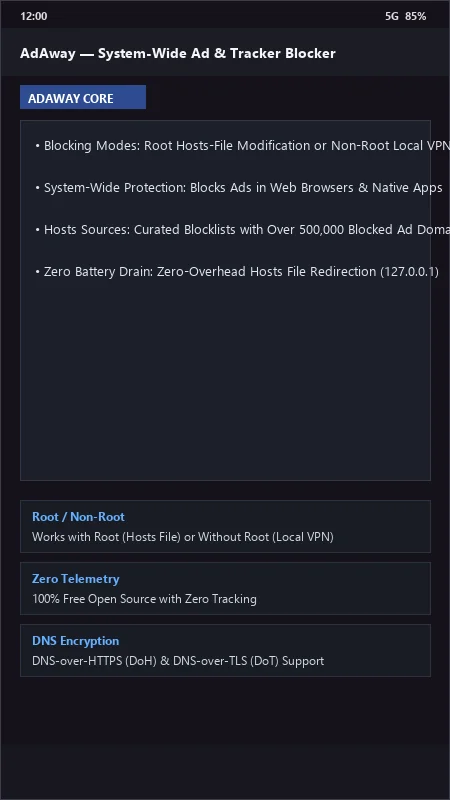
How to Install & Verify AdAway
Download the official verified APK file directly to your device.
Enable "Install Unknown Apps" in your Android Settings if prompted.
Tap the downloaded APK notification to install and launch the app.
AdAway Version History & Build Numbers
Every AdAway build FileCobra has mirrored, newest first. Match the build number against the copy you already have to confirm whether you are up to date.
- Added DNS-over-HTTPS (DoH) encrypted upstream resolver
- Fixed VPN reconnect on Wi-Fi switch
- Enhanced custom blocklist/allowlist wildcard domain rules
- Faster hosts file compilation
- Added log DNS queries real-time traffic inspector
- Dark AMOLED theme improvements
- Milestone stable release with full offline ad and telemetry blocking engine
Frequently Asked Questions & Verification Guide
Is AdAway free and open source?
Yes. AdAway is completely free and open-source software. You can download and use it at no cost, and its source code is publicly available.
Does AdAway require root permissions to block ads?
No! AdAway includes both a Root mode (which modifies the system hosts file for zero battery drain) and a Non-Root mode (which uses a secure local VPN loopback on non-rooted phones).
Will AdAway slow down my internet connection?
No! In fact, AdAway usually speeds up web browsing and saves mobile data because your phone no longer downloads heavy advertising graphics and tracking scripts.
How do I unblock a website or app that is not working?
Open the 'DNS Request Log' in AdAway to see recently queried domains, find the domain for that app, and tap 'Add to Whitelist'.